BitBucket
Bitbucket Pull Request comments
To avoid having to open job logs to see deployment errors, sfdx-hardis can post them as a comment on the Pull Request UI.
To use this capability:
- Go to Repository Settings -> Access Tokens and create a Repository Access Token with the following scopes:
- pullrequest
- pullrequest:write
- repository
- repository:write
- Go to Repository Settings -> Repository Variables and create a variable named CI_SFDX_HARDIS_BITBUCKET_TOKEN with the access token as value
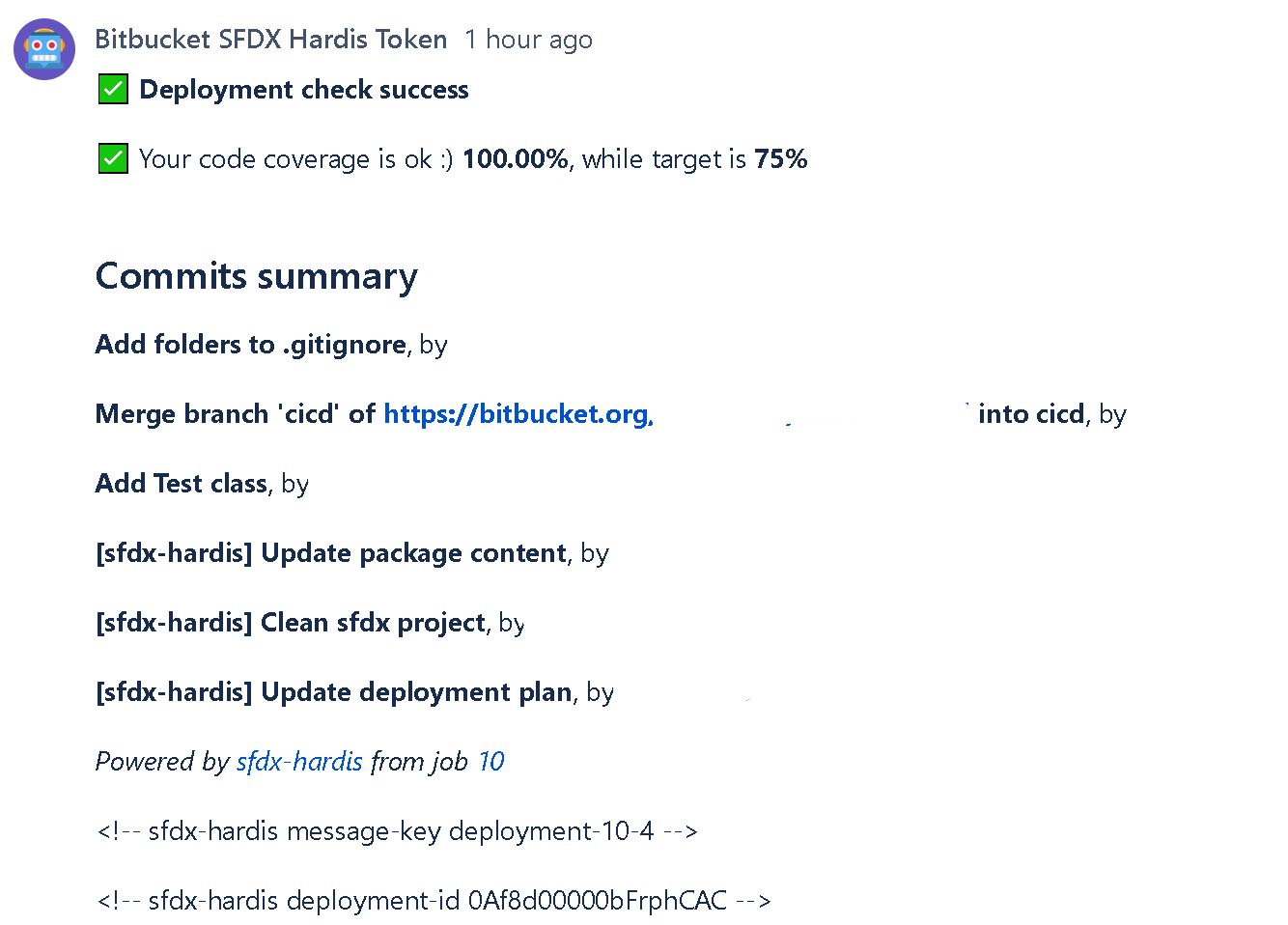
Every time you create a Pull Request, the CI job posts its result as a comment.
- Example with deployment success
Notes:
- This integration works with the sfdx-hardis pipeline, but also with home-made pipelines: just call sf hardis:project:deploy:start instead of
sf project:deploy:start.
- This integration uses the following variables:
- CI_SFDX_HARDIS_BITBUCKET_TOKEN
- BITBUCKET_WORKSPACE
- BITBUCKET_REPO_SLUG
- BITBUCKET_BRANCH
- BITBUCKET_PR_ID
- BITBUCKET_BUILD_NUMBER
Using Bitbucket integration from Jenkins
When running on Jenkins, sfdx-hardis automatically detects the Jenkins environment and maps its variables to Bitbucket equivalents. You only need to set:
| Variable | Description |
|---|---|
| CI_SFDX_HARDIS_BITBUCKET_TOKEN | A Bitbucket repository access token with scopes pullrequest, pullrequest:write, repository, repository:write, stored as a Jenkins credential |
The following variables are automatically derived from Jenkins built-in variables:
BITBUCKET_WORKSPACE,BITBUCKET_REPO_SLUG: parsed fromGIT_URL(git remote)BITBUCKET_BRANCH: fromGIT_BRANCH/CHANGE_BRANCHBITBUCKET_BUILD_NUMBER: fromBUILD_NUMBERBITBUCKET_PR_ID: fromCHANGE_ID(Jenkins Multibranch Pipeline)- Job URL: from
BUILD_URL
Instructions for using Coding Agents
When using auto-fix with coding agents, the pipeline must be able to push a fix branch and create/update Pull Requests.
This works for both:
- Bitbucket Cloud
- Bitbucket Data Center / Server (on-premise)
Add this in your pipeline script before running sf hardis:* commands:
- |
    if [ -n "${CI_SFDX_HARDIS_BITBUCKET_TOKEN:-}" ]; then
      git config user.email "sfdx-hardis-bot@cloudity.com"
      git config user.name "sfdx-hardis Bot"
      ORIGIN_PATH=$(git remote get-url origin | sed -E 's#^https?://##; s#^git@([^:]+):#\1/#; s#^ssh://git@([^/]+)/#\1/#; s#\.git$##')
      git remote set-url origin "https://x-token-auth:${CI_SFDX_HARDIS_BITBUCKET_TOKEN}@${ORIGIN_PATH}.git"
      echo "[sfdx-hardis] Bitbucket push/PR auth enabled for coding agents"
    else
      echo "[sfdx-hardis] Skipping coding-agent Bitbucket auth setup: CI_SFDX_HARDIS_BITBUCKET_TOKEN is not set"
    fi
Required secret/variable:
CI_SFDX_HARDIS_BITBUCKET_TOKEN:- Go to Repository Settings -> Access Tokens.
- Create a repository access token with scopes:
pullrequest,pullrequest:write,repository,repository:write. - Store it as a secured repository variable named
CI_SFDX_HARDIS_BITBUCKET_TOKEN.