hardis:org:diagnose:storage-stats
Description
Extracts and analyzes Data Storage usage for a Salesforce org, providing detailed per-object breakdowns with flexible grouping options.
This command provides a comprehensive overview of your Salesforce data storage consumption. It's particularly useful for:
- Storage Management: Understanding which SObjects consume the most storage and how usage has evolved over time.
- Cost Optimization: Identifying storage-heavy objects that could be candidates for data archival or cleanup strategies.
- Capacity Planning: Tracking storage trends to predict when additional capacity will be needed.
- Compliance & Governance: Monitoring data growth patterns to ensure alignment with data retention policies.
Key functionalities:
- Storage Limits Analysis: Retrieves and displays org data storage limits, including total capacity, used storage, remaining storage, and percentage used. Detects and alerts on over-usage scenarios.
- SObject Discovery & Filtering: Automatically discovers all SObjects in the org and filters them to focus on production/custom objects (excludes metadata types, platform-only objects, and cached empty objects).
- Interactive Selection: Prompts the user to select which SObjects to analyze and choose breakdown fields (date fields, RecordType, custom fields, or relationship fields).
- Flexible Breakdown Field: Supports grouping by any field including:
- Date/DateTime fields (
CreatedDate,LastModifiedDate, custom date fields) - RecordType (
RecordType.Name) - Custom fields (
Status__c, picklists, text fields) - Nested relationship fields (
SBQQ__Quote__r.RecordType.Name)
- Date/DateTime fields (
- Date Granularity Options: For date/datetime fields, choose between:
- Year-based grouping (
CALENDAR_YEAR) - Month-based grouping (
CALENDAR_MONTH) - Day-based grouping (exact date)
- Year-based grouping (
- WHERE Clause Filtering: Apply SOQL WHERE conditions to filter records before calculating storage (e.g., only active records, records from the last year).
- Storage Estimation: Estimates storage usage for each object using an average record size heuristic (2 KB per record) and calculates the percentage of org quota consumed.
- Dual CSV Reports: Generates two CSV files: a detailed breakdown by selected field and a totals-per-object summary, both suitable for spreadsheet analysis and reporting.
- Empty Objects Cache: Maintains a per-user cache of objects detected with zero records to optimize subsequent runs by skipping empty tables.
- Progress Tracking: Sends WebSocket progress messages for integration with external UIs and monitoring dashboards.
Technical explanations
The command's technical implementation involves:
- Limits Retrieval: Calls
conn.limits()to retrieve theDataStorageMBobject containingMaxandRemainingvalues. Handles negativeRemainingvalues (over-usage scenarios) by calculatingoverUsageMBand adjusting display values. - SObject Discovery: Uses
conn.metadata.list([{ type: 'CustomObject' }])to get custom objects andconn.describeGlobal()to get all SObjects. Filters by object capabilities (layoutable,queryable,retrieveable,createable,updateable,deletable) and excludes metadata types (__mdtsuffix) and cached empty objects. - User Interaction: Uses
promptsfor interactive multi-select of SObjects, breakdown field selection, granularity choice (for date fields), and optional WHERE conditions. All objects are pre-selected by default for user convenience. - Field Validation: Recursively validates breakdown fields including nested relationships (e.g.,
SBQQ__Quote__r.RecordType.Name) by traversing the relationship chain and checking field existence on each related object. Automatically handles special cases likeRecordType->RecordTypeIdand__r->__cconversions. - Dynamic Query Generation: Builds SOQL queries based on field type and granularity:
- For date fields with year granularity:
SELECT CALENDAR_YEAR(<Field>) breakdown, COUNT(Id) total FROM <SObject> [WHERE ...] GROUP BY CALENDAR_YEAR(<Field>) ORDER BY CALENDAR_YEAR(<Field>) - For date fields with month granularity:
SELECT CALENDAR_YEAR(<Field>) year, CALENDAR_MONTH(<Field>) month, COUNT(Id) total FROM <SObject> [WHERE ...] GROUP BY CALENDAR_YEAR(<Field>), CALENDAR_MONTH(<Field>) ORDER BY CALENDAR_YEAR(<Field>), CALENDAR_MONTH(<Field>) - For non-date fields:
SELECT <Field> breakdown, COUNT(Id) total FROM <SObject> [WHERE ...] GROUP BY <Field> ORDER BY <Field>
- For date fields with year granularity:
- WHERE Clause Support: Accepts user-provided WHERE conditions via flag (
--where) or interactive prompt. Injects the condition into all SOQL queries for consistent filtering across all objects. - Storage Calculation: Applies a conservative average record size of 2 KB (2048 bytes) to estimate storage consumption. Calculates both MB usage and percentage of org quota for each object and breakdown value.
- Report Generation: Uses
generateCsvFileandgenerateReportPathhelpers to create two CSV files in the reports directory:- Detailed breakdown: includes all statistics per breakdown value per object (e.g., by year, by month, by RecordType)
- Totals summary: includes only aggregate totals per object
- File naming includes breakdown field, granularity (for date fields), and
-filteredsuffix when WHERE clause is applied
- Caching Mechanism: Writes a JSON cache file per authenticated username (sanitized) in the reports directory (
<username>_empty_tables_cache.json) containing an array of empty object names. The cache is updated after each run with newly detected empty objects. - Progress & UX: Uses
WebSocketClientto emit start/step/end progress messages for external monitoring. Outputs summary tables withuxLogTableand status messages withuxLog. - Return Value: Returns a JSON object containing
tableStorageInfos(all rows),tableStorageInfosTotals(summary rows),storageLimits(org limits object), andoutputFiles(paths to generated CSV/XLSX reports).


Agent Mode
Supports non-interactive execution with --agent:
sf hardis:org:diagnose:storage-stats --agent --target-org myorg@example.com
In agent mode, all interactive prompts are skipped with sensible defaults:
- All filtered SObjects are selected for analysis
- Breakdown field defaults to CreatedDate (override with --breakdown-field)
- Date granularity defaults to year
- No WHERE clause is applied (override with --where)
Screenshots
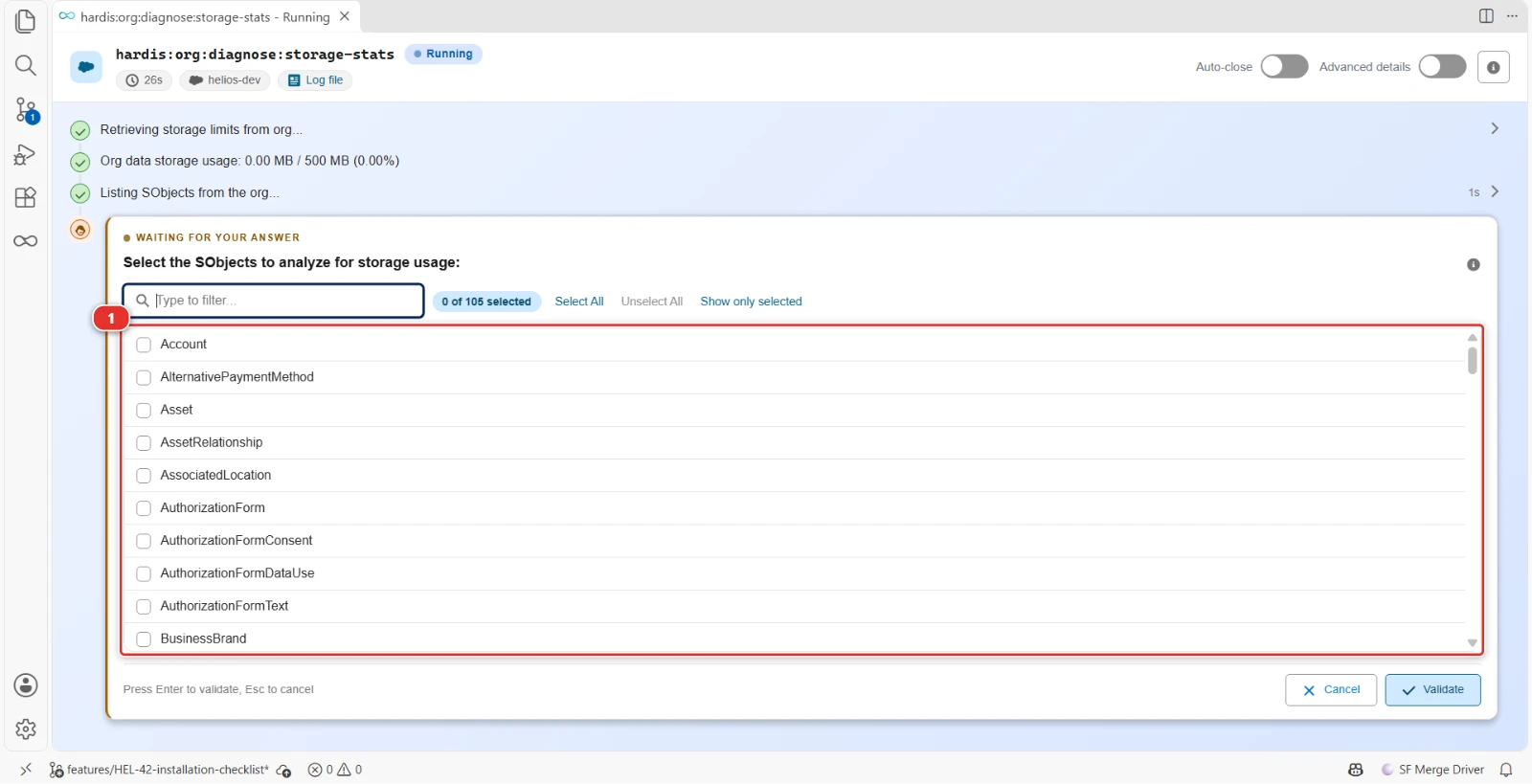
Pick the objects to count
- (1) A custom object of the project
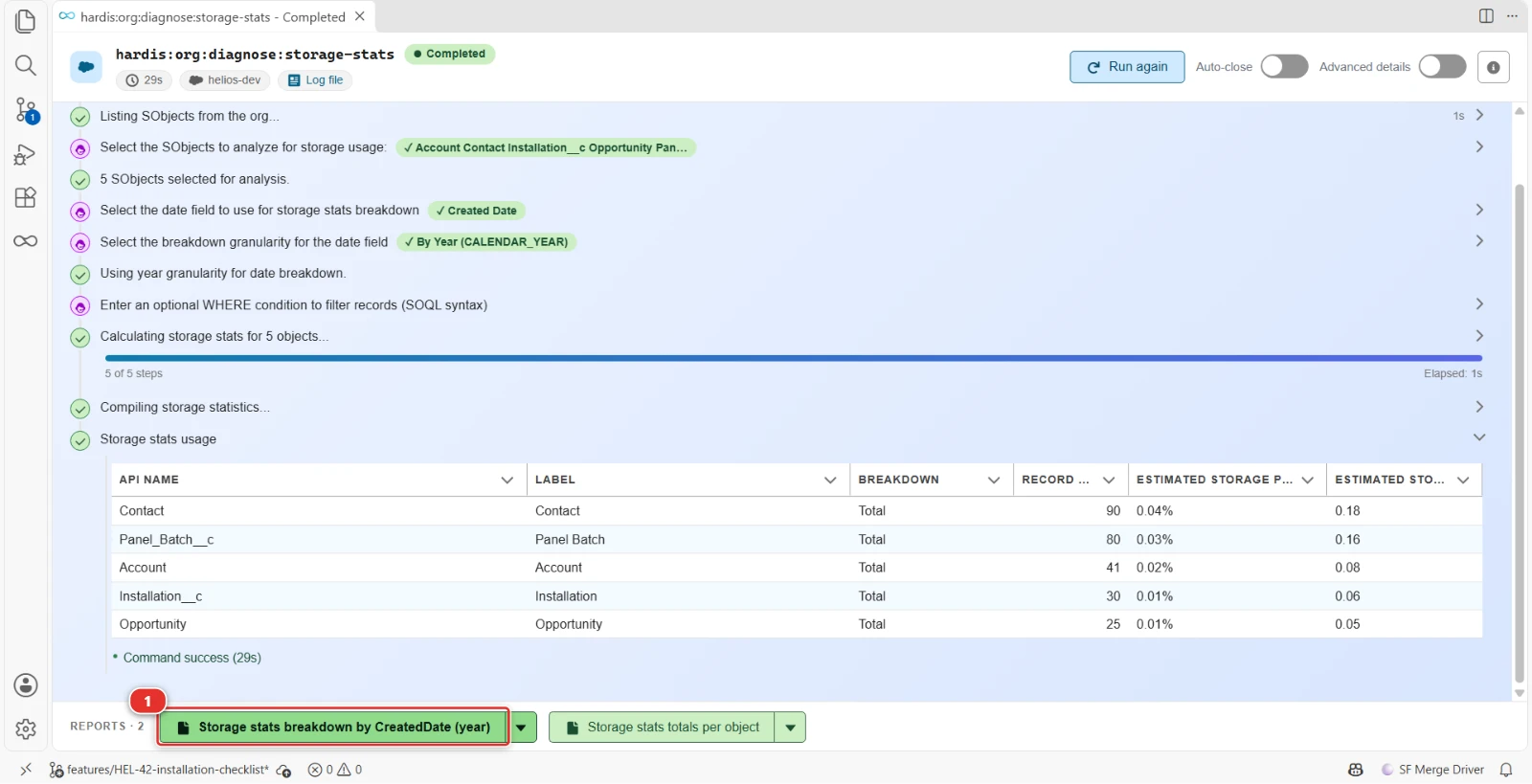
Records of the Helios objects by year of creation, to see what fills the data storage
- (1) The report of the run: the button opens it in Excel, the arrow lists its other files
Reports
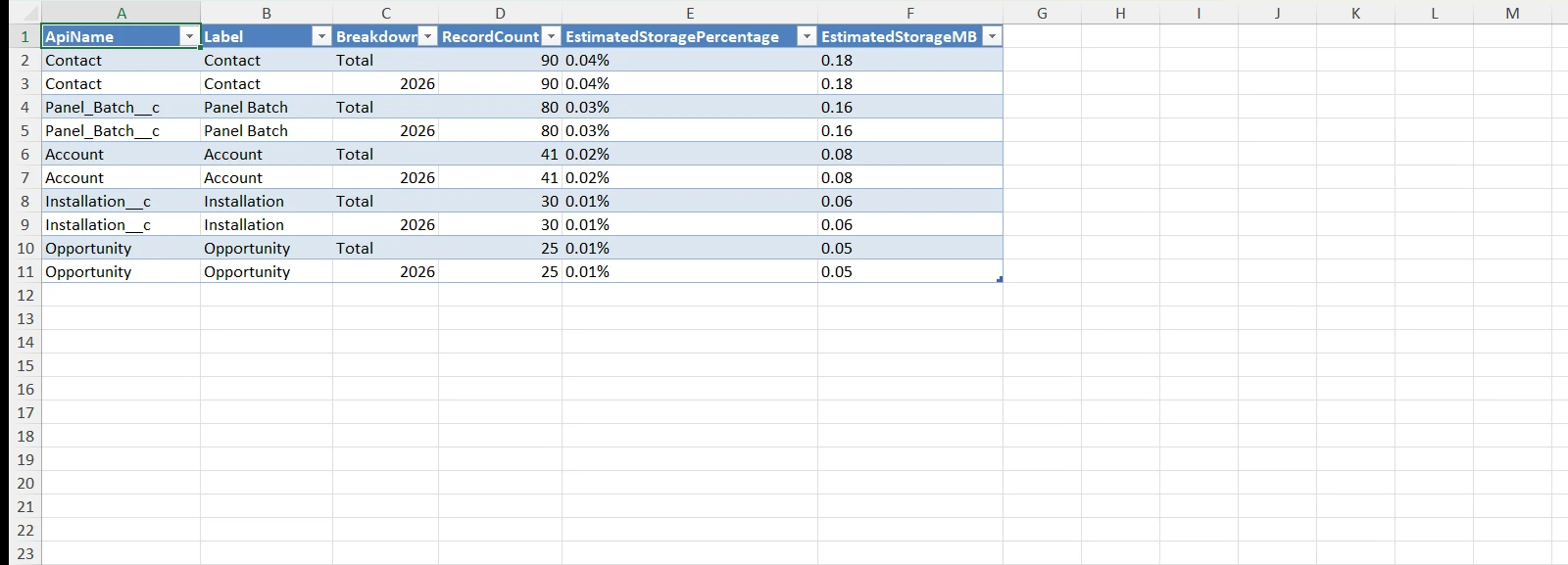
The command writes these reports in the hardis-report folder of the project: a CSV file, and its Excel copy (XLSX) in the xls sub-folder.
Storage stats
One row per object and breakdown value (the file name continues with the breakdown field, granularity and -filtered when a WHERE is used), with its record count and estimated storage in MB and percent; a copy with only the Total row of each object is written next to it with a -totals suffix.
Files: storage-stats-by-*.csv, xls/storage-stats-by-*.xlsx
Parameters
| Name | Type | Description | Default | Required | Options |
|---|---|---|---|---|---|
| agent | boolean | Run in non-interactive mode for agents and automation | |||
| breakdown-field -b |
option | Field to use for storage stats breakdown. Example: "CreatedDate", "LastModifiedDate", "RecordType.Name", or custom fields like "Status__c" | |||
| debug -d |
boolean | Activate debug mode (more logs) | |||
| flags-dir | option | Import flag values from a directory. | |||
| json | boolean | Format output as json. | |||
| outputfile -f |
option | Force the path and name of output report file. Must end with .csv | |||
| skipauth | boolean | Skip authentication check when a default username is required | |||
| target-org -o |
option | Username or alias of the target org. Not required if the target-org configuration variable is already set. |
true | ||
| websocket | option | Websocket host:port for VsCode SFDX Hardis UI integration | |||
| where -w |
option | WHERE clause to filter records in the query (without the WHERE keyword). Example: "CreatedDate = LAST_N_DAYS:365" or "Status__c = 'Active'" |
Examples
$ sf hardis:org:diagnose:storage-stats
$ sf hardis:org:diagnose:storage-stats --breakdown-field "CreatedDate"
$ sf hardis:org:diagnose:storage-stats -b "RecordType.Name"
$ sf hardis:org:diagnose:storage-stats --where "CreatedDate = LAST_N_DAYS:365"
$ sf hardis:org:diagnose:storage-stats -w "Status__c = 'Active'"
$ sf hardis:org:diagnose:storage-stats -b "LastModifiedDate" -w "IsDeleted = false"
$ sf hardis:org:diagnose:storage-stats --agent