Overview
Video tutorial
Instructions
Common instructions
All you need to configure sfdx-hardis Org Monitoring is a GitHub, GitLab, Azure, Bitbucket or any Git server accessible from a Jenkins instance.
- Create and clone a git repository (initialize it with README)
- Open it with Visual Studio Code, then open the VS Code SFDX Hardis extension menu.
- If you need installation instructions, see the installation documentation page
- Follow the instructions, which can differ depending on your git provider
Tip: Schedule monitoring jobs at different hours so the notifications are more readable, for example production at 1 AM and preprod at 2 AM
GitHub
GitLab
Azure
Bitbucket
Jenkins (any Git server)
Notifications
For a better user experience, we highly recommend configuring notifications.
You can wire any combination of the following targets. They are fully independent and can be enabled in parallel:
- Slack instructions - post to one or several Slack channels (global, branch-scoped, errors-only)
- Microsoft Teams instructions - post to Teams channels via incoming webhooks
- Email instructions - send to any recipient list, with per-notification-type overrides
- API / Grafana instructions - stream logs and Prometheus metrics to Grafana Loki, Prometheus, or any HTTP endpoint (used to build the Org Monitoring by sfdx-hardis Grafana dashboards)
sfdx-hardis groups these targets into three channels, and you can configure each channel independently per notification type:
- messaging: Slack and Microsoft Teams
- email: email recipients
- api: the sfdx-hardis API / metrics provider (e.g. Grafana Loki, Prometheus). The
apichannel is always sent when configured, unless explicitly set tooff.
The full configuration (frequency, per-channel severity thresholds, custom commands) can be edited from the VS Code SFDX Hardis extension UI, or directly in .sfdx-hardis.yml:
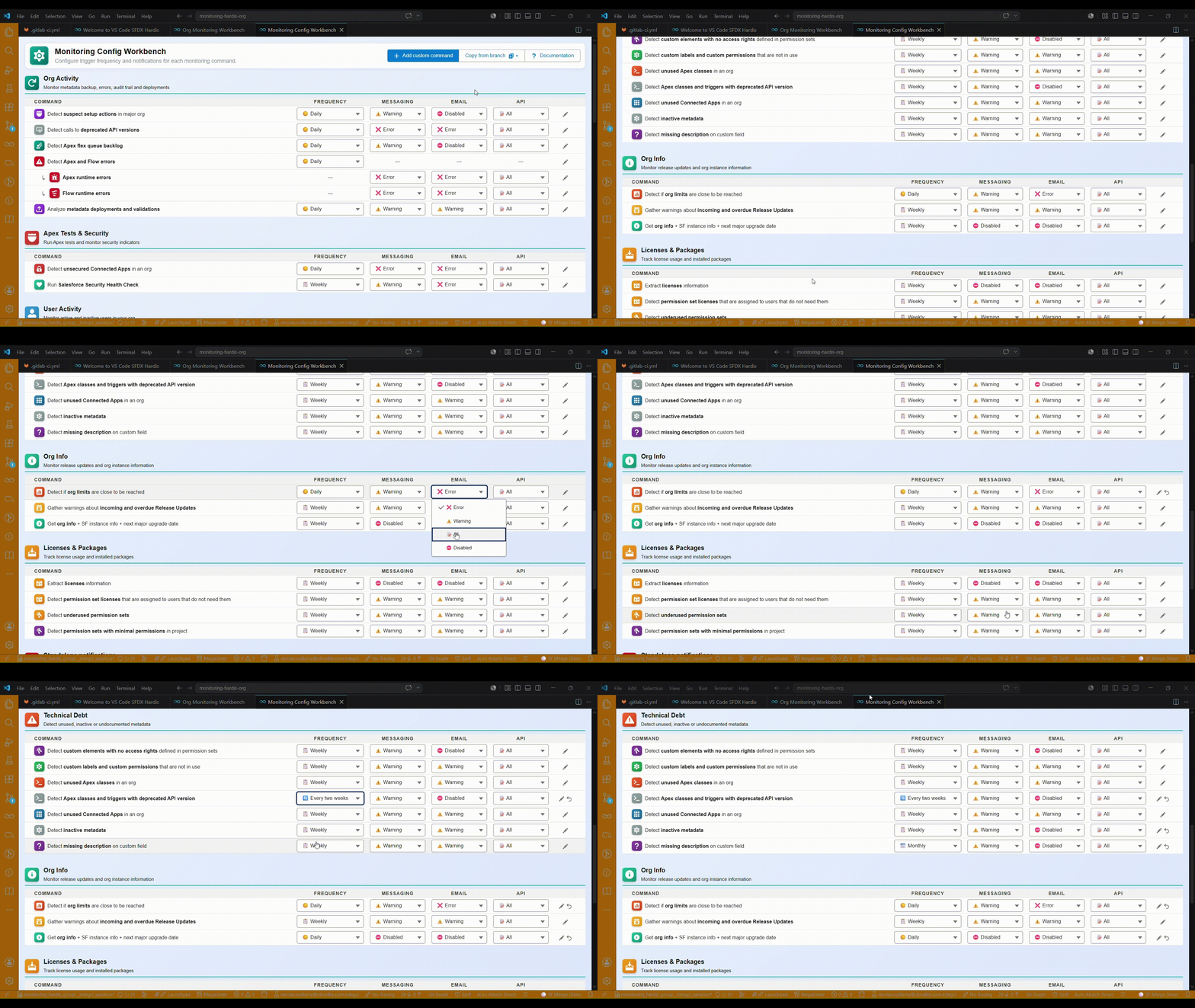
Fine-grained routing per notification type
You can configure, for each notification type, the minimum severity that must be reached before a channel is notified. This avoids overflowing Slack/Teams with informational notifications while still streaming everything to Grafana.
Severity order (low to high): log < success < info < warning < error < critical. Use off to disable a channel for a given notification type.
monitoringCommands:
  - key: AUDIT_TRAIL
    notifications:
      messaging: warning   # Slack/Teams only on warning, error, critical
      email: error         # email only on error and critical
      api: log             # everything goes to Grafana
  - key: ORG_LIMITS
    notifications:
      messaging: error
      email: critical
  - key: METADATA_STATUS
    notifications:
      messaging: off       # mute Slack/Teams for this notification type
Override email recipients per notification type
For email, you can also override the recipient list per notification type, on top of the env-var-based recipients (NOTIF_EMAIL_ADDRESS, NOTIF_EMAIL_ADDRESS_<BRANCH>, NOTIF_EMAIL_ADDRESS_<TYPE>). Recipients listed in YAML are appended by default; set replaceRecipients: true to fully redirect the notification type to a dedicated mailing list.
monitoringCommands:
  - key: AUDIT_TRAIL
    notifications:
      email:
        threshold: warning
        recipients:
          - security@company.com
          - audit-team@company.com
        replaceRecipients: true   # ignore env-var recipients for this type
  - key: BACKUP
    notifications:
      email:
        recipients:
          - devops@company.com    # appended to existing env-var recipients
You can also decide to skip posting logs or metrics to API for all notification types or specific ones by defining env variables NOTIF_API_SKIP_LOGS and NOTIF_API_SKIP_METRICS.
Examples:
# Skip posting logs to API and JSON file for specific notification types
NOTIF_API_SKIP_LOGS=UNUSED_USERS,METADATA_STATUS
# Skip posting logs to API and JSON file for all notification types
NOTIF_API_SKIP_LOGS=all
# Skip posting metrics to API for specific notification types
NOTIF_API_SKIP_METRICS=METADATA_STATUS,UNUSED_METADATAS
Monitoring commands
You can fine-tune which monitoring commands run, how often, and how their notifications are routed via the monitoringCommands property in .sfdx-hardis.yml. User entries are merged by key onto the built-in defaults, so you only need to declare the fields you want to override; new keys are appended as custom commands.
Frequency
Each entry accepts a frequency field with one of:
daily: runs on every runweekly: runs once per week. The firing day is configurable viafrequencyDay(monday..sunday, defaultsaturday)biweekly: runs every other week. SamefrequencyDayselector. The anchor uses ISO week parity so twobiweeklyentries with the samefrequencyDayalways fire on the same calendar weeksmonthly: runs once per month. The firing day is configurable viafrequencyDayOfMonth(1..31, default1). Values larger than the current month's last day are clamped to the last day, so31reliably means "last day of the month"off: never runs unless--force-allis passed tohardis:org:monitor:all(or env varMONITORING_IGNORE_FREQUENCY=trueis set)
Example overriding cadence + day:
monitoringCommands:
  - key: AUDIT_TRAIL
    frequency: weekly
    frequencyDay: monday
  - key: LICENSES
    frequency: monthly
    frequencyDayOfMonth: 1
  - key: ORG_LIMITS
    frequency: off
Custom commands
To add a brand new command, declare a new key with title and command. Frequency and notifications are optional and behave the same as built-in entries:
monitoringCommands:
  - key: MY_CUSTOM_REPORT
    title: My custom command
    command: sf my:custom:command
    frequency: biweekly
    frequencyDay: friday
    notifications:
      messaging: info
      email: warning
Troubleshooting
You might want to customize which metadata types are backed up, because you can't monitor more than 10000 items.
If there are more than 10000 items, your monitoring job will crash.
In that case, you can:
- Single branch scope: manually update the file
manifest/package-skip-items.xmlin the branch corresponding to an org, then commit and push. It works with:- Full wildcard (
<members>*</members>) - Named metadata (
<members>Account.Name</members>) - Partial wildcard names (
<members>pi__*</members>,<members>*__dlm</members>, or<members>prefix*suffix</members>)
- Full wildcard (
- All branches scope: define the CI/CD env var MONITORING_BACKUP_SKIP_METADATA_TYPES with the list of additional metadata types you want to skip
- example:
MONITORING_BACKUP_SKIP_METADATA_TYPES=CustomLabel,StaticResource,Translation
- example: