Home

New: What's new in sfdx-hardis v8 - Deployment Actions are generally available, Pull Request comments are redesigned, and the VS Code extension is rebuilt.
New: Free Salesforce DevOps course: build a complete pipeline on free orgs, one click at a time, and earn a badge per level.










Sfdx-hardis is a CLI and visual productivity tools suite for Salesforce, by Cloudity & friends, natively compliant with most Git platforms, messaging tools, ticketing systems and AI providers (including Agentforce), with a free hands-on training and shareable badges.

It is free and open-source, and lets you:
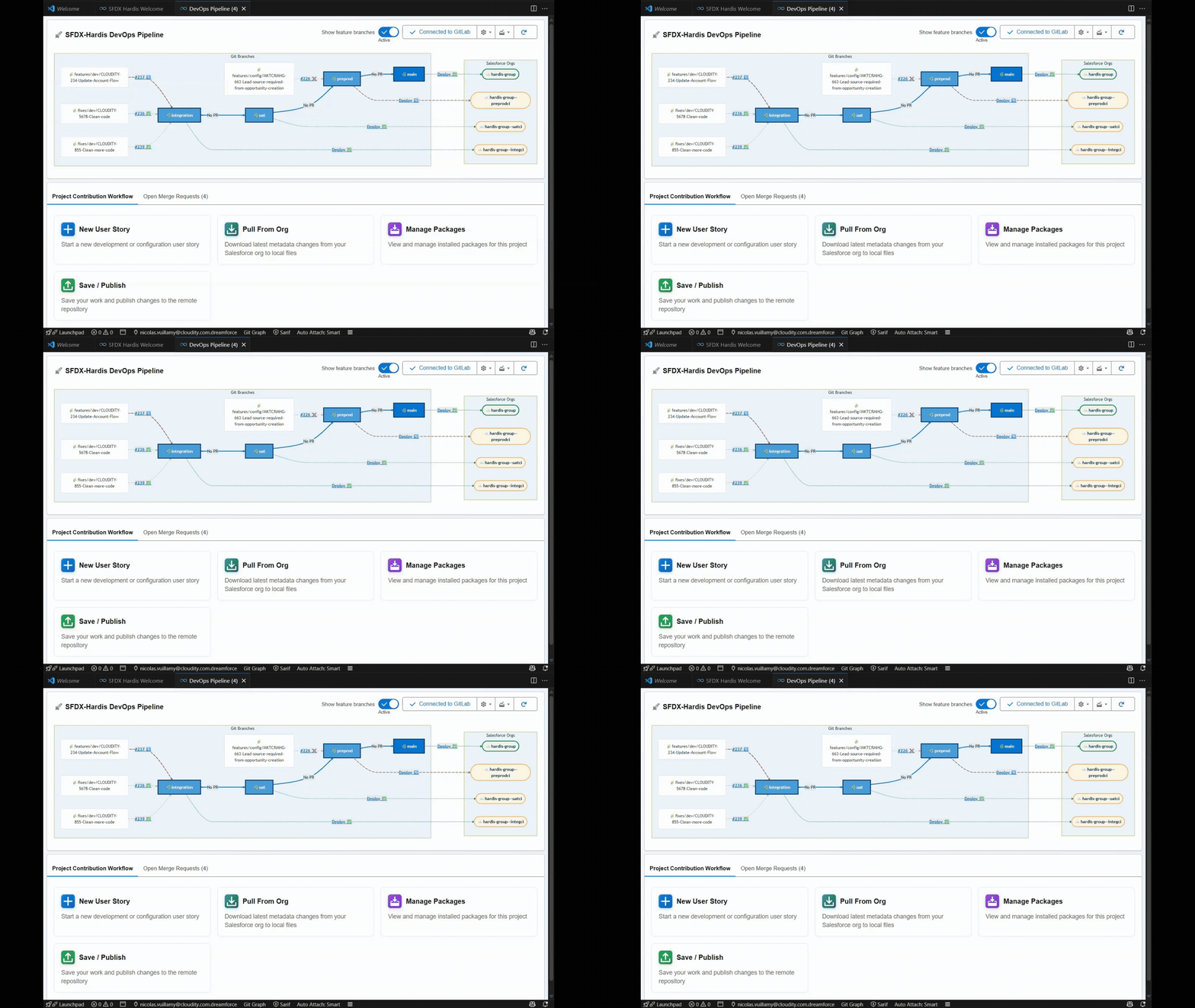
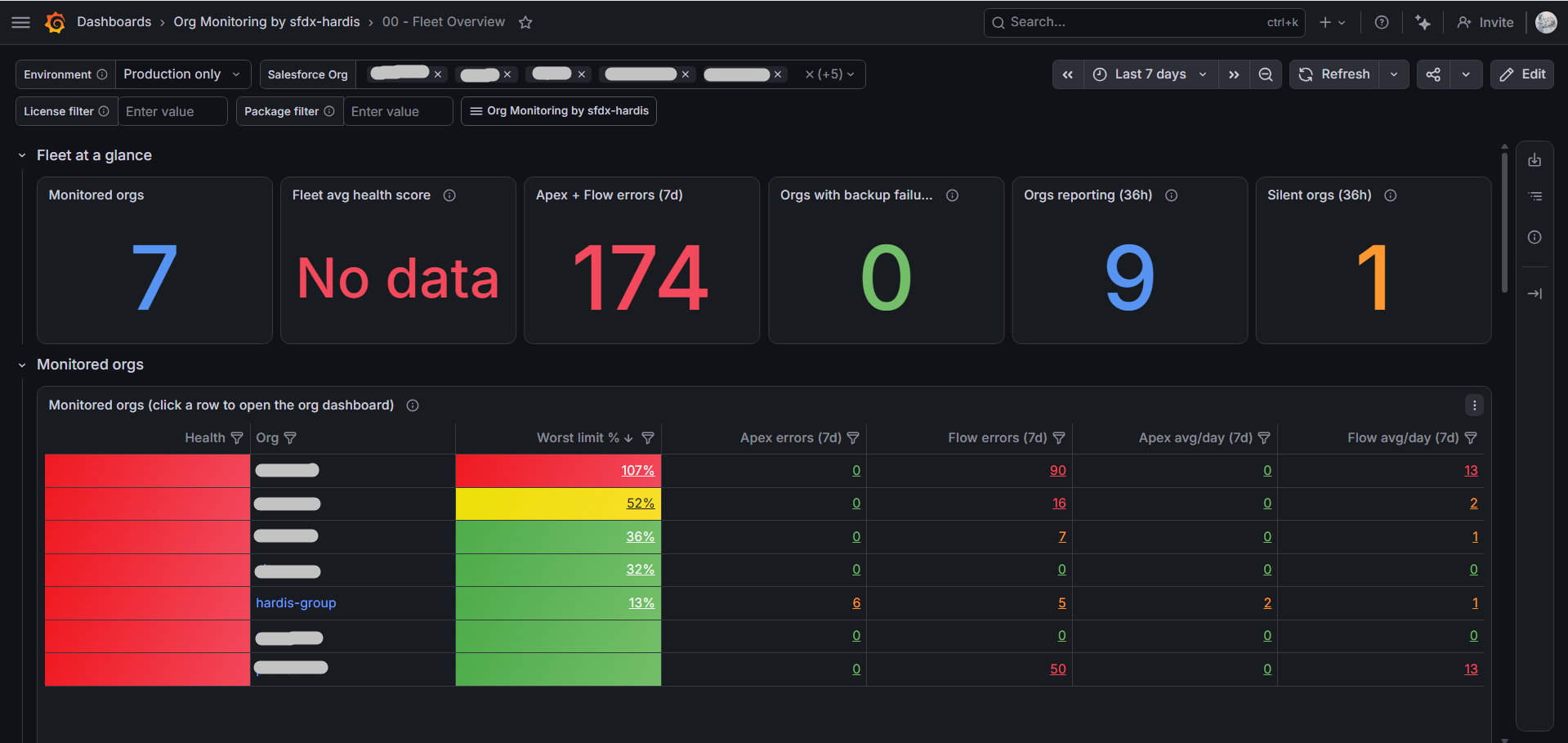
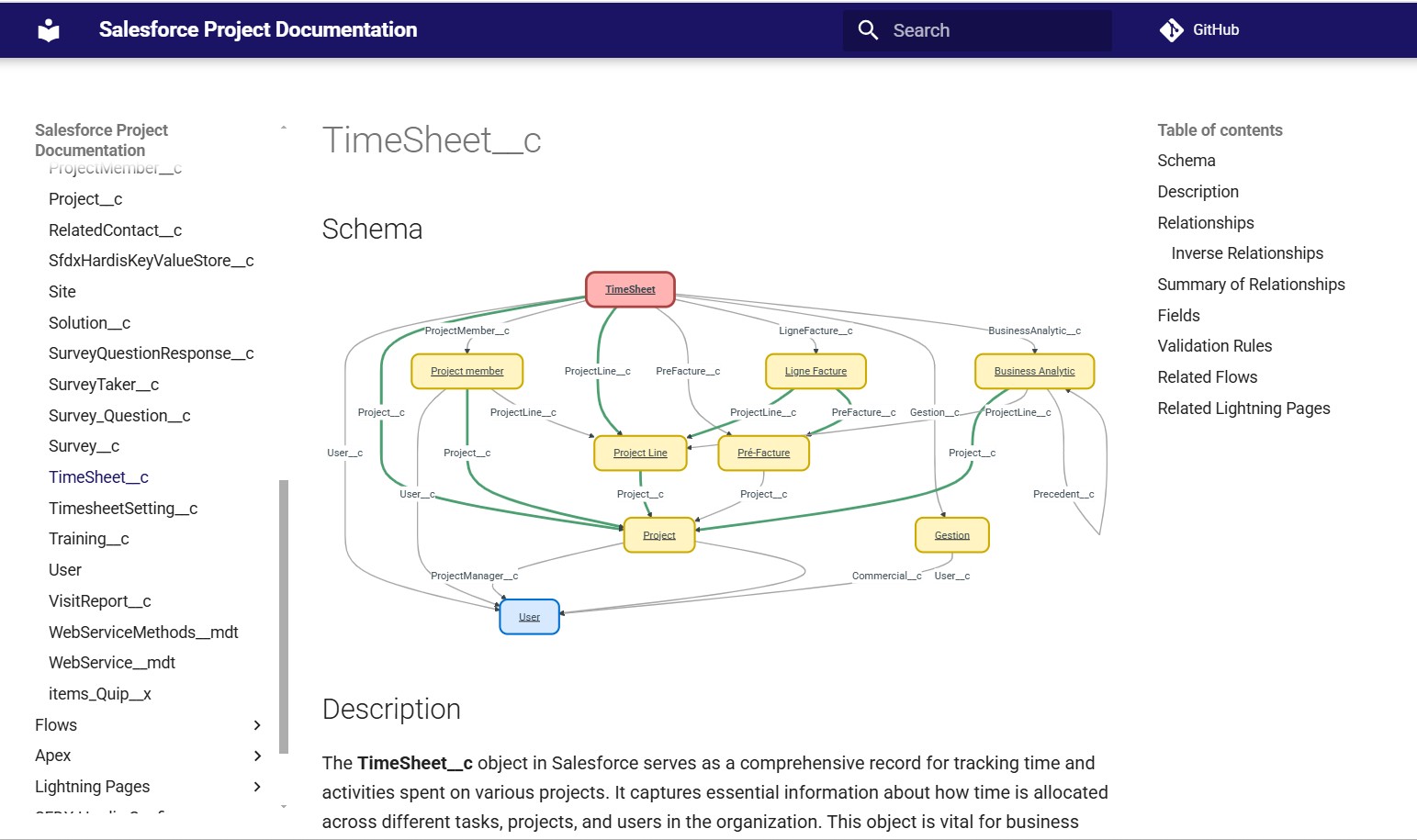
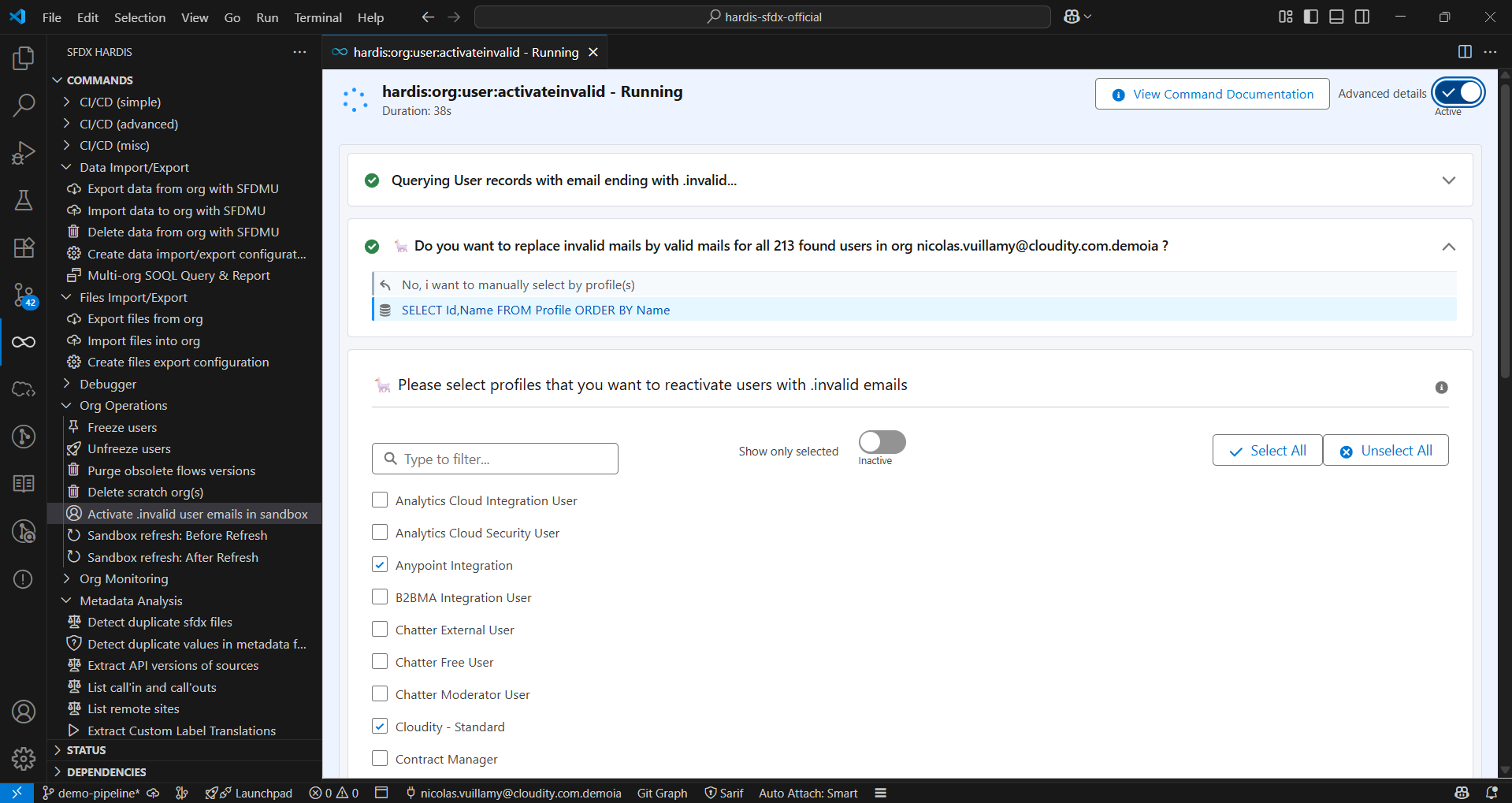
- Use many commands that save minutes, hours or even days of your daily admin or developer work.
If you need help to get the most out of sfdx-hardis, Cloudity's international teams of business and technical experts can help: contact us.

See online documentation for a better navigation
sfdx-hardis commands and configuration are best used from the SFDX Hardis Visual Studio Code extension
Featured on SalesforceBen

See Dreamforce presentation

Installation
Which installation do I need?
There are three ways to install sfdx-hardis, and you only need one of them.
| Your situation | What to install | Terminal needed |
|---|---|---|
| You want to use sfdx-hardis on your computer, with menus and buttons instead of commands. This is how most people use it. | Visual Studio Code and the SFDX Hardis extension | No |
| You are at ease with a terminal and only want the commands. | The sfdx-hardis plugin for Salesforce CLI | Yes |
| You are setting up a CI/CD pipeline (GitHub, GitLab, Azure, Bitbucket). | A ready to use Docker image | Yes |
Not sure? Take the first one: it also installs the command line version for you.
Install with Visual Studio Code (recommended)
Visual Studio Code, usually shortened to VS Code, is a free application published by Microsoft. sfdx-hardis runs inside it and adds its own menus and buttons, so you can use every feature without typing a single command.
You do not need to know VS Code, or to write code, to follow the five steps below. Plan about 15 minutes, mostly waiting for downloads.
Step 1: Install Visual Studio Code
Go to code.visualstudio.com, download the version for your system (Windows, macOS or Linux), then run the downloaded file and keep the proposed options.
If VS Code is already on your computer, jump to step 2.
Step 2: Install the SFDX Hardis extension
- Start VS Code.
- In the vertical bar of icons on the left, called the Activity Bar, click the Extensions icon
 (four small squares, the top right one tilted). Keyboard shortcut:
 Ctrl+Shift+X, orCmd+Shift+Xon macOS. - Type
sfdx hardisin the search box. - Click SFDX Hardis in the results, then click Install.
- If VS Code asks whether you trust the publisher, accept: the extension is published by NicolasVuillamy, the author of sfdx-hardis.
You can also do it from your browser: open the SFDX Hardis page on the Visual Studio Marketplace, click Install, and let the browser hand over to VS Code.
Step 3: Open the sfdx-hardis panel
Once the extension is installed, a new icon  appears in the Activity Bar, on the left. Click it (arrow 1 below): the sfdx-hardis menus appear, and the Welcome page opens.
At the top of the Welcome page, click the dependencies button (arrow 2 below).

Step 4: Install the dependencies
To talk to Salesforce and to Git, sfdx-hardis needs a few other free tools. The setup page lists them all, with a green check on those you already have.

- Click Install or Upgrade on every line that is not green, or click Run pending installs to handle them one after the other.
- Node.js and Git are the two you may have to install by yourself: download them from nodejs.org and git-scm.com, then click Re-check on the line.
- Close VS Code and open it again at the end, so it sees the newly installed tools.
When every line is green, the installation is over.
Step 5: Connect to your Salesforce org
Go back to the Welcome page and click Connect to log in to your first org. The same page then gives you access to all the features.
Where to go next:
- What you can do from the VS Code extension
- Set up a Salesforce CI/CD project
- Monitor a Salesforce org
Video tutorial
If you prefer to watch someone do it first, follow the video below.

If something does not work
- A line stays red after you installed the tool: close VS Code, open it again, then click Re-check on that line.
- A command does nothing: open the setup page again, a dependency may still be missing or outdated.
- Still stuck? Open a GitHub issue, the maintainers and the community answer there.
Other VS Code compatible IDEs
The extension is published on both the Visual Studio Marketplace and the Open VSX Registry, so the steps above also work in the IDEs built on VS Code, on desktop or in the browser.
| IDE | Install from | |
|---|---|---|
 |
Visual Studio Code | Visual Studio Marketplace |
 |
Agentforce Vibes IDE and other browser IDEs | Open VSX |
   |
Cursor, Windsurf, VSCodium and other VS Code forks | Open VSX |
The only requirement is the same as for VS Code: the IDE must be able to run the Salesforce CLI (Agentforce Vibes IDE ships it preinstalled).
Install as a Salesforce CLI plugin
For those who prefer to type commands in a terminal. If you followed the VS Code steps above, this is already done.
Pre-requisites
- Install Node.js (recommended version)
- Install the Salesforce CLI by running
npm install @salesforce/cli --global
Plugin installation
sf plugins install sfdx-hardis
For advanced use, please also install dependencies
sf plugins install @salesforce/plugin-packaging
sf plugins install sfdx-git-delta
sf plugins install sfdmu
If you are using CI/CD scripts, use echo y | sf plugins install ... to bypass prompt.
Run in CI/CD with a Docker image
For pipelines: the images already contain Node.js, the Salesforce CLI, sfdx-hardis and its plugins, so a job starts without installing anything.
All our Docker images are checked for security issues with MegaLinter by OX Security
Images are published on both GitHub Container Registry (ghcr.io) and Docker Hub. Prefer the ghcr.io images: their publication does not rely on any long-lived token (it is secured with the workflow's ephemeral credentials), so they have the most secure supply chain. Use the Docker Hub mirror images when your infrastructure can only pull from
docker.io.
Two image flavors are available:
- Standard images (
sfdx-hardis,sfdx-hardis-ubuntu): Salesforce CI/CD tooling without coding agent CLIs. Use these for standard deployments.
- With-agents images (
sfdx-hardis-with-agents,sfdx-hardis-ubuntu-with-agents): Same as standard + coding agent CLIs pre-installed (Claude, Codex, Gemini, GitHub Copilot). Use these for AI-powered auto-fix scenarios.
Standard images (without coding agent CLIs)
-
Linux Alpine based images (works on GitLab)
-
GitHub Container Registry (recommended)
- ghcr.io/hardisgroupcom/sfdx-hardis:latest (with latest @salesforce/cli version)
- ghcr.io/hardisgroupcom/sfdx-hardis:latest-sfdx-recommended (with recommended @salesforce/cli version, in case the latest version of @salesforce/cli is buggy)
-
Docker Hub (mirror)
- hardisgroupcom/sfdx-hardis:latest (with latest @salesforce/cli version)
- hardisgroupcom/sfdx-hardis:latest-sfdx-recommended (with recommended @salesforce/cli version, in case the latest version of @salesforce/cli is buggy)
-
See Dockerfile
-
Linux Ubuntu based images (works on GitHub, Azure & Bitbucket)
-
GitHub Container Registry (recommended)
- ghcr.io/hardisgroupcom/sfdx-hardis-ubuntu:latest (with latest @salesforce/cli version)
- ghcr.io/hardisgroupcom/sfdx-hardis-ubuntu:latest-sfdx-recommended (with recommended @salesforce/cli version, in case the latest version of @salesforce/cli is buggy)
-
Docker Hub (mirror)
- hardisgroupcom/sfdx-hardis-ubuntu:latest (with latest @salesforce/cli version)
- hardisgroupcom/sfdx-hardis-ubuntu:latest-sfdx-recommended (with recommended @salesforce/cli version, in case the latest version of @salesforce/cli is buggy)
-
With-agents images (includes coding agent CLIs)
These images include Claude Code, OpenAI Codex, Gemini CLI, and GitHub Copilot pre-installed and are required for the AI coding agent auto-fix feature.
Note: Alpine-based with-agents images may have limitations with some agent CLIs at runtime due to musl libc. Use Ubuntu-based images for full agent compatibility.
-
Linux Alpine based images (works on GitLab)
- GitHub Container Registry (recommended): ghcr.io/hardisgroupcom/sfdx-hardis-with-agents:latest
- Docker Hub (mirror): hardisgroupcom/sfdx-hardis-with-agents:latest
See Dockerfile
-
Linux Ubuntu based images (works on GitHub, Azure & Bitbucket - recommended for coding agents)
- GitHub Container Registry (recommended): ghcr.io/hardisgroupcom/sfdx-hardis-ubuntu-with-agents:latest
- Docker Hub (mirror): hardisgroupcom/sfdx-hardis-ubuntu-with-agents:latest
Usage
sf hardis:<COMMAND> <OPTIONS>
Learn by doing
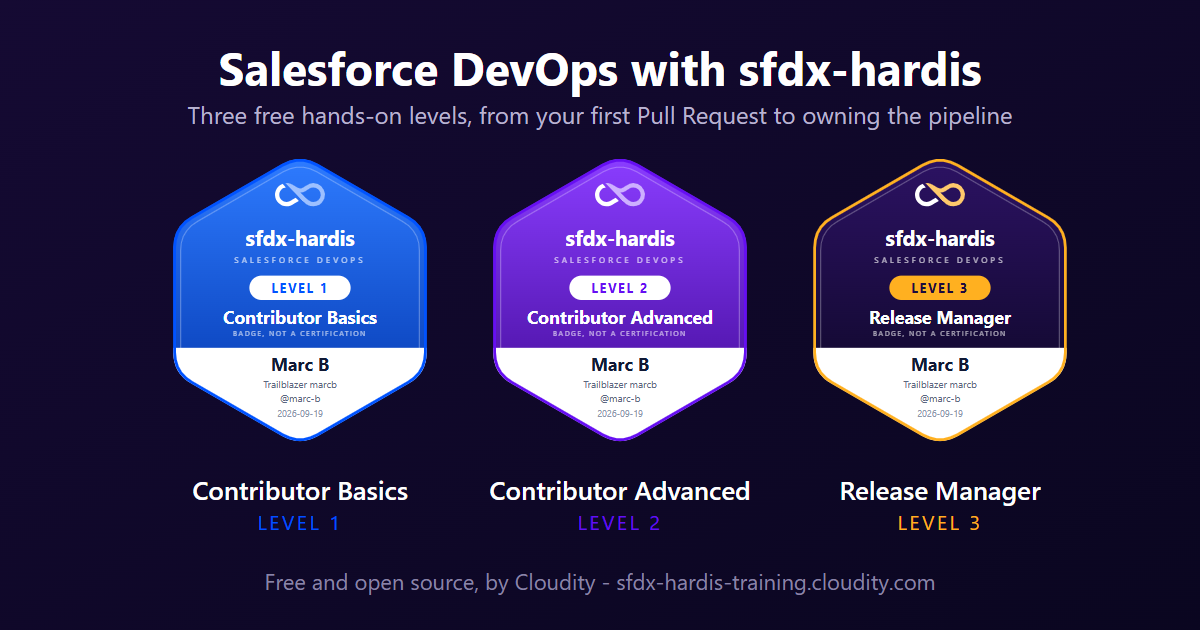
Salesforce DevOps with sfdx-hardis is a free hands-on course that builds a complete CI/CD pipeline on free orgs, one click at a time.
- Level 1 - Contributor basics: 7 labs, from your first User Story to a merged Pull Request
- Level 2 - Contributor advanced: 9 labs, deployment errors, deployment actions, code quality, conflicts
- Level 3 - Release Manager: 11 labs, the pipeline up to production, releases, hotfixes, monitoring
Events
North Africa Dreamin' 2026, Casablanca (upcoming)
Casablanca, Morocco - 24/10/2026
Czech Dreamin '26, Prague
Refresh your full sandboxes without needing to reconfigure everything
Prague, Czechia - 29/05/2026
Wir Sind Ohana '26, Berlin
When was the last time you refreshed your sandboxes to have fresh data?
Berlin, Germany - 08/05/2026
Dream Ole '26, Valencia
Refresh your full sandboxes without needing to reconfigure everything, with Louise Lockie
Valencia, Spain - 27/03/2026
Polish Dreamin '26, Wroclaw
Refresh your full sandboxes without needing to reconfigure everything
Wroclaw, Poland - 20/03/2026
Irish Dreamin '26, Dublin
No-Cost DevOps: Enterprise-Grade CI/CD with SFDX-HARDIS, by Abdeslam Loukili
Dublin, Ireland - 19/03/2026

French Touch Dreamin '25
Refresh your full sandboxes without needing to reconfigure everything - with Mehdi Abdennasser
Paris, France - 02/12/2025
DevOps Dreamin
Why you don't need DevOps vendors tools
London, UK - 20/11/2025
Trailblazer User Group '25, Casablanca
Salesforce Org Documentation with Open-Source and Agentforce, by Taha Basri

Trailblazer Developer Group '25, Berlin (online)
Summer of Docs: Auto-Document Your Salesforce Org Like a Pro, by Mariia Pyvovarchuk (Aspect) and Roman Hentschke

London's Calling '25, London
Auto-generate your SF project Documentation site with open-source and Agentforce
Czech Dreamin '25, Prague
Auto-generate your SF project Documentation site with open-source and Agentforce, with Mariia Pyvovarchuk
Trailblazer Admin Group '25, Lyon
Techs for Admins: Afterwork Salesforce Inspector Reloaded & sfdx-hardis, with Thomas Prouvot
Dreamforce 2024, San Francisco
Save the Day by Monitoring Your Org with Open-Source Tools, with Olga Shirikova

Wir Sind Ohana '24, Berlin
Automate the Monitoring of your Salesforce orgs with open-source tools only!, with Yosra Saidani

Polish Dreamin '24, Wroclaw, Poland
Easy and complete Salesforce CI/CD with open-source only!, with Wojciech Suwiński
French Touch Dreamin '23, Paris
Automate the Monitoring of your Salesforce orgs with open-source tools only!, with Maxime Guenego
Dreamforce 2023, San Francisco
Easy Salesforce CI/CD with open-source and clicks only thanks to sfdx-hardis!, with Jean-Pierre Rizzi
Yeur Dreamin' 2023, Brussels
An easy and complete Salesforce CI/CD release management with open-source only !, with Angélique Picoreau
Articles & Videos
Web Articles
Here are some articles about sfdx-hardis
- English


Recorded Conferences
Dreamforce Sessions
- Dreamforce 2024 - Save the Day by Monitoring Your Org with Open-Source Tools (with Olga Shirikova)
- Dreamforce 2023 - Easy Salesforce CI/CD with open-source and clicks only thanks to sfdx-hardis! (with Jean-Pierre Rizzi)
Community Events
- Wir Sind Ohana 2024 - Automate the Monitoring of your Salesforce orgs with open-source tools only! (with Yosra Saidani)
Podcasts
- SalesforceBen Deep Dives with Peter Chittum, 2025: Simplify Salesforce Deployment with SFDX Hardis
- Apex Hours 2025 - Org monitoring with Grafana + AI generated doc

- Salesforce Way Podcast #102 - Sfdx-hardis with Nicolas Vuillamy

- Salesforce Developers Podcast Episode 182: SFDX-Hardis with Nicolas Vuillamy
sfdx-hardis Usage
Features Overview
- sfdx-hardis 2025 new features overview
- SFDX-HARDIS: A demo with Nicolas Vuillamy from Cloudity

Installation & Setup
- Complete installation tutorial for sfdx-hardis - 📖 Documentation
CI/CD Workflows
- Complete CI/CD workflow for Salesforce projects - 📖 Documentation

- How to start a new User Story in sandbox - 📖 Documentation

- How to commit updates and create merge requests - 📖 Documentation

- How to resolve git merge conflicts in Visual Studio Code - 📖 Documentation
- How to install packages in your org - 📖 Documentation

- Configure CI server authentication to Salesforce orgs - 📖 Documentation

Monitoring
- How to configure monitoring for your Salesforce org - 📖 Documentation

Integrations
- Configure Slack integration for deployment notifications - 📖 Documentation

- How to create a Personal Access Token in GitLab - 📖 Documentation

Documentation
- How to generate AI-enhanced Salesforce project documentation - 📖 Documentation

- Host your documentation on Cloudflare free tier - 📖 Documentation

Contributing
Everyone is welcome to contribute to sfdx-hardis (even juniors: we will help you).
Salesforce CLI Plugin: sfdx-hardis
- Install Node.js (recommended version)
- Install TypeScript by running
npm install typescript --global - Install yarn by running
npm install yarn --global - Install the Salesforce CLI by running
npm install @salesforce/cli --global - Fork https://github.com/hardisgroupcom/sfdx-hardis and clone it (or just clone if you are an internal contributor)
- At the root of the repository:
- Run
yarnto install dependencies - Run
sf plugins linkto link the local sfdx-hardis to the Salesforce CLI - Run
tsc --watchto transpile TypeScript into JavaScript every time you update a TS file - Optional, recommended on Windows: export
NODE_OPTIONS="--import file:///<path-to-your-clone>/scripts/disable-auto-transpile.mjs"in your shell profile or VS Code terminal environment. A linked plugin is normally re-transpiled from TypeScript at every command (about 3 extra seconds per run): sincetsc --watchalready keepslib/fresh, this preload makes commands start from the compiled sources instead, as fast as an installed plugin. Remove the variable to run live TypeScript again.
- Run
- Debug commands using
NODE_OPTIONS=--inspect-brk sf hardis:somecommand --someparameter somevalue(you can also debug commands with the VS Code SFDX Hardis extension debug setting)
Note: To test a feature from CI, you can add the following code in your workflow before running sfdx-hardis commands:
REPO_URL="https://github.com/hardisgroupcom/sfdx-hardis.git" # or your forked repo URL
GIT_BRANCH="fixes/my-git-branch" # or the branch you want to test

TEMP_DIR=$(mktemp -d)
git clone "$REPO_URL" "$TEMP_DIR"
cd "$TEMP_DIR"
git checkout "$GIT_BRANCH"
yarn
npm install typescript --global
tsc
sf plugins link
cd -
VS Code Extension: vscode-sfdx-hardis
- Install Node.js (recommended version)
- Install TypeScript by running
npm install typescript --global - Install yarn by running
npm install yarn --global - Install Visual Studio Code Insiders (download here)
- Fork https://github.com/hardisgroupcom/vscode-sfdx-hardis and clone it (or just clone if you are an internal contributor)
- At the root of the repository:
- Run
yarnto install dependencies
- Run
- To test your code in the VS Code extension:
- Open the
vscode-sfdx-hardisfolder in VS Code Insiders - Press
F5to open a new VS Code window with the extension loaded (or menu Run > Start Debugging) - In the new window, open a Salesforce DX project
- Run commands from the command palette (Ctrl+Shift+P) or use the buttons in the panel or webviews
- Open the
Dependencies
sfdx-hardis partially relies on the following SFDX Open-Source packages
Contributors
Organization
sfdx-hardis is primarily led by Nicolas Vuillamy & Cloudity, but has many external contributors that we cant thank enough !
Pull Requests Authors
Special Thanks
- Roman Hentschke, for building the BitBucket CI/CD integration and german translation
- Leo Jokinen, for building the GitHub CI/CD integration
- Mariia Pyvovarchuk, for her work about generating automations documentation
- Matheus Delazeri, for the PDF output of documentation and brazilian-portuguese translation
- Taha Basri, for his work about generating documentation of LWC
- Anush Poudel, for integrating sfdx-hardis with multiple LLMs using langchainJs
- Sebastien Colladon, for providing sfdx-git-delta which is highly used within sfdx-hardis
- Stepan Stepanov, for implementing the deployment mode delta with dependencies
- Shamina Mossodeean, for automating SF decomposed metadata
- Michael Havrilla, for the integration with Vector.dev allowing to provide monitoring logs to external systems like DataDog
- Teoman Sertcelik, for allowing to configure authentication using External Client App
- Fernando Fernandez, for the great command that detects objects fields usage
- Yamilet Oliva, for sfdx-hardis spanish translation and the enriched Flow error monitoring notifications
- Shinnosuke Takakura, for sfdx-hardis japanese translation
- Dagmara Ryborz, for Polish translation
- Matt Carvin, for the underused permission sets command and the real deployment metrics of smart deploy
- Salik Lennert Pedersen, for his numerous bug fixes, the hardis:mdapi:read and hardis:mdapi:upsert commands, git worktrees support and Flow deletion in destructive changes
- Ryad Meguimi, for the Light & Dark modes and the whole refactoring of CSS
- Nicholas Fiorendi, for Italian translation
- Timo Pouw, for Dutch translation
- Quentin Tiercelin, for the commands to detect unsecure permissions and generate a data dictionary
- Pranay Jaiswal, for smarter audit trail monitoring with allowed actions per user
- Maciej Ptak, for fixing Flow git diff on projects with custom package directories
- Eric Mulder, for revising the sandbox setup and best practices documentation
- Maxime Guenego, for the metadata lint commands: unused metadata, inactive metadata and missing descriptions
- Meric Asaner, for the unused users detection and bulkified Flow deletions
- Brahim Laissaoui, for major files export improvements (batched processing, Attachments support)
- Dimitri Monge, for the user freeze/unfreeze commands and the Jenkins and GitHub Actions pipeline templates
- zzyviolette, for restoring Connected Apps after a sandbox refresh
- Yan Imensar, for the MS Teams notifications integration
- Maksym Petrov, for Apex Trigger support in project documentation generation and CI runner cost savings
- Manoel Calixto, for robustness fixes on sources cleaning and Flow documentation
- Piotr, for the files export filename format options
- Thomas Prouvot, for the Experience Cloud communities activation command
- JMMlw, for the profile purge command
- mbobard, for the System.debug cleaning command
- Juliano de Medeiros Machado, for keeping original translations in custom label translations
- Alain Bates, for the Bitbucket Git provider support
- Theodoor van Donge, for switching Apex logs purge to the Tooling API
- Kris Goncalves, for the option to hide Apex code in generated project documentation
- Clément Fernandez, for the metadata duplicates detection command and many early improvements
- Mehdi, for the bypass generation command and its application to Flows, Validation Rules and Triggers
- Mathieu Rodrigues, for the SFDMU configuration for CPQ projects
- Hasnioui-Ysf, for the work on Permission Sets management
- Olivier Mulot, for the qualification and testing of the sfdx-hardis DevOps trainings
- fkramer690, for the step template of the sfdx-hardis training labs
Translations have been performed by GitHub Copilot with Claude Sonnet 4.6, then reviewed and arranged by real humans !
- English: Nicolas Vuillamy (if someone is interested to make better english, please contact me !)
- French: Nicolas Vuillamy
- Spanish: Yamilet Oliva
- German: Roman Hentschke
- Polish: Dagmara Ryborz
- Japanese: Shinnosuke Takakura
- Brazilian-portuguese: Matheus Delazeri
- Italian: Nicholas Fiorendi
- Dutch: Timo Pouw
Commands
hardis:auth
| Command | Title |
|---|---|
| hardis:auth:login | Login |
hardis:cache
| Command | Title |
|---|---|
| hardis:cache:clear | Clear sfdx-hardis cache |
hardis:config
| Command | Title |
|---|---|
| hardis:config:get | Deploy metadata sources to org |
| hardis:config:monitoring-defaults | Get monitoring & notification defaults |
| hardis:config:org-init | Get org initialization configuration (Beta) |
hardis:datacloud
| Command | Title |
|---|---|
| hardis:datacloud:extract:agentforce-conversations | Extract Agentforce Conversations Data from Data Cloud |
| hardis:datacloud:extract:agentforce-feedback | Extract Agentforce Feedback Data from Data Cloud |
| hardis:datacloud:sql-query | Execute a SQL query on Data Cloud |
hardis:deploy
| Command | Title |
|---|---|
| hardis:deploy:quick | sfdx-hardis wrapper for sf project deploy quick that displays tips to solve deployment errors. |
| hardis:deploy:start | sfdx-hardis wrapper for sf project deploy start that displays tips to solve deployment errors. |
| hardis:deploy:validate | sfdx-hardis wrapper for sf project deploy validate that displays tips to solve deployment errors. |
hardis:doc
| Command | Title |
|---|---|
| hardis:doc:data-dictionary | Generates an Excel (.xlsx) data dictionary for one or more Salesforce objects, read live from the target org, including Data Cloud (Data 360) Data Model Objects and Data Lake Objects. |
| hardis:doc:dora-report | DORA Metrics Report |
| hardis:doc:extract:permsetgroups | Generate project documentation |
| hardis:doc:fieldusage | Retrieves and displays the usage of custom fields within a Salesforce org, based on metadata dependencies. |
| hardis:doc:flow2markdown | Flow to Markdown |
| hardis:doc:metadata-deps | Find metadata dependencies |
| hardis:doc:mkdocs-to-cf | MkDocs to Cloudflare |
| hardis:doc:mkdocs-to-confluence | MkDocs to Confluence |
| hardis:doc:mkdocs-to-salesforce | MkDocs to Salesforce |
| hardis:doc:object-field-usage | Analyzes how populated fields are for a specific Salesforce object. |
| hardis:doc:override-prompts | Override AI Prompt Templates |
| hardis:doc:packagexml2markdown | PackageXml to Markdown |
| hardis:doc:plugin:generate | Generate SF Cli Plugin Documentation |
| hardis:doc:project2markdown | SFDX Project to Markdown |
| hardis:doc:release-notes | Release Notes |
hardis:doctor
| Command | Title |
|---|---|
| hardis:doctor | Doctor |
hardis:git
| Command | Title |
|---|---|
| hardis:git:artifacts:download | Download job artifacts |
| hardis:git:pull-requests:extract | Extract pull requests |
hardis:lint
| Command | Title |
|---|---|
| hardis:lint:access | check permission access |
| hardis:lint:metadatastatus | check inactive metadatas |
| hardis:lint:missingattributes | check missing description on custom fields |
| hardis:lint:unusedmetadatas | check unused labels and custom permissions |
hardis:mdapi
| Command | Title |
|---|---|
| hardis:mdapi:deploy | A wrapper command for Salesforce CLI's sf project deploy start (formerly sfdx force:mdapi:deploy), designed to assist with deployment error resolution. |
| hardis:mdapi:read | Read metadata using the CRUD-based Metadata API |
| hardis:mdapi:upsert | Upsert metadata using the CRUD-based Metadata API |
hardis:misc
| Command | Title |
|---|---|
| hardis:misc:custom-label-translations | Custom Label Translations |
| hardis:misc:purge-references | Purge References |
| hardis:misc:servicenow-report | ServiceNow Report |
| hardis:misc:toml2csv | TOML to CSV |
hardis:org
| Command | Title |
|---|---|
| hardis:org:community:update | Update a community status. |
| hardis:org:configure:data | Configure Data project |
| hardis:org:configure:files | Configure File export project |
| hardis:org:configure:generic-prompt | Configure Generic Prompt Template |
| hardis:org:configure:grafana-dashboards | Install Grafana dashboards |
| hardis:org:configure:monitoring | Configure org monitoring |
| hardis:org:connect | Connect to an org |
| hardis:org:create | Create sandbox org |
| hardis:org:data:delete | Delete data |
| hardis:org:data:export | Export data |
| hardis:org:data:import | Import data |
| hardis:org:diagnose:ai-usage | Check Agentforce and Data 360 credit usage |
| hardis:org:diagnose:apex-api-version | Check Apex classes and triggers for deprecated API versions |
| hardis:org:diagnose:audittrail | Diagnose content of Setup Audit Trail |
| hardis:org:diagnose:consumption-alerts | Check consumption utilization alerts |
| hardis:org:diagnose:deployments | Analyze metadata deployments and validations |
| hardis:org:diagnose:flex-queue | Monitor Apex flex queue (AsyncApexJob Holding) |
| hardis:org:diagnose:instanceupgrade | Get Instance Upgrade date |
| hardis:org:diagnose:legacyapi | Check for legacy API use |
| hardis:org:diagnose:licenses | List licenses subscribed and used in a Salesforce org |
| hardis:org:diagnose:mfa | Diagnose MFA configuration |
| hardis:org:diagnose:minimalpermsets | Detect permission sets with minimal permissions |
| hardis:org:diagnose:releaseupdates | Check Release Updates of an org |
| hardis:org:diagnose:storage-stats | Extract Data Storage stats |
| hardis:org:diagnose:underusedpermsets | Detect underused Permission Sets |
| hardis:org:diagnose:unsecure-connected-apps | Detect Unsecured Connected Apps |
| hardis:org:diagnose:unsecure-permissions | Audit dangerous permissions |
| hardis:org:diagnose:unused-apex-classes | Detect unused Apex classes in an org |
| hardis:org:diagnose:unused-connected-apps | Unused Connected Apps in an org |
| hardis:org:diagnose:unusedlicenses | Detect unused Permission Set Licenses (beta) |
| hardis:org:diagnose:unusedusers | Detect unused Users in Salesforce |
| hardis:org:diagnose:usage-entitlements | Check usage-based entitlements |
| hardis:org:ext-client-app:rotate-credentials | Rotate External Client App Credentials |
| hardis:org:files:export | Export files |
| hardis:org:files:import | Import files |
| hardis:org:fix:listviewmine | Fix listviews with |
| hardis:org:generate:packagexmlfull | Generate Full Org package.xml |
| hardis:org:init | Initialize a scratch org or a sandbox (Beta) |
| hardis:org:list:metadata | List metadata components of an org |
| hardis:org:monitor:all | Monitor org |
| hardis:org:monitor:backup | Backup DX sources |
| hardis:org:monitor:errors | Monitor Apex and Flow errors |
| hardis:org:monitor:health-check | Check org security health |
| hardis:org:monitor:limits | Check org limits |
| hardis:org:multi-org-query | Multiple Orgs SOQL Query |
| hardis:org:purge:apexlog | Purge Apex Logs |
| hardis:org:purge:flow | Purge Flow versions |
| hardis:org:purge:profile | Remove PS attributes from Profile |
| hardis:org:refresh:after-refresh | Restore Connected Apps after org refresh |
| hardis:org:refresh:before-refresh | > This command must always be run by a human. It is intentionally interactive and must not be called by an AI agent. |
| hardis:org:retrieve:packageconfig | Retrieve package configuration from an org |
| hardis:org:retrieve:sources:analytics | Retrieve CRM Analytics configuration from an org |
| hardis:org:retrieve:sources:dx | Retrieve sfdx sources from org |
| hardis:org:retrieve:sources:dx2 | Retrieve sfdx sources from org (2) |
| hardis:org:retrieve:sources:metadata | Retrieve sfdx sources from org |
| hardis:org:retrieve:sources:retrofit | Retrofit changes from an org |
| hardis:org:select | Select org |
| hardis:org:test:agents | Run agent tests |
| hardis:org:test:apex | Run apex tests |
| hardis:org:user:activateinvalid | Reactivate sandbox invalid users |
| hardis:org:user:freeze | Freeze user logins |
| hardis:org:user:unfreeze | Unfreeze user logins |
| hardis:org:user:unlink-security-key | Unlink user security keys / MFA methods |
hardis:package
| Command | Title |
|---|---|
hardis create create |
Create a new package |
| hardisinstall |
Install packages in an org |
| hardismergexml |
Merge package.xml files |
| hardisversion:create |
Create a new version of a package |
| hardisversion:list |
Create a new version of a package |
| hardisversion:promote |
Promote new versions of package(s) |
hardis:packagexml
| Command | Title |
|---|---|
| hardis:packagexml:append | Appends the content of one or more Salesforce package.xml files into a single target package.xml file. |
| hardis:packagexml:remove | Removes metadata components from a package.xml file using either another package.xml as a filter or inline metadata type/member specifications. |
| hardis:packagexml:remove-managed | Removes all managed package items from a package.xml file, while preserving custom metadata created on top of managed objects. |
hardis:project
| Command | Title |
|---|---|
| hardis:project:action:create | Create deployment action |
| hardis:project:action:delete | Delete deployment action |
| hardis:project:action:link-pull-request | Link draft actions to a pull request |
| hardis:project:action:list | List deployment actions |
| hardis:project:action:reorder | Reorder deployment actions |
| hardis:project:action:run | Run a deployment action |
| hardis:project:action:set-status | Set the status of a deployment action |
| hardis:project:action:test-class:add | Add deployment Apex test class |
| hardis:project:action:test-class:list | List deployment Apex test classes |
| hardis:project:action:test-class:remove | Remove deployment Apex test class |
| hardis:project:action:update | Update deployment action |
| hardis:project:audit:apiversion | Audit Metadatas API Version |
| hardis:project:audit:callincallout | Audit CallIns and CallOuts |
| hardis:project:audit:duplicatefiles | Find duplicate sfdx files |
| hardis:project:audit:remotesites | Audit Remote Sites |
| hardis:project:clean:emptyitems | Clean retrieved empty items in dx sources |
| hardis:project:clean:filter-xml-content | Filters the content of Salesforce metadata XML files to remove specific elements, enabling more granular deployments. |
| hardis:project:clean:flowpositions | Clean Flow Positions |
| hardis:project:clean:hiddenitems | Clean retrieved hidden items in dx sources |
| hardis:project:clean:listviews | Replace Mine by Everything in ListViews |
| hardis:project:clean:manageditems | Clean retrieved managed items in dx sources |
| hardis:project:clean:minimizeprofiles | Clean profiles of Permission Set attributes |
| hardis:project:clean:orgmissingitems | Clean SFDX items using target org definition |
| hardis:project:clean:profiles-extract | Guides administrators through extracting Salesforce profiles, personas, and related metadata into structured CSV/XLSX deliverables. |
| hardis:project:clean:references | Clean references in dx sources |
| hardis:project:clean:retrievefolders | Retrieve dashboards, documents and report folders in DX sources |
| hardis:project:clean:sensitive-metadatas | Clean Sensitive Metadatas |
| hardis:project:clean:standarditems | Clean retrieved standard items in dx sources |
| hardis:project:clean:systemdebug | Clean System debug |
| hardis:project:clean:xml | Clean retrieved empty items in dx sources |
| hardis:project:configure:auth | Configure authentication |
| hardis:project:convert:profilestopermsets | Convert Profiles into Permission Sets |
| hardis:project:create | Login |
| hardis:project:deploy:notify | Deployment Notifications |
| hardis:project:deploy:quick | sfdx-hardis wrapper for sf project deploy quick that displays tips to solve deployment errors. |
| hardis:project:deploy:simulate | Simulate the deployment of metadata in an org prompted to the user. Used by VS Code extension. |
| hardis:project:deploy:smart | Smart Deploy sfdx sources to org |
| hardis:project:deploy:sources:dx | Smart Deploy sfdx sources to org |
| hardis:project:deploy:sources:metadata | Deploy metadata sources to org |
| hardis:project:deploy:start | sfdx-hardis wrapper for sf project deploy start that displays tips to solve deployment errors. |
| hardis:project:deploy:validate | sfdx-hardis wrapper for sf project deploy validate that displays tips to solve deployment errors. |
| hardis:project:fix:profiletabs | Fix profiles to add tabs that are not retrieved by SF CLI |
| hardis:project:fix:v53flexipages | Fix flexipages for v53 |
| hardis:project:function:create | Create custom function |
| hardis:project:function:delete | Delete custom function |
| hardis:project:function:list | List custom functions |
| hardis:project:function:update | Update custom function |
| hardis:project:generate:bypass | Generates custom permissions and permission sets to bypass specified Salesforce automations (Flows, Triggers, and Validation Rules) for specific sObjects, with optional automatic implementation of bypass logic. |
| hardis:project:generate:flow-git-diff | Generate Flow Visual Gif Diff |
| hardis:project:generate:gitdelta | Generate Git Delta |
| hardis:project:lint | Lint |
| hardis:project:metadata:activate-decomposed | Activate Decomposed Metadata (Beta) |
| hardis:project:metadata:findduplicates | XML duplicate values finder |
| hardis:project:pipeline:describe | Describe the pipeline of the project |
| hardis:project:promotion:create | Create a promotion branch (Beta) |
| hardis:project:promotion:list-candidates | List the User Stories waiting for promotion (Beta) |
| hardis:project:replacement:create | Create replacement rule (Beta) |
| hardis:project:replacement:delete | Delete replacement rule (Beta) |
| hardis:project:replacement:list | List replacement rules (Beta) |
| hardis:project:replacement:preview | Preview replacement rules (Beta) |
| hardis:project:replacement:update | Update replacement rule (Beta) |
| hardis:project:skills:import | Import Skills |
hardis:scratch
| Command | Title |
|---|---|
| hardis:scratch:create | Create and initialize scratch org |
| hardis:scratch:delete | Delete scratch orgs(s) |
| hardis:scratch:pool:create | Create and configure scratch org pool |
| hardis:scratch:pool:localauth | Authenticate locally to scratch org pool |
| hardis:scratch:pool:refresh | Refresh scratch org pool |
| hardis:scratch:pool:reset | Reset scratch org pool |
| hardis:scratch:pool:view | View scratch org pool info |
| hardis:scratch:pull | Scratch PULL |
| hardis:scratch:push | Scratch PUSH |
hardis:source
| Command | Title |
|---|---|
| hardis:source:deploy | sfdx-hardis wrapper for sfdx force:source:deploy that displays tips to solve deployment errors. |
| hardis:source:push | sfdx-hardis wrapper for sfdx force:source:push that displays tips to solve deployment errors. |
| hardis:source:retrieve | A wrapper command for Salesforce CLI's sf project retrieve start (formerly sfdx force:source:retrieve), with enhanced interactive features. |
hardis:ticket
| Command | Title |
|---|---|
hardis get get |
Get ticket |
| hardislist |
List tickets |
| hardismeta |
Describe a ticketing project |
| hardispost-comment |
Post a comment on tickets |
| hardisset-label |
Label a ticket |
| hardistest-cases:init |
Initialize the test cases of a ticket |
| hardistest-cases:upsert |
Upsert the test cases of a ticket |
| hardiswhoami |
Show the ticketing account |
hardis:work
| Command | Title |
|---|---|
| hardis:work:backpromote | Backpromote to a dev sandbox (Beta) |
| hardis:work:new | New User Story |
| hardis:work:refresh | Refresh User Story branch |
| hardis:work:resetselection | Select again |
| hardis:work:save | Save User Story |
| hardis:work:ws | WebSocket operations |
hello:world
| Command | Title |
|---|---|
| hello:world | Say hello. |