Jenkins
- Pre-requisites
- Run sfdx-hardis configuration command
- Add credentials in Jenkins
- Create the Multibranch Pipeline
- Update the Jenkinsfile
- Auto-fix branches
Pre-requisites
Install required Jenkins plugins
Make sure the following plugins are installed on your Jenkins instance (Manage Jenkins -> Plugins):
| Plugin | Purpose |
|---|---|
| Docker Pipeline | Run pipeline stages inside a Docker container |
| Credentials Binding >= 1.24 | Inject credentials as environment variables (required for optional: true support) |
| Pipeline | Declarative / scripted pipeline support |
| Multibranch Pipeline | Automatically create one sub-job per branch |
Docker must also be available on the Jenkins node (the pipeline mounts /var/run/docker.sock for MegaLinter).
Run sfdx-hardis configuration command
Run command Configuration -> Configure CI/CD in VS Code SFDX Hardis, then follow the instructions.
When prompted to define CI/CD variables, copy the variable names and values into a notepad before continuing. You will need them in the next step.
Add credentials in Jenkins
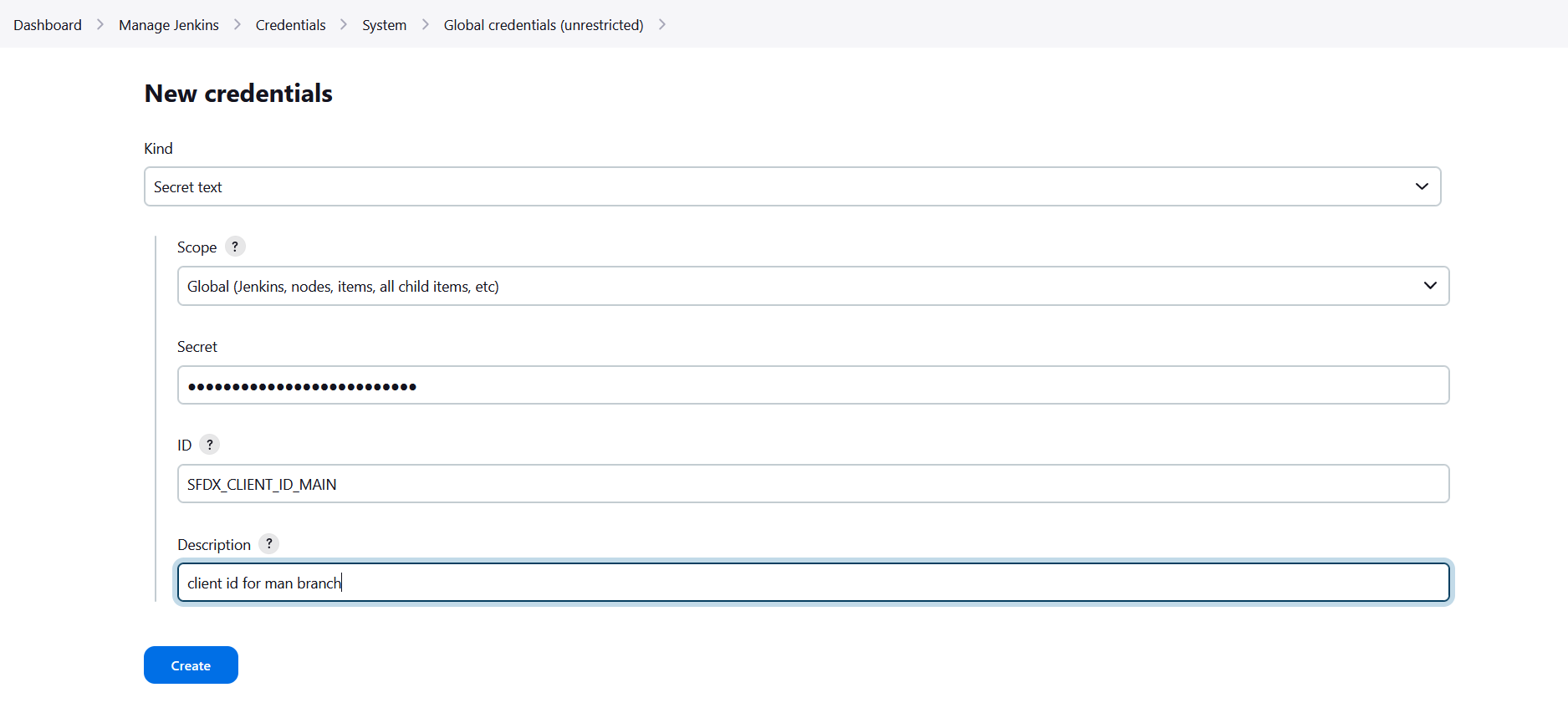
For each variable that the configuration command tells you to define, create a Secret text credential:
- Go to Dashboard -> Manage Jenkins -> Credentials -> (global)
- Click Add Credentials
- Kind: Secret text
- Secret: paste the value from sfdx-hardis
- ID: the variable name (e.g.
SFDX_CLIENT_ID_INTEGRATION) - Click Create
Repeat for every required SFDX_CLIENT_ID_<BRANCH> / SFDX_CLIENT_KEY_<BRANCH> pair.
Optional credentials
The pipeline also accepts the following optional credentials. Create them if you use the corresponding feature. Missing optional credentials are silently ignored and will NOT crash the pipeline (requires Credentials Binding Plugin >= 1.24).
| Credential ID | Feature |
|---|---|
SLACK_TOKEN + SLACK_CHANNEL_ID |
Slack notifications |
NOTIF_EMAIL_ADDRESS |
Email notifications |
JIRA_HOST + JIRA_EMAIL + JIRA_TOKEN / JIRA_PAT |
Jira integration |
ANTHROPIC_API_KEY / OPENAI_API_KEY / GEMINI_API_KEY |
AI auto-fix of deployment errors |
one of: GITHUB_TOKEN, CI_SFDX_HARDIS_GITHUB_TOKEN, CI_SFDX_HARDIS_GITLAB_TOKEN, CI_SFDX_HARDIS_BITBUCKET_TOKEN, CI_SFDX_HARDIS_AZURE_TOKEN |
Git provider integration: post deployment comments on Pull Requests and allow the coding agent to push fix branches and open Pull Requests. See Git provider integration |
SFDX_AUTH_URL_TECHNICAL_ORG |
Technical org authentication (DevHub or scratch org workflows) |
Create the Multibranch Pipeline
- Go to Dashboard -> New Item
- Enter a name (e.g.
salesforce-cicd) - Select Multibranch Pipeline and click OK
- Under Branch Sources, add your Git server and point it to your Salesforce project repository
- Under Build Configuration, leave the default by Jenkinsfile (the
Jenkinsfileis at the repository root) - Under Scan Multibranch Pipeline Triggers, enable Periodically if not otherwise run (e.g. every hour) so Jenkins discovers new branches automatically
- Click Save: Jenkins scans the repository and creates one sub-job per branch it finds
Update the Jenkinsfile
The sfdx-hardis configuration command places a Jenkinsfile at the root of your repository. Open it and search for MANUAL to find all sections that need your attention.
1 - Add your org credentials
In both the Validation and Deployment stages, uncomment and duplicate the credential pairs to match every org you deploy to:
withCredentials([
    // MANUAL: Add one pair of credentials per deployment org
    string(credentialsId: 'SFDX_CLIENT_ID_INTEGRATION',  variable: 'SFDX_CLIENT_ID_INTEGRATION'),
    string(credentialsId: 'SFDX_CLIENT_KEY_INTEGRATION', variable: 'SFDX_CLIENT_KEY_INTEGRATION'),
    string(credentialsId: 'SFDX_CLIENT_ID_UAT',          variable: 'SFDX_CLIENT_ID_UAT'),
    string(credentialsId: 'SFDX_CLIENT_KEY_UAT',         variable: 'SFDX_CLIENT_KEY_UAT'),
    // ... add more pairs here
])
The credential ID must exactly match the ID you created in Jenkins.
2 - Add your deployment branch names
Near the top of the Jenkinsfile, before the pipeline block, update the DEPLOYMENT_BRANCHES list:
// MANUAL: List every branch that triggers a real deployment to a Salesforce org
def DEPLOYMENT_BRANCHES = [
    'integration',
    'uat',
    'preprod',
    'main',
    // add more branches here if needed
]
The Deployment stage automatically uses this list in its when condition, so no other change is needed when adding or removing branches.
3 - Commit and push
Commit the updated Jenkinsfile and push. Jenkins will pick up the changes on the next scan or pipeline run.
How the pipeline works
| Trigger | Stages that run |
|---|---|
| Pull Request opened / updated | MegaLinter (code quality) + Validation (check-only deploy) run in parallel |
| Push to a deployment branch | Deployment (real deploy to the target org) |
Git provider integration
When running on Jenkins, sfdx-hardis automatically detects the Jenkins environment and maps its built-in variables (GIT_URL, GIT_BRANCH, BUILD_URL, BUILD_NUMBER, JOB_NAME, CHANGE_ID, etc.) to the native equivalents of your git provider (GitHub, GitLab, Azure DevOps, or Bitbucket).
This means you only need to set the authentication token for your git provider: all other CI variables are derived automatically.
| Git provider | Required credential | Documentation |
|---|---|---|
| GitHub | CI_SFDX_HARDIS_GITHUB_TOKEN |
GitHub integration |
| GitLab | CI_SFDX_HARDIS_GITLAB_TOKEN |
GitLab integration |
| Azure DevOps | CI_SFDX_HARDIS_AZURE_TOKEN |
Azure integration |
| Bitbucket | CI_SFDX_HARDIS_BITBUCKET_TOKEN |
Bitbucket integration |
Jenkins variables used for auto-detection:
| Jenkins variable | Purpose |
|---|---|
JENKINS_URL |
Detect that the CI runner is Jenkins |
GIT_URL |
Parse server URL, repository owner/name |
GIT_BRANCH |
Current branch name (fallback: GIT_LOCAL_BRANCH) |
BUILD_URL |
Link to the current build page |
BUILD_NUMBER |
Build identifier |
JOB_NAME |
Job/workflow name |
CHANGE_ID |
Pull Request number (Multibranch Pipeline) |
CHANGE_BRANCH |
Source branch of a Pull Request build |
Auto-fix branches
The pipeline skips sf hardis commands when the current branch name starts with auto-fix/.
This prevents recursive or redundant runs on branches that the coding agent automatically creates.
MegaLinter still runs on auto-fix branches so code quality is always checked.