Coding Agent Auto-Fix (Beta)
Beta feature: this feature is currently in beta. AI coding agents can make mistakes, so all proposed changes must be carefully reviewed by an expert before merging. Never blindly accept auto-fix Pull Requests.
Overview
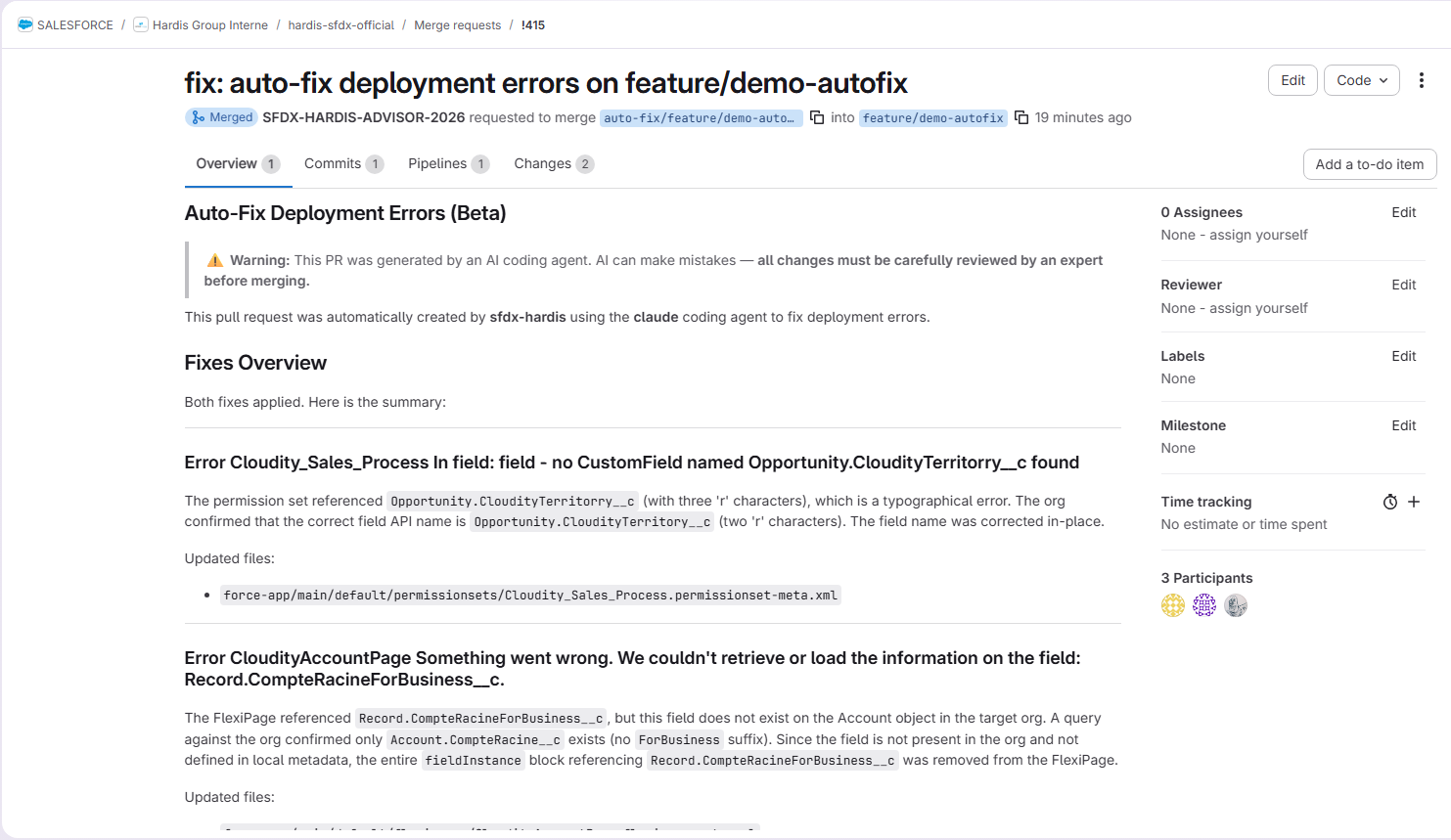
When a deployment fails, sfdx-hardis can automatically invoke a coding agent CLI to analyze the errors, modify local metadata files, and create a Pull Request with the proposed fixes.
This feature works with the following coding agent CLIs:
| Agent | CLI Package | Auth mechanism |
|---|---|---|
| Claude (Anthropic) | @anthropic-ai/claude-code |
ANTHROPIC_API_KEY env var, or claude login locally |
| Codex (OpenAI) | @openai/codex |
OPENAI_API_KEY or CODEX_API_KEY env var, or local auth |
| Gemini (Google) | @google/gemini-cli |
GEMINI_API_KEY env var, or gemini login locally |
| Copilot (GitHub) | @github/copilot |
COPILOT_GITHUB_TOKEN, GH_TOKEN, GITHUB_TOKEN, or gh auth login locally |
How it works
When codingAgentAutoFix is enabled and a deployment fails:
- sfdx-hardis analyzes the deployment errors and collects tips (including AI-generated suggestions if an LLM provider is configured)
- A fix branch is created from the current branch (e.g.
auto-fix/integration/2026-04-15T10-30-00) - The configured coding agent CLI is invoked with a detailed prompt describing all errors and failed tests
- The agent reads, analyzes and modifies local metadata files to fix the errors (it does NOT deploy anything)
- Changes are committed and pushed to the fix branch
- A Pull Request is created targeting the original branch, with a description of all errors and applied fixes
Deployment Agent cinematic
flowchart TD
  A[Contributor creates PR-1] --> B[Check deploy job runs]
  B --> C{Deployment valid?}
  C -->|Yes| D[PR-1 can be merged]
  C -->|No| E[Collect errors and tips]
  E --> F[Call coding agent CLI]
  F --> G[Agent updates local metadata]
  G --> H[Create fix PR-n targeting PR-1 branch]
  H --> I[Review and merge fix PR-n into PR-1]
  I --> B

  classDef contributor fill:#EAF5FE,stroke:#0176D3,stroke-width:2px,color:#032D60;
  classDef pipeline fill:#F3F2F2,stroke:#706E6B,stroke-width:1.5px,color:#181818;
  classDef decision fill:#E5F3FF,stroke:#0B5CAB,stroke-width:2px,color:#032D60;
  classDef agent fill:#E8F7F1,stroke:#2E844A,stroke-width:2px,color:#0B3E26;
  classDef fix fill:#FFF6E5,stroke:#A96403,stroke-width:2px,color:#4A2F00;
  classDef success fill:#E9F9EE,stroke:#2E844A,stroke-width:2px,color:#0B3E26;

  class A contributor;
  class B pipeline;
  class C decision;
  class D success;
  class E,F,G agent;
  class H,I fix;
This loop can run multiple times (PR-2, PR-3, etc.) until the check deploy job is valid and the initial Pull Request can be merged.
Setup
1. Install a coding agent CLI
If you are using the sfdx-hardis Docker images (the default in the CI/CD pipeline templates), switch to a -with-agents image variant, which has all agent CLIs pre-installed:
ghcr.io/hardisgroupcom/sfdx-hardis-ubuntu-with-agents:latest(GitHub Actions, Azure Pipelines, Bitbucket Pipelines)ghcr.io/hardisgroupcom/sfdx-hardis-with-agents:latest(GitLab CI, Alpine-based: some agents may crash on Alpine/musl; if so, prefer the Ubuntu variant)
If your CI/CD pipeline installs Salesforce CLI with npm instead of using the Docker images, install the CLI(s) you want to use:
# Pick one (or more):
npm install -g @anthropic-ai/claude-code
npm install -g @openai/codex
npm install -g @google/gemini-cli
npm install -g @github/copilot
2. Enable auto-fix
You can enable auto-fix either via environment variable or via .sfdx-hardis.yml.
SFDX_HARDIS_CODING_AGENT_AUTO_FIX=true
codingAgentAutoFix: true
3. Provide API keys
In CI/CD, the coding agent CLI needs to authenticate with its AI provider. You must provide the appropriate API key as a secure environment variable in your CI/CD pipeline.
| Agent | Required env var |
|---|---|
| Claude | ANTHROPIC_API_KEY |
| Codex | OPENAI_API_KEY or CODEX_API_KEY |
| Gemini | GEMINI_API_KEY |
| Copilot | COPILOT_GITHUB_TOKEN, GH_TOKEN or GITHUB_TOKEN (usually already available in CI/CD) |
Tip: If you already have a LangChain AI provider configured (see AI setup), sfdx-hardis automatically reuses LANGCHAIN_LLM_MODEL_API_KEY, so you do not need to set a separate key.
Local mode: no API key needed. When running outside CI/CD (i.e. on your local machine), sfdx-hardis uses the configured
codingAgent(for exampleclaude) with your existing local CLI authentication session.Example: if
codingAgent: claudeis configured andclaude loginhas already been completed, commands run with Claude directly, without requiring API key environment variables.
4. Choose a coding agent
You must specify which coding agent CLI to use. Set it via environment variable or .sfdx-hardis.yml:
SFDX_HARDIS_CODING_AGENT=claude # or: codex-cli, gemini-cli, copilot-cli
codingAgent: claude # or: codex-cli, gemini-cli, copilot-cli
Configuration reference
| Variable / Config key | Description | Default |
|---|---|---|
SFDX_HARDIS_CODING_AGENT_AUTO_FIX / codingAgentAutoFix |
Enable automatic fix of deployment errors using a coding agent | false |
SFDX_HARDIS_CODING_AGENT / codingAgent |
Required. Coding agent CLI to use (claude, codex-cli, gemini-cli, copilot-cli) |
|
SFDX_HARDIS_CODING_AGENT_MODEL / codingAgentModel |
Override the model used by the coding agent CLI (e.g. claude-sonnet-4-20250514, o3, gemini-2.5-pro) |
Agent default |
SFDX_HARDIS_CODING_AGENT_MAX_TURNS / codingAgentMaxTurns |
Maximum number of agentic turns / iterations the CLI is allowed to perform | Agent default |
DEBUG_CODING_AGENT |
Set to true to show full coding agent output in logs |
false |
Customizing the prompt
The prompt sent to the coding agent uses the template PROMPT_CODING_AGENT_FIX_DEPLOYMENT_ERRORS, which can be overridden by placing a file at:
config/prompt-templates/PROMPT_CODING_AGENT_FIX_DEPLOYMENT_ERRORS.md
The template receives the following variables:
| Variable | Description |
|---|---|
ERRORS |
Structured list of deployment errors with tips |
FAILED_TESTS |
Failed Apex test classes with error details and stack traces |
TARGET_ORG |
The target org username (for read-only queries) |
See prompt templates documentation for more details on how to override prompts.
Security considerations
Expert review required: AI coding agents can produce incorrect or incomplete fixes. Every auto-fix Pull Request must be reviewed and validated by an expert before merging. Treat these Pull Requests the same way you would treat any code contribution: run tests, inspect changes, and verify correctness.
- The coding agent runs with
--allow-all-tools/ full auto-approval mode so it can read and modify files autonomously - The agent is instructed to never deploy anything to Salesforce: it only modifies local files
- The agent can query the target org for metadata/data (read-only) to understand the current state
- All changes go through a Pull Request for human review before being merged. Do not auto-merge these Pull Requests
- It is recommended to run coding agents in a restricted CI/CD environment (container, VM) with limited permissions
Example CI/CD configuration
GitHub Actions
env:
  SFDX_HARDIS_CODING_AGENT_AUTO_FIX: "true"
  ANTHROPIC_API_KEY: ${{ secrets.ANTHROPIC_API_KEY }}
GitLab CI
variables:
  SFDX_HARDIS_CODING_AGENT_AUTO_FIX: "true"
  ANTHROPIC_API_KEY: $ANTHROPIC_API_KEY
.sfdx-hardis.yml (shared config)
codingAgentAutoFix: true
codingAgent: claude # required: which agent CLI to use
codingAgentModel: claude-sonnet-4-20250514 # optional: override the model
codingAgentMaxTurns: 30 # optional: limit the number of agentic turns