hardis:scratch:create
Description
Command Behavior
Creates and fully initializes a Salesforce scratch org with complete development environment setup.
This command is a comprehensive scratch org provisioning tool that automates the entire process of creating, configuring, and initializing a Salesforce scratch org for development work. It handles everything from basic org creation to advanced configuration including package installation, metadata deployment, and data initialization.
Key functionalities:
- Intelligent Org Management: Automatically generates unique scratch org aliases based on username, git branch, and timestamp, with options to reuse existing orgs or force creation of new ones.
- Scratch Org Pool Integration: Supports fetching pre-configured scratch orgs from pools for faster development cycles and CI/CD optimization.
- Custom Scratch Definition: Dynamically builds project-scratch-def.json files with user-specific configurations including email, username patterns, and org shape settings (set variable SCRATCH_ORG_SHAPE to use org shapes).
- Scratch Org Definition Check: Validates
config/project-scratch-def.jsonagainst the Salesforce CLI schema before asking the Dev Hub for an org, and lists every issue found. - Initialization Steps: Runs the org initialization steps of the project in their order: packages, project sources, permission sets, Apex scripts, data, custom commands... They are defined in
orgInitSteps(edit them from the Org Initialization panel of the VS Code extension). Without that key, the steps are built from the older keysinstalledPackages,initPermissionSets,scratchOrgInitApexScripts,dataPackagesand thescripts/data/ScratchInitfolder. - Pool Readiness: When filling a scratch org pool (
--pool), the steps flaggedrunAtPoolFill(all of them by default) run right away, so a scratch org taken from the pool is ready to use. Taking an org from the pool runs the remaining steps, then resets its source tracking (sf project reset tracking), so a pull only lists the changes made from then on. - User Configuration: Automatically configures the scratch org admin user with proper names, email, country settings, and marketing user permissions.
- Password Generation: Creates and stores secure passwords for easy scratch org access during development.
- CI/CD Integration: Provides specialized handling for continuous integration environments including automated cleanup and pool management.
- Error Handling: Comprehensive error recovery including scratch org cleanup on failure and detailed troubleshooting messages.
The command configuration can be customized using:
config/.sfdx-hardis.ymlfile with properties likeorgInitSteps,installedPackages,scratchOrgDurationandpoolConfig.- Environment variable SCRATCH_ORG_SHAPE with shape org id, if you want to use org shapes
- Branch config
useScratchOrgSnapshot: trueon a major branch: in CI, the scratch org of a Pull Request to that branch is created from the newest Active snapshot of the branch whose commit is in the history of the Pull Request (taken by hardis:scratch:snapshot:refresh), and only what changed since that commit is deployed. The target branch is the one of the Pull Request the git provider gives; without a Pull Request (no token, local run), it is read from FORCE_TARGET_BRANCH, then from the CI tool's own variable (GITHUB_BASE_REF,CI_MERGE_REQUEST_TARGET_BRANCH_NAME,SYSTEM_PULLREQUEST_TARGETBRANCH,BITBUCKET_PR_DESTINATION_BRANCH,CHANGE_TARGET). Without a usable snapshot, or when the Pull Request changed the scratch org definition or a step run at pool fill (its definition, its Apex script or its data workspace), the scratch org is created empty and the log says why. These checks apply to the snapshot route only: a scratch org taken from the pool keeps what its pool fill deployed and ran. Outside CI, as in hardis:work:new when the pool has no org left, the scratch org starts from the snapshot of the major branch the User Story started from. More info in Use scratch org snapshots for Pull Requests. - Environment variable SCRATCH_ORG_SNAPSHOT with the name of a Dev Hub org snapshot, to create the scratch org from that snapshot. The commit of the snapshot is not known, so the sources are pushed in full. With a scratch org pool, a pool org is still taken first, as it is already there: the named snapshot is used only when the pool has no org left. A pool fill (
--pool) ignores it. - With a snapshot, the definition file leaves out the keys a snapshot does not accept (
features,edition,sourceOrg...) and the scratch org pool comes first: a Pull Request scratch org is created from the snapshot only when the pool has no org left. A pool fill (--pool) creates its org from the newest usable snapshot of its own branch: it installs the packages the snapshot lacks, deploys the changes since the snapshot commit and assigns the permission sets, and the steps withrunAtPoolFill: falsestill run when a job takes the org. The org initialization steps are split as for a pool: the snapshot holds the result of the steps run when filling the pool (runAtPoolFill), and the scratch org installs the packages it lacks, gets the delta, then the other steps and the permission set assignments. Those steps and packages are read from the config of the snapshot's branch, the one the snapshot was built with, not from the branch the job runs on. - Environment variables SF_SCRATCH_SIGNUP_CONNECTED_APP and SF_SCRATCH_SIGNUP_CALLBACK_URL: by default the new org is signed up with the Salesforce CLI built-in app (
PlatformCLI), so a Dev Hub authenticated through an External Client App works (Salesforce CLI 2.147.7 or later). Not applied when you set SF_SCRATCH_SIGNUP_CONNECTED_APP or SFDX_CLIENT_SECRET.
Technical explanations
The command's technical implementation involves:
- Configuration Management: Loads hierarchical configuration from
.sfdx-hardis.yml, branch-specific, and user-specific configuration files usinggetConfig('user'). - Alias Generation Logic: Creates intelligent scratch org aliases using username, git branch, timestamp patterns with CI and pool prefixes for different environments.
- Scratch Org Definition Building: Dynamically constructs
project-scratch-def.jsonwith user email, custom usernames, org shapes, and feature flags like StateAndCountryPicklist and MarketingUser. - Pool Integration: Implements scratch org pool fetching using
fetchScratchOrgfor rapid org provisioning in development and CI environments. - Salesforce CLI Integration: Executes
sf org create scratchcommands with proper parameter handling including wait times, duration, and dev hub targeting. - Initialization Steps:
runOrgInitSteps(src/common/utils/orgInitUtils.ts) runs the steps with the deployment actions providers, plus theinstall-packages,deploy-sourcesandassign-permission-setstypes. The phase ispool-fillwith--pool,after-pool-fetchfor an org taken from the pool,allotherwise. With--pool, the result storesorgInit(the commit and branch whose sources were deployed). An org taken from the pool gets the delta between that commit and the working copy (callSfdxGitDelta, thensf project deploy start), thensf project reset tracking. A pool org withoutorgInit(filled by an older version) runs every step. The scratch org definition is validated withsourceOrgset fromscratchOrgShape/SCRATCH_ORG_SHAPE, so an org shape definition needs no edition. - Definition Validation:
validateScratchOrgDefusesScratchOrgDefSchemafrom@salesforce/core, then checks eachsettingsname against the Salesforce CLI JSON schema. - User Management: Performs SOQL queries and DML operations to configure scratch org users with proper names, emails, country codes, and permission flags.
- Authentication Management: Handles SFDX auth URL generation and storage for CI/CD environments and scratch org pool management.
- Error Recovery: Implements comprehensive error handling with scratch org cleanup, pool management, and detailed error messaging for troubleshooting.
- WebSocket Integration: Provides real-time status updates and file reporting through WebSocket connections for VS Code extension integration.
Agent Mode
Supports non-interactive execution with --agent:
sf hardis:scratch:create --agent --target-dev-hub mydevhub@example.com
In agent mode:
- The scratch org reuse confirmation prompt is skipped and a new org is always created.
- All other interactive prompts are skipped.
Screenshots
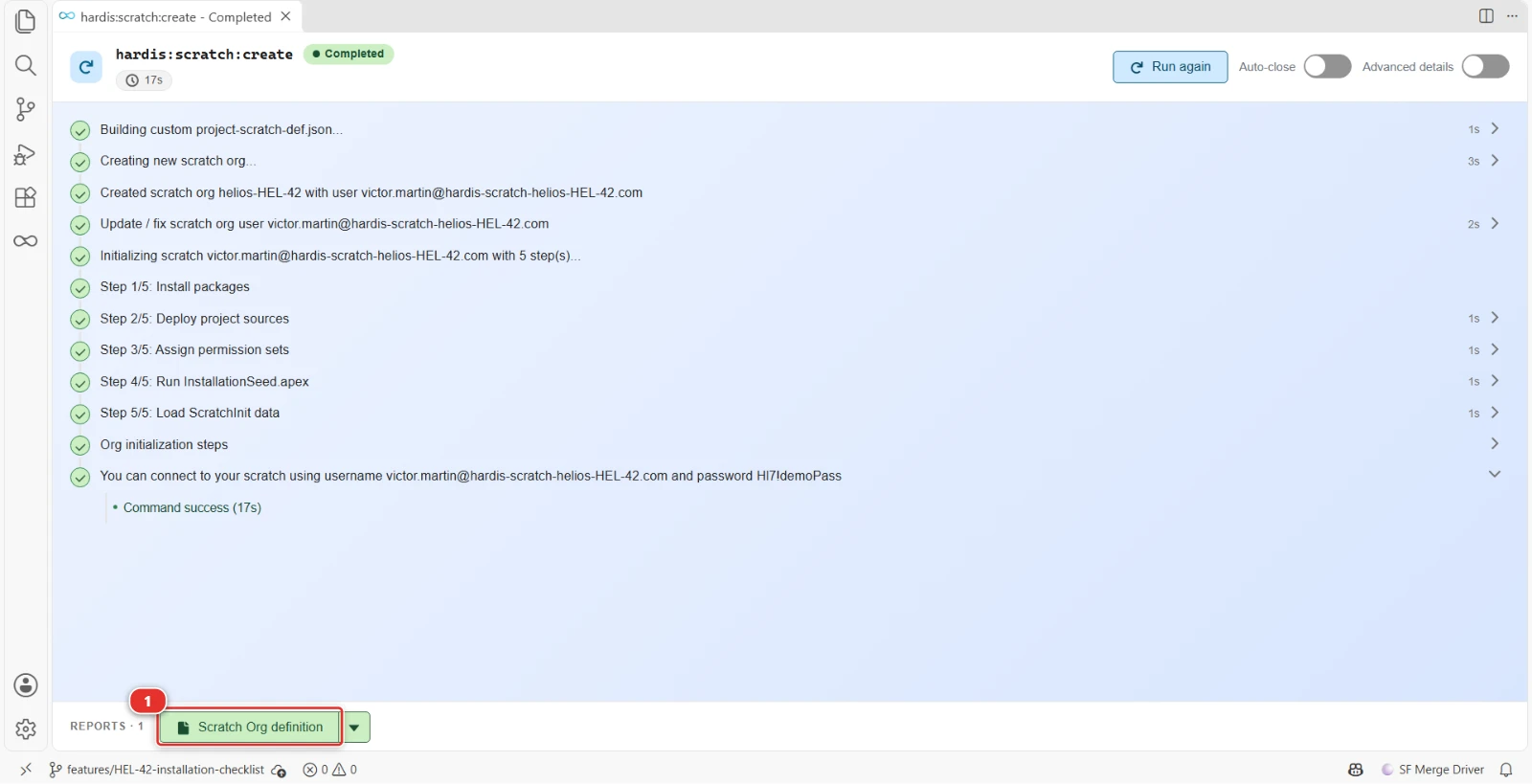
The scratch org helios-HEL-42 is created from the Dev Hub and initialized with the Helios project steps
- (1) The report of the run: the button opens it in Excel, the arrow lists its other files
Parameters
| Name | Type | Description | Default | Required | Options |
|---|---|---|---|---|---|
| agent | boolean | Run in non-interactive mode for agents and automation | |||
| debug -d |
boolean | Activate debug mode (more logs) | |||
| flags-dir | option | Import flag values from a directory. | |||
| forcenew -n |
boolean | If an existing scratch org exists, do not reuse it but create a new one | |||
| json | boolean | Format output as json. | |||
| pool | boolean | Creates the scratch org for a scratch org pool | |||
| skipauth | boolean | Skip authentication check when a default username is required | |||
| target-dev-hub -v |
option | Username or alias of the Dev Hub org. Not required if the target-dev-hub configuration variable is already set. |
true | ||
| websocket | option | Websocket host:port for VsCode SFDX Hardis UI integration |
Examples
$ sf hardis:scratch:create
$ sf hardis:scratch:create --agent