GitHub
GitHub Pull Requests comments
To avoid having to open job logs to see deployment errors, sfdx-hardis can post them as a comment on the Pull Request UI.
To use this capability, all you need is to set permissions on your workflows and to pass your GITHUB_TOKEN to the job (see full example)
    permissions:
      pull-requests: write

...
      env:
        GITHUB_TOKEN: ${{ secrets.GITHUB_TOKEN }}
        FORCE_COLOR: "1"
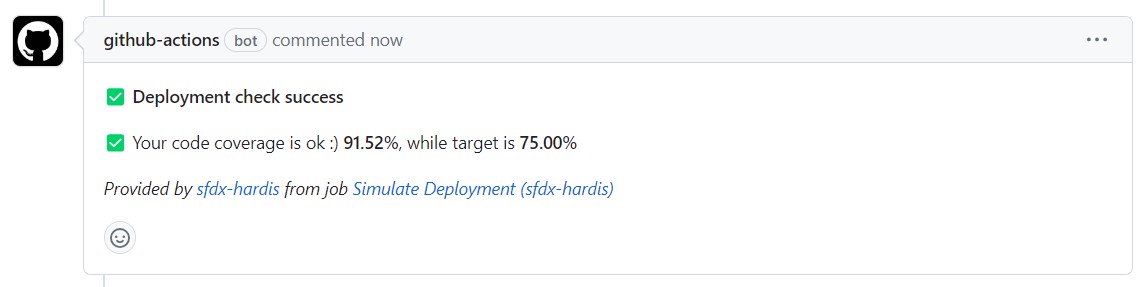
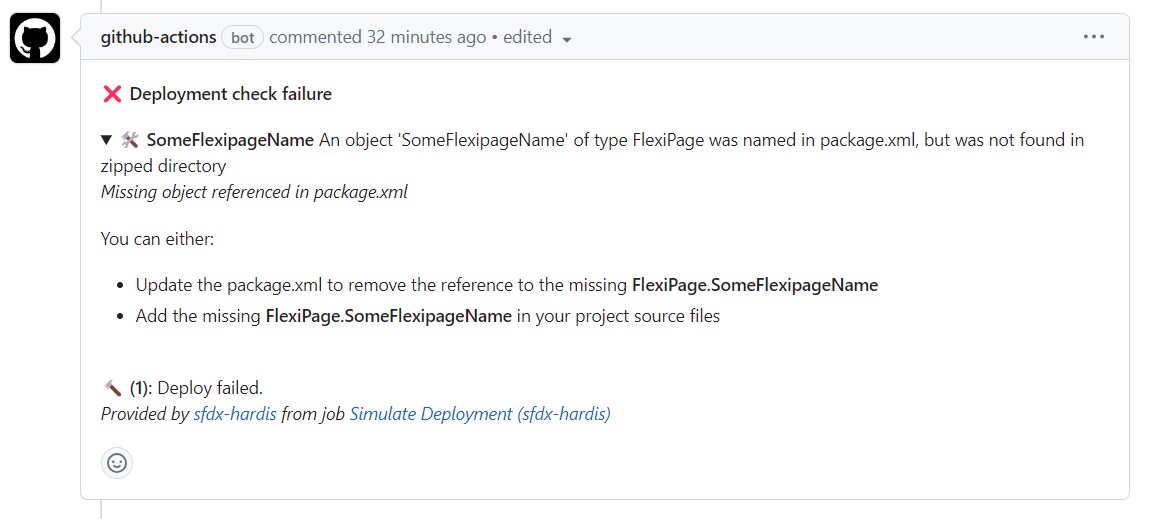
Every time you create a Pull Request, the CI job posts its result as a comment.
- Example with deployment success
- Example with deployment errors
Notes:
- This integration works with the sfdx-hardis pipeline, but also with home-made pipelines: just call sf hardis:project:deploy:start instead of
sf project:deploy:start.
-
This integration uses the following variables:
- GITHUB_TOKEN (provided by GitHub, but it has to be passed as an environment variable to the deployment jobs)
Using GitHub integration without GitHub Actions
You might want to use the GitHub integration with tools other than GitHub Actions, like Jenkins or Codefresh.
Jenkins
When running on Jenkins, sfdx-hardis automatically detects the Jenkins environment and maps its variables to GitHub equivalents. You only need to set:
| Variable | Description |
|---|---|
| CI_SFDX_HARDIS_GITHUB_TOKEN | A GitHub Personal Access Token stored as a Jenkins credential |
The following variables are automatically derived from Jenkins built-in variables (GIT_URL, GIT_BRANCH, BUILD_URL, BUILD_NUMBER, JOB_NAME, CHANGE_ID):
GITHUB_REPOSITORY,GITHUB_REPOSITORY_OWNER,GITHUB_SERVER_URL: parsed fromGIT_URL(git remote)GITHUB_REF,GITHUB_REF_NAME: fromGIT_BRANCH/CHANGE_BRANCHGITHUB_RUN_ID: fromBUILD_NUMBERGITHUB_WORKFLOW: fromJOB_NAME- Pull Request number: from
CHANGE_ID(Jenkins Multibranch Pipeline) - Job URL: from
BUILD_URL
Other CI systems
For other CI systems (Codefresh, etc.), you need to manually set the following variables:
| Variable | Description |
|---|---|
| GITHUB_TOKEN | You might need to create a GitHub Personal Access Token |
| GITHUB_REPOSITORY | ex: MyClient/crm-salesforce |
| GITHUB_REPOSITORY_OWNER | ex: MyClient |
| GITHUB_SERVER_URL | ex: https://github.mycompanydomain.com |
| GITHUB_API_URL | ex: https://github.mycompanydomain.com/api |
| GITHUB_GRAPHQL_URL | ex: https://github.mycompanydomain.com/api/graphql |
| GITHUB_WORKFLOW | ex: Simulate Deployment (sfdx-hardis) |
| GITHUB_REF | ex: refs/pull/503/merge |
| GITHUB_REF_NAME | ex: 503/merge |
| GITHUB_RUN_ID | ex: 14282257027. If you cannot get it, do not set the variable. |
| PIPELINE_JOB_URL | Direct link to the page showing your job results. ex: https://yourserver.com/jobs/345 |
Instructions for using Coding Agents
When using auto-fix with coding agents, the pipeline must be able to push a fix branch and create/update Pull Requests.
This works for both:
- GitHub Cloud (
github.com) - GitHub Enterprise Server / GitHub Enterprise Cloud custom domains
Add this in your deployment/check workflow step before running sf hardis:* commands:
env:
  CI_SFDX_HARDIS_GITHUB_PUSH_TOKEN: ${{ secrets.GITHUB_TOKEN }}

run: |
  if [ -n "${CI_SFDX_HARDIS_GITHUB_PUSH_TOKEN:-}" ]; then
    git config user.email "sfdx-hardis-bot@cloudity.com"
    git config user.name "sfdx-hardis Bot"
    GITHUB_HOST=$(echo "${GITHUB_SERVER_URL:-https://github.com}" | sed -E 's#^https?://##')
    git remote set-url origin "https://x-access-token:${CI_SFDX_HARDIS_GITHUB_PUSH_TOKEN}@${GITHUB_HOST}/${GITHUB_REPOSITORY}.git"
    echo "[sfdx-hardis] GitHub push/PR auth enabled for coding agents"
  else
    echo "[sfdx-hardis] Skipping coding-agent GitHub auth setup: CI_SFDX_HARDIS_GITHUB_PUSH_TOKEN is not set"
  fi
Required secret/variable:
CI_SFDX_HARDIS_GITHUB_PUSH_TOKEN(orPAT):- Use
secrets.GITHUB_TOKENif your workflow permissions includecontents: writeandpull-requests: write. - Otherwise create a fine-grained PAT with repository scopes
Contents: Read and writeandPull requests: Read and write.
- Use