Apply a Setup setting in a browser
Apply a Setup setting in a browser
One of the types of deployment actions, YAML type: browser. That page explains what all types share: when actions run, how to choose their target orgs, how they are tracked and how to recover a failed one.
Some Setup settings cannot be deployed with the Metadata API: the density of Lightning Experience, the company currency, the secret of an auth provider, the record types of a picklist value, and many more. A browser action applies one of them with Browserforce, which clicks through the Setup pages in a headless browser. It only changes what differs from the org, so running it again does nothing.
In VS Code, pick the setting in the list: its fields show as a form, with the example of Browserforce already filled in, and its warnings (a value that cannot be changed back, a feature that only exists in Salesforce Classic, what the org needs first). Edit as JSON shows the whole value, and Check with Browserforce validates it before saving.
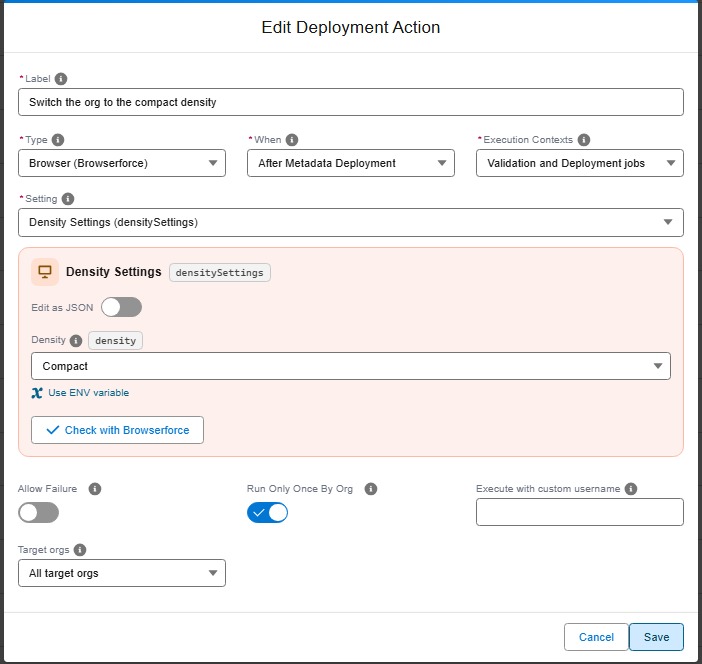
During a deployment check, nothing is changed: Browserforce reads the org and the Pull Request comment shows what the deployment will change.
A browser action can also be an org initialization step, to set up each new scratch org or refreshed sandbox the same way.
Examples
Run a User Access Policy on new users only
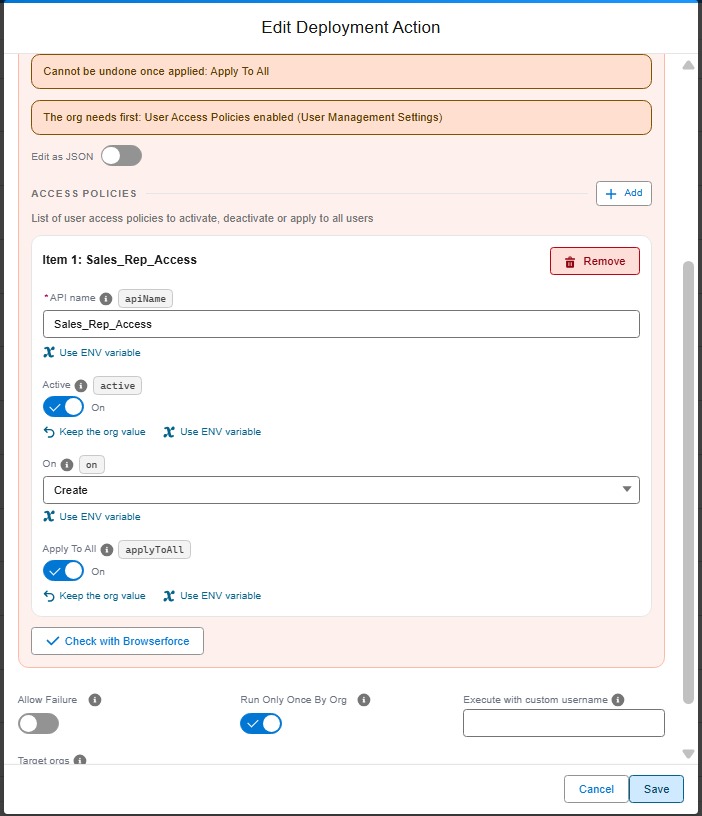
The Activate User Access Policies type activates policies and runs Apply To All on them, which covers most needs. The userAccessPolicies setting of Browserforce goes further, policy by policy: choose when the policy runs (when a user is created, updated, or both), deactivate it, or run Apply To All without changing its status.
Here, the Sales Rep policy only runs when a user is created, and Apply To All gives its access to the users that already match it:
commandsPostDeploy:
  - id: 6f0b2b1e-1c9a-4e0d-9d2a-128a00000014
    label: Run the Sales Rep access policy on new users only
    type: browser
    context: all
    parameters:
      setting: userAccessPolicies
      config:
        accessPolicies:
          - apiName: Sales_Rep_Access
            active: true
            "on": Create
            applyToAll: true
Change the API name of a picklist value
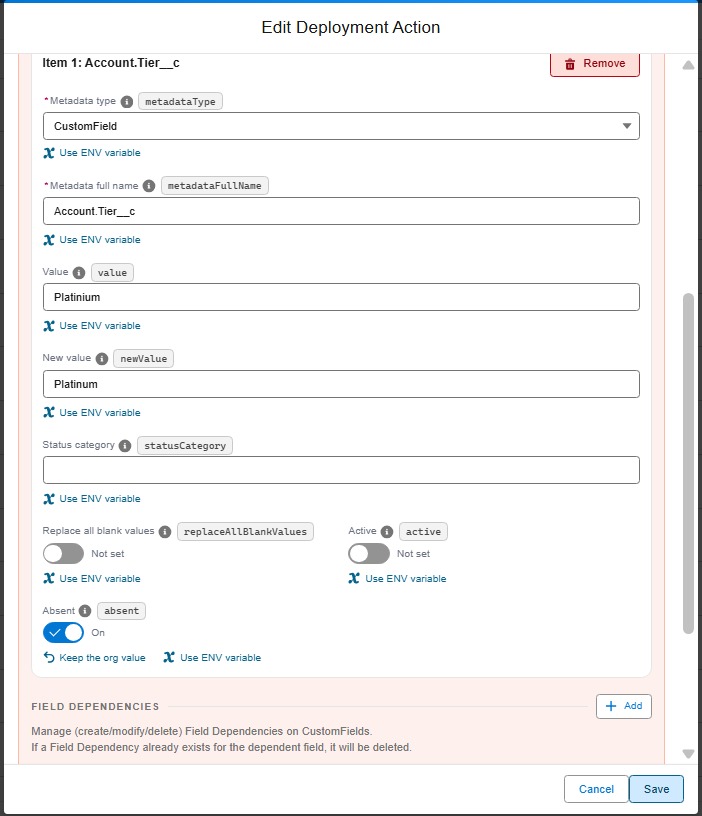
With the Metadata API, a new API name is a new picklist value: the records keep the old one. To fix a typo in an API name (Platinium instead of Platinum), the Pull Request adds the new value to the field, and a browser action with the picklists setting of Browserforce does the rest after the deployment: it replaces the old value with the new one in every record that uses it, then deletes the old value (absent: true).
commandsPostDeploy:
  - id: 6f0b2b1e-1c9a-4e0d-9d2a-128a00000015
    label: Fix the API name of the Platinium account tier
    type: browser
    context: all
    parameters:
      setting: picklists
      config:
        picklistValues:
          - metadataType: CustomField
            metadataFullName: Account.Tier__c
            value: Platinium
            newValue: Platinum
            absent: true
Once the action has run in every org, remove the old value from the field in git, so that a later deployment does not create it again. The same setting replaces values of a standard field (metadataType: StandardValueSet) or of a global value set (GlobalValueSet).
Technical: browser action (YAML)
| Custom parameter | Required? | Description | Example |
|---|---|---|---|
parameters.setting |
Yes | Key of the Browserforce setting. | densitySettings |
parameters.config |
Yes | Value of the setting: an object or a list, in the format Browserforce describes for that setting. | { density: "Compact" } |
commandsPostDeploy:
  - id: 2f0c4d1e-7a3b-4c5d-9e8f-0a1b2c3d4e5f
    label: Compact density for all users
    type: browser
    context: all
    parameters:
      setting: densitySettings
      config:
        density: Compact
List the settings and the format of each one with hardis:project:action:types:
sf hardis:project:action:types --type browser
sf hardis:project:action:types --type browser --browser-setting authProviders --json
Secrets and values that differ per org. Write a value as "${VARIABLE}" and declare a CI/CD variable instead of writing the value in git. When deploying to uat, sfdx-hardis reads VARIABLE_UAT first, then VARIABLE (the same rule as SFDX_CLIENT_ID_<BRANCH>), and passes the value to Browserforce as an environment variable only. The values are masked in the job logs and in the Pull Request comments. A missing variable fails the action and lists the names that were looked up.
    parameters:
      setting: authProviders
      config:
        PaymentProvider:
          consumerSecret: "${PAYMENT_PROVIDER_SECRET}"
On GitHub Actions, a workflow only passes to its jobs the secrets it lists: add the variables to the env of the deployment check and deployment workflows.
The action runs in both phases. Its default context is all: the check job shows the planned changes, the deployment job applies them. It runs once per org by default, like most types: set runOnlyOnceByOrg: false to apply the setting at each deployment, for a setting that a deployment can change back.
Browserforce (sfdx-browserforce-plugin) is installed when missing. It is in the sfdx-hardis Docker images, which also set its browser. On another machine, Browserforce uses CHROME_BIN, or the local Chrome sfdx-hardis finds; otherwise run sf browserforce playwright -- install chromium.