Initialize scratch orgs and sandboxes (optional, Beta)
Initialize scratch orgs and sandboxes (optional, Beta)
This feature is in Beta. Its behavior may still change from feedback. Please report any issue or feedback on the sfdx-hardis GitHub repository.
A new scratch org or developer sandbox is empty: it needs the project packages, the sources, the permission sets of the team, a few Apex scripts and some test data before anyone can work in it. sfdx-hardis runs these org initialization steps for you, in the order your project defines.
This step is optional: without any configuration, a new scratch org still gets the project packages and sources.
- When the steps run
- Edit the steps from VS Code
- Step types
- The scratch org definition
- Configuration reference
- Projects configured before orgInitSteps
When the steps run
| Situation | Steps that run |
|---|---|
| hardis:scratch:create creates a new scratch org | Every enabled step that applies to scratch orgs |
| The scratch org pool is filled | The steps with Run when filling the pool (all of them by default), so an org taken from the pool is ready to use |
| A scratch org is taken from the pool (New User Story, CI jobs) | The steps without Run when filling the pool |
| hardis:org:create creates a new sandbox | Every enabled step that applies to sandboxes |
| hardis:org:init on an existing org | The steps you pick, among the ones that apply to that org |
New User Story never initializes an existing sandbox. Its metadata comes from a backpromote, and Run now in the Org Initialization panel (or sf hardis:org:init) runs the other steps when you need them.
hardis:org:init refuses production orgs.
Edit the steps from VS Code
Open Org Initialization from the sfdx-hardis commands of the VS Code extension.
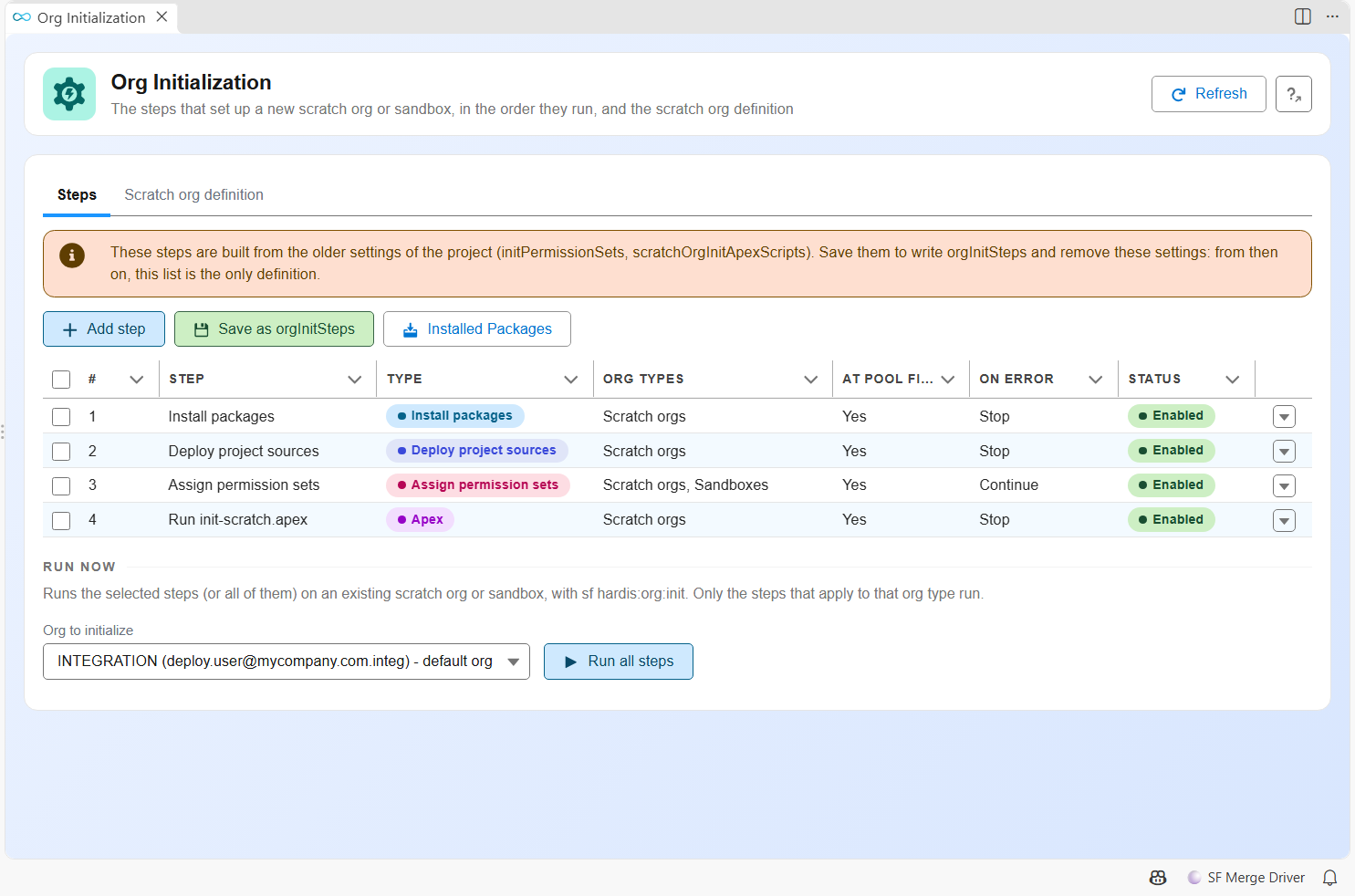
- The Steps tab lists the steps in their run order. Move them up and down, switch them on or off, and open one to edit it.
- Add step creates a step of any type.
- Run now runs the selected steps on the org you pick, with
sf hardis:org:init. - The Scratch org definition tab edits
config/project-scratch-def.jsonand the scratch org duration.
The panel writes orgInitSteps in config/.sfdx-hardis.yml.
Step types
| Type | What it does | Org types |
|---|---|---|
install-packages |
Installs the packages of installedPackages (on a scratch org, not the ones with installOnScratchOrgs: false) |
scratch, sandbox |
deploy-sources |
Pushes the project sources (deploys them in CI when CI_SCRATCH_MODE=deploy) |
scratch only |
assign-permission-sets |
Assigns permission sets or permission set groups to the org user | scratch, sandbox |
apex |
Runs an anonymous Apex script | scratch, sandbox |
data |
Imports an SFDMU workspace of scripts/data |
scratch, sandbox |
command |
Runs a command line. sf commands without --target-org target the org being initialized |
scratch, sandbox |
run-batch, schedule-batch, publish-community |
Same as the deployment actions of the same type | scratch, sandbox |
| A custom function | A custom function declared without a deployment phase | scratch, sandbox |
install-packages, deploy-sources and assign-permission-sets only exist in org initialization steps: deployments already install packages and deploy sources, and a permission set assignment only reaches the user running it.
Each step also has:
- Enabled: a switched off step stays in the list and never runs.
- Org types: scratch orgs, sandboxes, or both.
- Continue on error (
allowFailure): a failed step is reported as a warning and the next steps run. Without it, a failure stops the initialization. - Run when filling the pool (
runAtPoolFill, on by default).
While the steps run, SF_TARGET_ORG, SFDX_HARDIS_ORG_USERNAME and SFDX_HARDIS_ORG_TYPE (scratch or sandbox) point to the org, so your scripts know where they run.
The scratch org definition
config/project-scratch-def.json defines the edition, the features and the settings of the scratch orgs. The panel shows a form for the main fields and a JSON editor for settings, and checks the file against the Salesforce CLI schema before saving it.
- Language, country and release are picked from lists read from your default Dev Hub (or your default org): its user languages and countries, and its API versions with their release names.
- Features are picked from the list Salesforce CLI knows, with a number field for the ones that take one (
MaxApexCodeSize...). Import from an org shape creates an org shape of an org and adds its features. Org Shape must be enabled in that org and in the Dev Hub. - Settings can be imported from any connected org, production included: pick the settings types, the panel reads them with the Metadata API and merges them into the definition. Check them before saving, some values cannot be set on a scratch org.
- Org shape: pick the active org shape the scratch orgs are created from (
scratchOrgShape, overridden by theSCRATCH_ORG_SHAPEvariable). It belongs to a major branch: the panel writes it inconfig/branches/.sfdx-hardis.<branch>.yml, and a scratch org uses the shape of the branch its User Story started from, or none. With an org shape, the definition needs no edition. Importing the features of an org shape is different: it copies them into the definition, and the scratch orgs are still created from the edition. - The Documentation buttons open the Salesforce pages that list the features and the settings.
The panel reads these values with hardis:config:org-init (--org-values, --import-settings, --import-features-from-shape).
hardis:scratch:create runs the same check before it asks the Dev Hub for an org, and lists every issue it finds.
Configuration reference
orgInitSteps:
  - id: install-packages
    label: Install packages
    type: install-packages
    orgTypes: [scratch]
  - id: deploy-sources
    label: Deploy project sources
    type: deploy-sources
    orgTypes: [scratch]
  - id: assign-permsets
    label: Assign permission sets
    type: assign-permission-sets
    parameters:
      permissionSets:
        - PS_Admin
        - PS_Sales
  - id: init-custom-settings
    label: Initialize custom settings
    type: apex
    parameters:
      apexScript: scripts/apex/init-custom-settings.apex
    allowFailure: true
  - id: load-accounts
    label: Load test accounts
    type: data
    parameters:
      sfdmuProject: ScratchInit
    runAtPoolFill: false
List the steps and their ids with sf hardis:config:org-init --json, and run some of them with sf hardis:org:init --steps assign-permsets,load-accounts.
Projects configured before orgInitSteps
When orgInitSteps is not defined, sfdx-hardis builds the steps from the older properties, in the order they always ran:
installedPackages(scratch orgs)- The project sources (scratch orgs)
initPermissionSets(both, a failure does not stop the initialization)scratchOrgInitApexScripts(scratch orgs) andsandboxOrgInitApexScripts(sandboxes)scripts/data/ScratchInit(scratch orgs) andscripts/data/SandboxInit(sandboxes), when the folders existdataPackagesentries withimportInSandboxOrgs: true(both)
The Org Initialization panel shows that list. The first save writes orgInitSteps and removes initPermissionSets, scratchOrgInitApexScripts and sandboxOrgInitApexScripts. Once orgInitSteps exists, the older properties are ignored for org initialization.
All these steps now run when the scratch org pool is filled. Before, the pool only installed the packages and the rest ran when someone took the org. A scratch org filled by an older sfdx-hardis version gets every step when someone takes it.
The pool job pushes the sources from its own runner, and stores the commit and the branch they came from with the org. When you take a scratch org from the pool:
- If your branch is on another commit, sfdx-hardis deploys what changed between the two (with deletions), so the org matches your branch. When that commit is not in your local history, it fetches the branch of the pool job first (the branch your User Story started from), and deploys every source again if the commit is still missing.
- It resets the source tracking (
sf project reset tracking), so a pull only lists the changes made after you took the org.
Learn by doing
The free Salesforce DevOps with sfdx-hardis course does this, click by click, on an org of your own: