Remove items from package.xml
Remove items from package.xml
One of the types of deployment actions, YAML type: remove-packagexml-items. That page explains what all types share: when actions run, how to choose their target orgs, how they are tracked and how to recover a failed one.
Excludes some metadata from the deployment without touching your repository: the listed items are removed from the calculated package.xml just before deploying. Useful for org-specific components that exist in git but must not reach a given org.
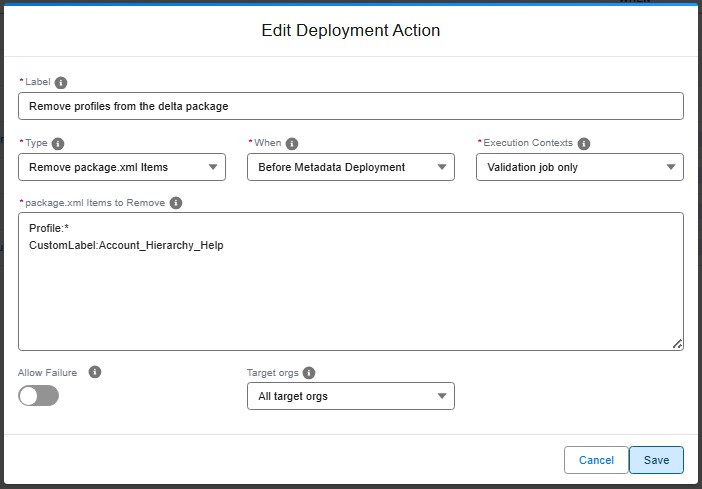
Technical: remove-packagexml-items action (YAML)
Removes metadata items from the package.xml calculated by hardis:deploy:smart, so they are ignored during the metadata deployment step.
Only available as a pre-deploy action. The removal applies to the temporary copies of package.xml used by the deployment, never to the manifest files committed in the repository. It is also compatible with delta deployments: items are removed from the calculated delta package.xml.
runOnlyOnceByOrg is ignored for this action type: since it only alters the current deployment, it runs at every deployment (check and process).
| Custom parameter | Description | Example |
|---|---|---|
parameters.packageXmlItems |
List of items to remove, each in format TypeName:Member1,Member2. Use * as member to remove a whole type. Member names also support glob wildcards (ex: Account*). A single string is also accepted for a single entry. |
ApexClass:MyClass1,MyClass3 |
- id: a803e4c8-4471-48fd-ba14-7cd6c45b8ad1
  label: Remove legacy items from deployment package.xml
  type: remove-packagexml-items
  parameters:
    packageXmlItems:
      - ApexClass:MyClass1,MyClass3
      - Layout:MyLayout1,MyLayout2,MyLayout3
  context: all