Hotfixes (RUN)
Hotfixes
Production is broken, or a fix cannot wait for the next version. A hotfix takes it straight to production through the RUN stream, while the BUILD stream keeps preparing the next version.
BUILD and RUN
Except for projects in maintenance that only have a RUN, a project is split in two streams:
- the RUN stream: a fast cycle, to often deploy minor changes and fixes
- the BUILD stream: the project cycle, to build larger features and enhancements that require User Acceptance Testing
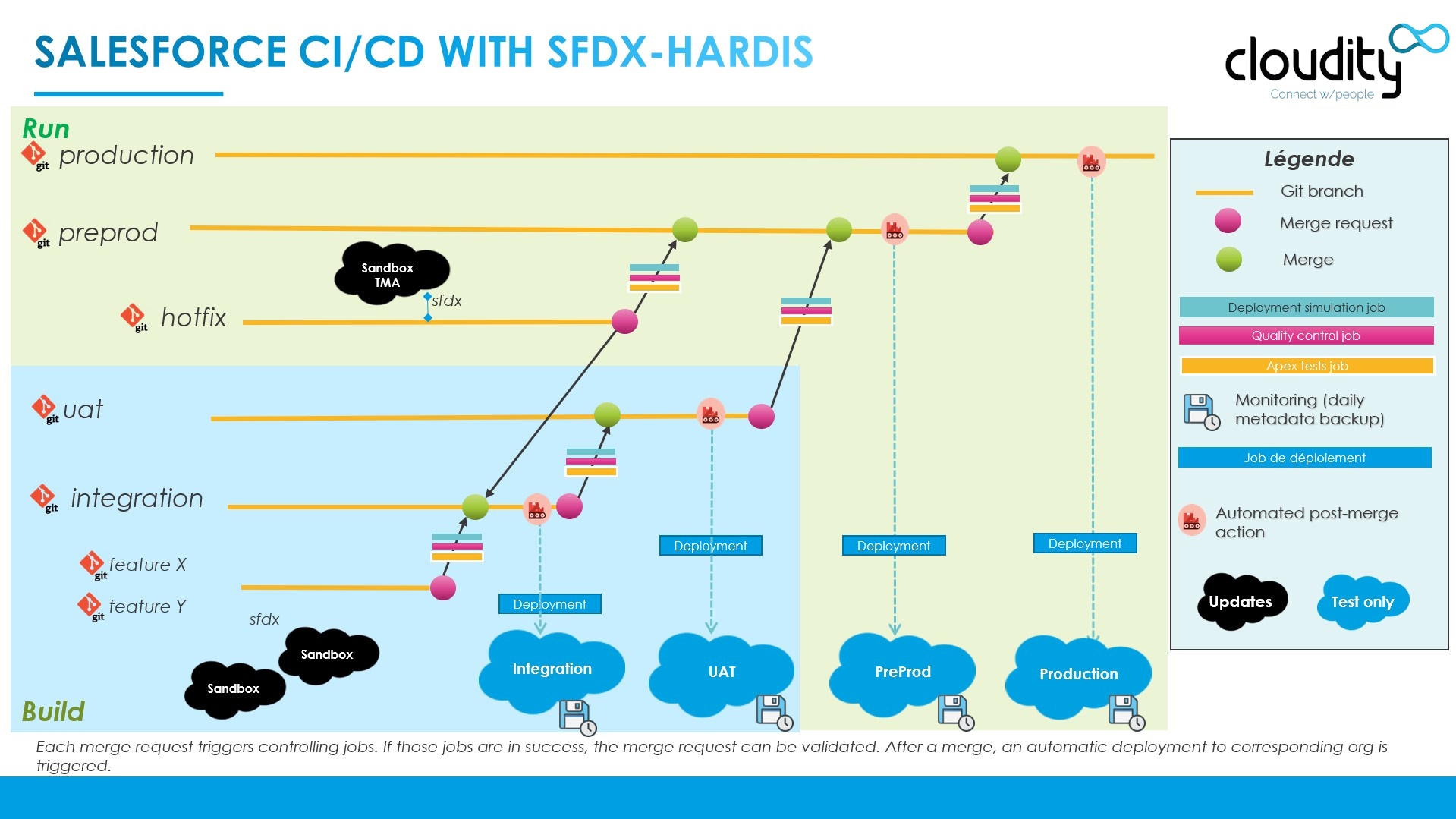
The BUILD
This is the stream where you prepare the next major or minor version.
New features go through the integration level, then the uat level, where business users qualify and validate them.
Once the User Acceptance Test is validated in the uat org, uat is merged into preprod. After minimal (mostly technical) tests, preprod is merged into production.
Major features or enhancements must not be tested directly at preprod level: while the next version is being validated in preprod, the RUN cannot deploy anything into production.
The RUN
The daily maintenance of the production org must be very reactive: the RUN stream lets you often deploy patch versions.
As you usually cannot wait for the next minor or major version to reach production, you need a way to quickly deploy hotfixes. That stream is the RUN, and on pattern A it only involves the preprod and main branches. On pattern B it also has a uat_run branch and org, where the maintenance work that can wait is validated before reaching preprod.
A hotfix therefore lands in production before the version being prepared in the BUILD. The BUILD branches do not have it yet, so it has to be brought back down to them: that is the retrofit, and it is not optional.
Is a hotfix the right move?
Not every urgent request is a hotfix. What decides is where the fix already lives.
%%{init: {"theme": "base", "themeVariables": {"primaryColor": "#eaf5fe", "primaryTextColor": "#032d60", "primaryBorderColor": "#0176d3", "lineColor": "#0176d3", "secondaryColor": "#f3f3f3", "tertiaryColor": "#ffffff", "fontFamily": "Salesforce Sans, Arial, sans-serif"}}}%%
flowchart TB
    START{"A change has to reach<br/>production before the<br/>next version"}
    START -->|"it does not exist yet,<br/>you write it now"| HOTFIX["**Hotfix**<br/>branch to preprod, then to main"]
    START -->|"it is already merged in uat,<br/>with stories nobody approved"| PROMO["**Promotion branch**<br/>carries the approved stories only"]
    HOTFIX --> RETRO["Then retrofit it into the BUILD"]
    PROMO --> RETRO
    style HOTFIX fill:#e3f7e8,stroke:#2e844a
style RETRO fill:#fff7e0,stroke:#dd7a01- Hotfix: this page.
- Promotion branch (Beta): do not fix it a second time, assemble a promotion branch carrying the approved stories.
Either way, it ends the same way: what reached production has to come back down to the BUILD branches.
⚠️ Fixing it by hand in the production org is not on this list, and never is. A change made through Setup is in no branch, so the next deployment overwrites it and the fix is lost. Always go through a branch and a Pull Request, even when it is one field and even at 2am. If it has already happened, treat it as an incident to repair: recover it as a User Story, see manual retrofit.
Hotfix process
%%{init: {"theme": "base", "themeVariables": {"primaryColor": "#eaf5fe", "primaryTextColor": "#032d60", "primaryBorderColor": "#0176d3", "lineColor": "#0176d3", "secondaryColor": "#f3f3f3", "tertiaryColor": "#ffffff", "fontFamily": "Salesforce Sans, Arial, sans-serif"}}}%%
flowchart LR
    %% Lanes stack in reverse declaration order: BUILD is declared first so RUN draws on top
    subgraph BUILD_STREAM["BUILD: the next version"]
        direction LR
        RETROFIT["retrofit/from-main<br/>cut from integration"] --> INTEGRATION["integration"]
    end
    subgraph RUN_STREAM["RUN: production"]
        direction LR
        HOTFIX["my-very-hot-hotfix<br/>cut from preprod"] --> PREPROD["preprod"] --> MAIN["main<br/>production"]
    end
    MAIN -.->|"then merge main into<br/>the retrofit branch"| RETROFIT
    style HOTFIX fill:#e3f7e8,stroke:#2e844a
    style MAIN fill:#fef1ee,stroke:#ea001e
Three phases: you ship the fix in the RUN, then you give it to the BUILD.
Note: this page follows pattern A, where the hotfix is merged directly into
preprod. On pattern B, which adds auat_runbranch and org for the RUN stream, a hotfix still goes directly intopreprod:uat_runis for the maintenance work that can wait for a validation round, not for what is on fire.
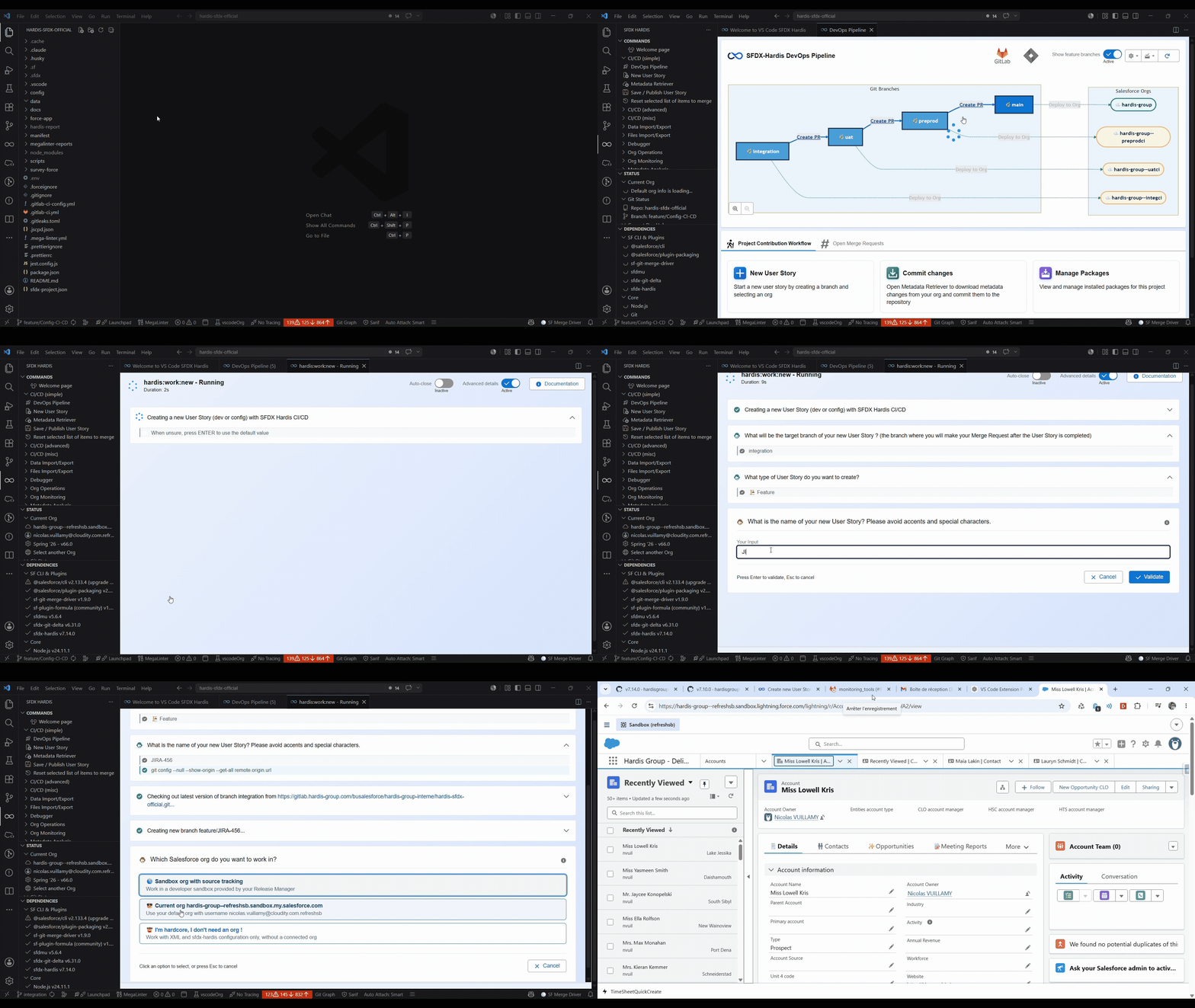
1. Implement the hotfix
- Start a new User Story and select preprod as target branch when prompted. Name it
my-very-hot-hotfix, for example - Work on a dev sandbox that has been cloned from production
2. Deploy in the RUN stream
- Create a Pull Request (Merge Request on GitLab) from
my-very-hot-hotfixtopreprod, and merge it once the control jobs pass. It is a User Story branch like any other, so Squash commits and Delete source branch after merge are checked, as in the merge rules - Create a Pull Request from
preprodtomain - Merge it once the control jobs are green: the hotfix is deployed in production
How it works behind the hood
The merge of preprod into main is a merge between two major branches, so its scope is every Pull Request merged into preprod since its last promotion, not only the hotfix. Their deployment actions run in production and their Apex test classes are collected, with runOnlyOnceByOrg making sure an action already performed in that org is not replayed.
The DevOps Pipeline lists the hotfix Pull Request as work of its own, whatever the branch is named (feature/, fix/, hotfix/...). Only the Pull Requests that move other Pull Requests, such as the preprod -> main merge itself, are left out of the lists and counters.
3. Retrofit in the BUILD stream
The hotfix is in production but not in the BUILD branches. Bring it down to integration with a retrofit/ branch, before the next version overwrites it.
This is a separate process, on its own page: Retrofit.
Do it right away, while the hotfix is still fresh: the longer the BUILD branches go without it, the bigger the conflict when they finally meet.
See also
- Retrofit: bring what reached production back into the BUILD branches.
- Promotion branches (Beta): ship the approved stories of
uatwithout waiting for the rest. - Deploy to major orgs: the ordinary promotion of a version.
Learn by doing
The free Salesforce DevOps with sfdx-hardis course does this, click by click, on an org of your own: