Activate User Access Policies
Activate User Access Policies
One of the types of deployment actions, YAML type: user-access-policy. That page explains what all types share: when actions run, how to choose their target orgs, how they are tracked and how to recover a failed one.
A deployment always leaves the User Access Policies it contains in Design status, even one that was active in the org before. Their automation stops until someone activates them again in Setup. This action activates them right after the deployment, and can also run Apply To All on them, so the users that already match the criteria get their permission sets, groups and package licenses.
The policy picker proposes the policies of the org and of the project.
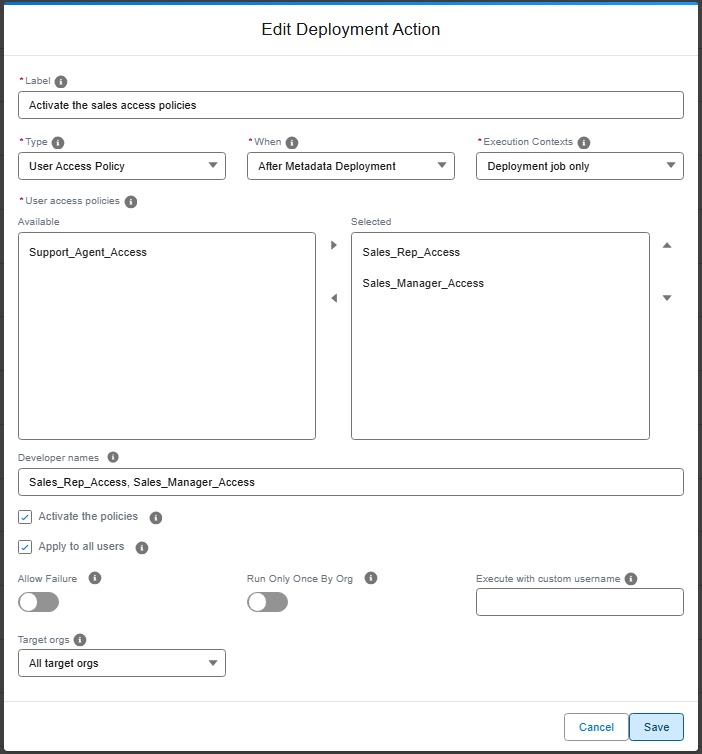
It can also be an org initialization step: after deploy-sources, the policies of the project are in Design status in a new scratch org too.
To choose when a policy runs (when a user is created, updated, or both) or to deactivate one, use a browser action with the userAccessPolicies setting of Browserforce.
Technical: user-access-policy action (YAML)
- Activate (
activate, on by default): the policies are set to Active. A policy already active is left as it is. When Salesforce refuses, for example for a policy without filter or action, the action fails with the message of Salesforce. - Apply to all users (
applyToAll, off by default): Apply To All runs for each policy at each run of the action, then the action waits up to 2 minutes for Salesforce to record an access change. A policy that matches no user records none: the action then only warns.
Salesforce has no API for Apply To All, so both are done by Browserforce (its userAccessPolicies setting) in a headless browser, like a browser action. The action first reads the policies with the API, to say clearly when one is missing or when User Access Policies are not enabled.
The action runs after the deployment only, and only in the process-deployment-only context: a deployment check deploys nothing. It runs at every deployment by default (runOnlyOnceByOrg: false), because each new deployment of a policy turns it off again. With applyToAll, that also means a new Apply To All at each deployment: set runOnlyOnceByOrg: true when once per org is enough.
User Access Policies must be enabled in the org: Setup > User Management Settings > User Access Policies, or the userAccessPoliciesEnabled field of the UserManagement settings.
| Custom parameter | Required? | Description | Example |
|---|---|---|---|
parameters.policies |
Yes | Developer names of the policies. | [Sales_Rep_Access] |
parameters.activate |
No | Activates the policies. Defaults to true. |
true |
parameters.applyToAll |
No | Runs Apply To All for each policy. Defaults to false. |
true |
commandsPostDeploy:
  - id: 0b6c2a43-8f7e-4f0e-9a51-6a3a6d1c2e11
    label: Activate the sales access policies
    type: user-access-policy
    parameters:
      policies:
        - Sales_Rep_Access
        - Sales_Manager_Access
      activate: true
      applyToAll: true
    context: process-deployment-only
    runOnlyOnceByOrg: false