Generic Ticketing
Generic ticketing integration
If you use a ticketing system on your project, sfdx-hardis can use it to enrich its integrations.
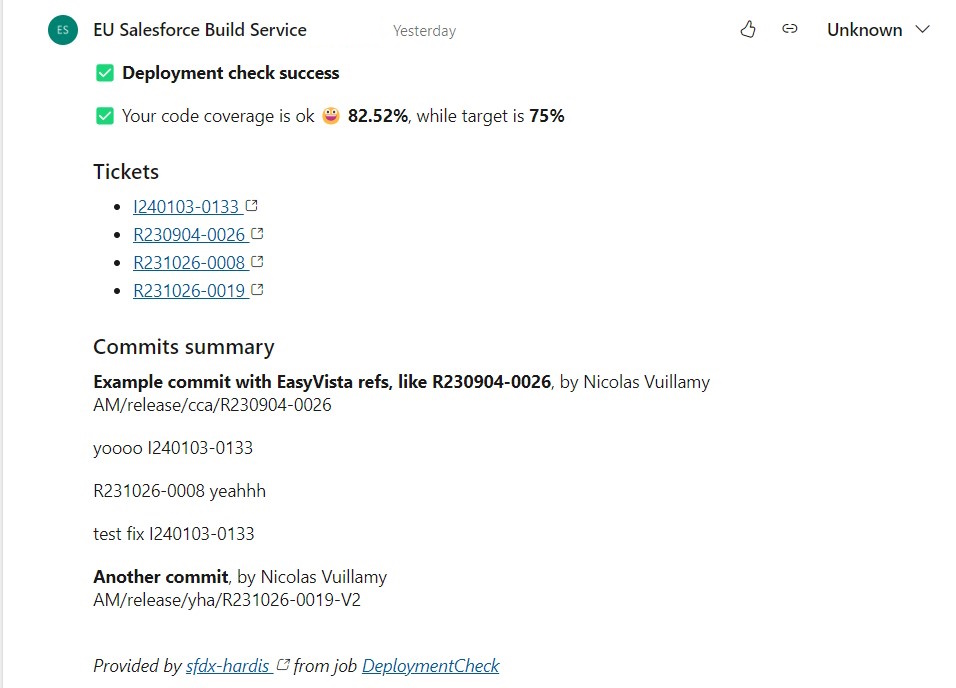
sfdx-hardis automatically analyzes commits and Pull Request descriptions to collect tickets and build their URLs.
Configuration
You need to define two properties in .sfdx-hardis.yml, or two environment variables in your CI/CD configuration.
It is recommended to store these properties in .sfdx-hardis.yml, so that the VS Code SFDX Hardis extension can use them for UI features.
Regular Expression to identify a Ticket
- .sfdx-hardis.yml property: genericTicketingProviderRegex
- ENV variable: GENERIC_TICKETING_PROVIDER_REGEX
Regular expression used to detect your ticketing system identifiers in commit and Pull Request texts.
You can use https://regex101.com/ to check your Regular Expression.
Example: ([R|I][0-9]+-[0-9]+) to detect EasyVista references, which can look like I240103-0133 or
R230904-0026
URL Builder for Ticket Hyperlinks
- .sfdx-hardis.yml property: genericTicketingProviderUrlBuilder
- ENV variable: GENERIC_TICKETING_PROVIDER_URL_BUILDER
Template string used to build a hyperlink from a ticket identifier.
It must contain a {REF} segment, which is replaced by the ticket identifier.
Example: https://instance.easyvista.com/index.php?ticket={REF}
Ticket titles and statuses (optional)
- .sfdx-hardis.yml property: genericTicketingProviderDetailsUrlBuilder
- ENV variable: GENERIC_TICKETING_PROVIDER_DETAILS_URL_BUILDER
- ENV variable, only if the URL needs a token: GENERIC_TICKETING_PROVIDER_TOKEN, sent as
Authorization: Bearer <token>
Without it, each ticket is a bare link. With it, sfdx-hardis reads one JSON document per ticket and writes the ticket title and status next to the link, in Pull Request comments, release notes and notifications.
It must contain a {REF} segment, which is replaced by the ticket identifier, and answer a JSON object:
{
  "subject": "Crew size becomes mandatory",
  "status": "Ready for UAT"
}
subjectis the title.titleorsummaryare read whensubjectis absent.statusis optional.statusLabelis used for display when present.
Example: https://tickets.mycompany.com/api/ticket/{REF}.json
A static site can serve these files next to its pages. The sfdx-hardis training does that: its backlog publishes BACKLOG/US-021/ for people and BACKLOG/US-021.json for sfdx-hardis.
When a ticket cannot be read, it stays a bare link and the Pull Request comment says why.
GitLab configuration
If you are using GitLab, you need to update the Merge Request settings.
Go to Project -> Settings -> Merge Requests
Update Merge Commit Message Template with the following value:
%{title} Merge branch '%{source_branch}' into '%{target_branch}'

%{issues}

See merge request %{reference}

%{description}

%{all_commits}
Update Squash Commit Message Template with the following value:
%{title} Merge branch '%{source_branch}' into '%{target_branch}'

%{issues}

See merge request %{reference}

%{description}

%{all_commits}
Technical notes
This integration uses the following variables, which must be available from the pipelines or in .sfdx-hardis.yml:
- genericTicketingProviderRegex or GENERIC_TICKETING_PROVIDER_REGEX
- genericTicketingProviderUrlBuilder or GENERIC_TICKETING_PROVIDER_URL_BUILDER
- optionally genericTicketingProviderDetailsUrlBuilder or GENERIC_TICKETING_PROVIDER_DETAILS_URL_BUILDER, and GENERIC_TICKETING_PROVIDER_TOKEN
Learn by doing
The free Salesforce DevOps with sfdx-hardis course does this, click by click, on an org of your own: