DORA Metrics
DORA Metrics for Salesforce CI/CD
DORA (DevOps Research and Assessment) is the industry standard for measuring software delivery performance. sfdx-hardis computes DORA metrics for each major org of your pipeline (integration, uat, preprod, production...) from what your git provider already knows: the deployment jobs and the Pull Requests. No org login and no data export are needed, so every team member reads the same numbers.
Command: sf hardis:doc:dora-report
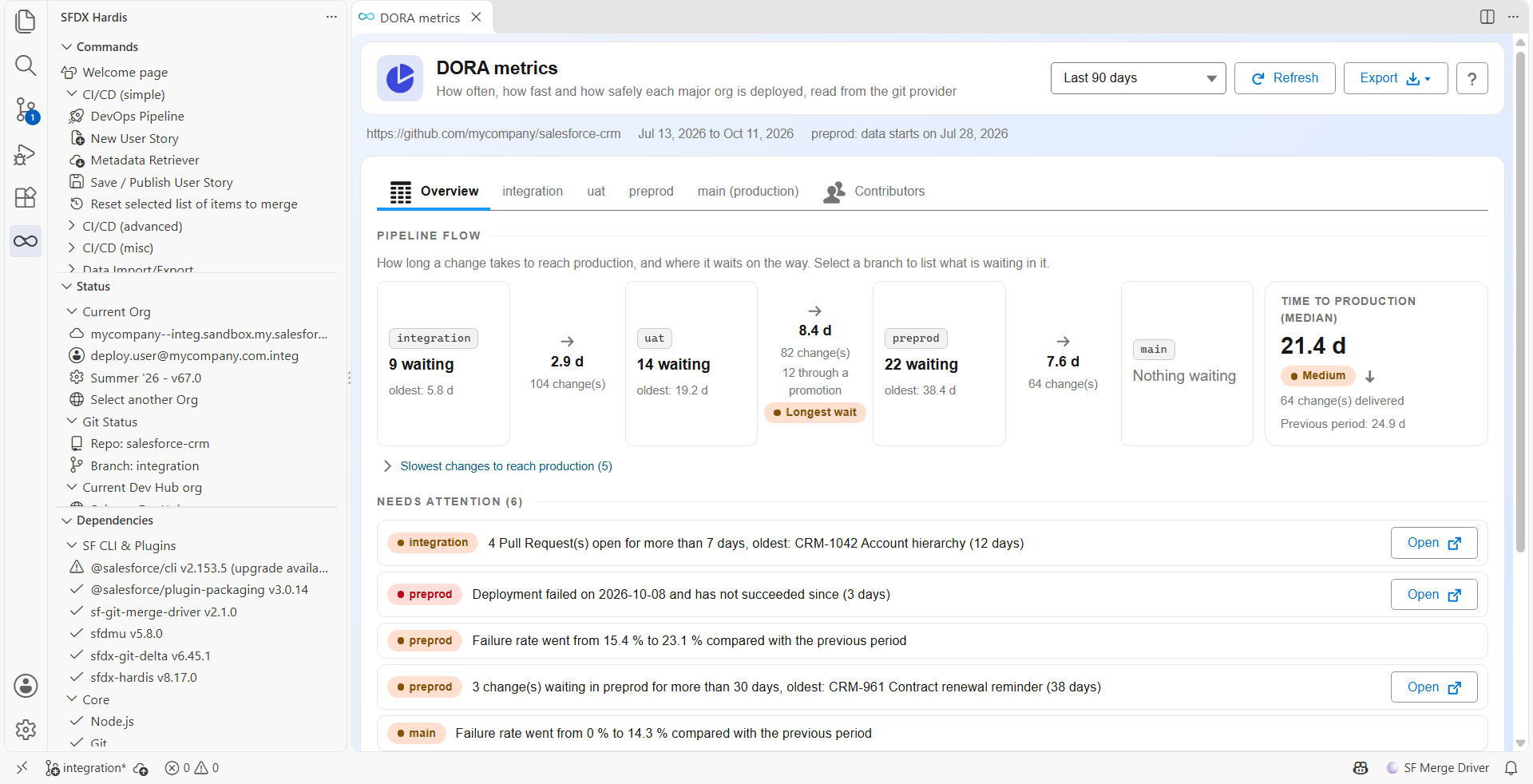
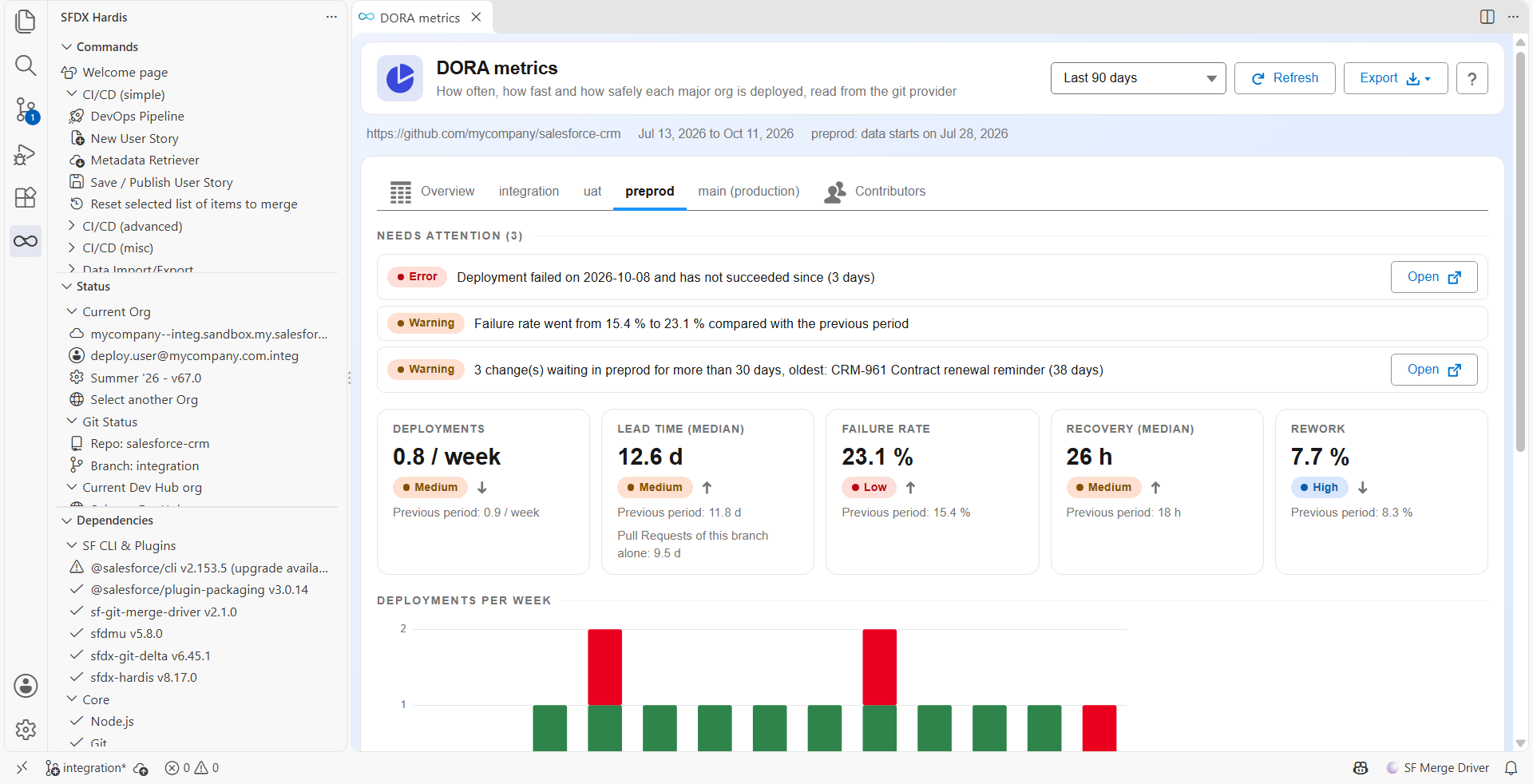
In VS Code, open the DORA metrics panel from the gear menu of the DevOps Pipeline: one tab per major org, an overview comparing them, and the contributors.
What it measures
Core DORA Metrics (5), per major branch
| Metric | How it is computed |
|---|---|
| Deployment Frequency | Successful runs of the deployment job of the branch, per week |
| Lead Time for Changes | From the creation of a Pull Request to the end of the job that deployed its merge |
| Change Failure Rate | Failed deployment jobs / (succeeded + failed). Canceled jobs are counted apart |
| Mean Time to Recovery (MTTR) | From a failed deployment job to the next successful one on the same branch |
| Deployment Rework Rate | Share of Pull Requests coming from hotfix/, fix/ or bugfix/ branches, or of deployments redone within a day of a failure |
Supplementary Metrics
| Metric | Description |
|---|---|
| Deployment Duration | Time the deployment job ran (p50, p90, avg) |
| Deployment Queue Time | Time the deployment job waited for a runner |
| PR Cycle Time | Time from Pull Request creation to merge |
| Change Volume | Pull Requests and deployments per week |
| Validation Success Rate | Pass rate of the deployment checks of the Pull Requests |
| Contributors | Pull Requests, cycle time and deployments per person |
Each metric is classified against DORA benchmarks as Elite, High, Medium, or Low, with the same scale for every branch.
Each branch also gets a needs attention list: a deployment that is still failing, Pull Requests open for more than 7 days, a failure rate that went up, no deployment for 30 days, changes waiting there for more than 30 days.
Pipeline flow
A Pull Request that merges uat into preprod is often opened and merged the same day, while the User Stories it carries were waiting in uat for three weeks. When several major branches are computed, sfdx-hardis follows each change from the branch its own Pull Request was merged into until production.
| Metric | How it is computed |
|---|---|
| Time to production | From the creation of the Pull Request of a change to its deployment on the production branch |
| Wait at each step | From the deployment of a change on a branch to its deployment on the next one, for example uat to preprod |
| Waiting changes | Changes that reached a branch and were not carried further, the oldest first |
| Longest wait | The step of the pipeline where changes wait the longest |
The Lead Time for Changes of each branch is then the one of the changes themselves, from the creation of their Pull Request to their deployment on that branch. The lead time of the Pull Requests merged into the branch is still given below it, and it is the one sent to Grafana.
How a change is followed:
- A Pull Request from a major branch into the next one carries every change that was in its source branch when it was merged.
- A promotion Pull Request carries the Pull Requests listed in its description.
- A hotfix merged straight into
preprodormainis counted from that branch. The merge that brings it back to the earlier branches does not send it through the pipeline a second time. - A change cherry-picked by hand, or merged more than 90 days before the period, is not followed.
- A promotion whose list cannot be read, and a change a promotion lists that was not read, are counted apart and said in the report: nothing is guessed.
- Every branch of a step must be computed. With
--branches uat,mainon a project whereuatis merged intopreprod, no pipeline flow is computed.
Where the data comes from
Everything is read from the git provider (GitHub, GitLab, Azure DevOps, Bitbucket):
- A deployment is a run of the deployment job of a major branch, after a merge. A deployment made outside the pipeline (a change set, a manual
sf project deploy) is not counted. - A validation is a run of the deployment check of a Pull Request.
- The command fails when no authenticated git provider is available, or when its token cannot read CI jobs. The token needs:
Actions: Readon GitHub,read_apion GitLab,Build: Readon Azure DevOps,pipelineon Bitbucket. - A git provider keeps its job runs for a limited time. When a branch has no run as old as the period asked for, the report says when its data starts.
Until sfdx-hardis 8.16, deployments were read from the org (DeployRequest). The numbers of an existing report can therefore change after an upgrade: deployments made outside the pipeline no longer count, and failures are the ones of the CI job.
Output
- Markdown report with Mermaid bar/line/pie charts: a summary of every branch, then one chapter per branch
- PDF with
--pdf - CSV export of the jobs behind the numbers
- Notification to Slack, Microsoft Teams, Grafana or any configured channel, when a single branch is computed
The Markdown report is also copied to docs/dora/ in your project so it can be published alongside your project documentation.
Usage
# Every major branch, last 90 days
sf hardis:doc:dora-report

# Some branches, another period
sf hardis:doc:dora-report --branches integration,uat,main --period 30

# Generate PDF in addition to Markdown
sf hardis:doc:dora-report --pdf

# JSON only, with the previous period to compare with (what the VS Code panel runs)
sf hardis:doc:dora-report --agent --data-only --compare --json
Send DORA metrics to Grafana
The DevOps & DORA dashboard shows the DORA metrics of an org once the command runs on a schedule, in one of these two places.
In the deployment pipeline, add a step after the deployment step of your CI file. In a CI job the command computes the current branch, and the org already authenticated by the job labels the metrics:
sf hardis:doc:dora-report --agent
In the monitoring pipeline, set deploymentRepository and deploymentBranch in the .sfdx-hardis.yml of the monitoring branch, then add the command to its monitoring commands. The jobs and Pull Requests are read from the deployment repository:
- with the token in
SFDX_HARDIS_DEPLOYMENT_REPO_TOKENwhen this variable is set. This is required when the two repositories are on different git providers. - otherwise with the git provider token of the monitoring repository, which must then be able to read the deployment repository.
DORA Benchmarks Reference
| Metric | Elite | High | Medium | Low |
|---|---|---|---|---|
| Deployment Frequency | Multiple deploys/day | Once/week to once/day | Once/month to once/week | Less than once/month |
| Lead Time for Changes | < 1 day | 1 day to 1 week | 1 week to 1 month | > 1 month |
| Change Failure Rate | 0-5% | 5-10% | 10-15% | > 15% |
| MTTR | < 1 hour | < 1 day | < 1 week | > 1 week |
Related
- sf hardis:doc:dora-report command reference
- Deployment Monitoring
- Observability integrations (Grafana, Slack, Teams)
Learn by doing
The free Salesforce DevOps with sfdx-hardis course does this, click by click, on an org of your own: