hardis:project:action:types
Description
Command Behavior
Describes the deployment action types: what each one takes, in which phase and context it runs, and its defaults.
It is meant for AI agents and scripts that create deployment actions with sf hardis:project:action:create --agent: they read here which flags and parameters a type expects, instead of guessing them.
For each built-in type:
allowedWhen: the phases it may run in (pre-deploy,post-deploy)defaultContext: the context a new action gets, anddeploymentOnlywhen it only runs in deployment jobsrunOnlyOnceByOrgDefault: whether it runs once per org by defaultparameters: each field of the action, where it is stored, the flag ofaction:createthat sets it, its type, whether it is required and its default
The custom functions declared in the project (customFunctions) are listed too, with their inputs.
Browser actions
A browser action applies one setting of Browserforce (sfdx-browserforce-plugin), installed when missing. With --type browser, the result lists the settings Browserforce can apply, each with its documentation page (docUrl, given by Browserforce 7.1.0 and later). With --type browser --browser-setting <key>, it describes that setting: its fields, its JSON Schema, examples, warnings and documentation page, which is what --browser-config of action:create must follow.
Both also describe the names of the CI/CD variables a value can be read from, for each major branch (secretsLookup).
Agent Mode
Supports non-interactive execution with --agent. The command never prompts: --agent is accepted so agents can pass it to every sfdx-hardis command.
sf hardis:project:action:types --json
sf hardis:project:action:types --type browser --json
sf hardis:project:action:types --type browser --browser-setting densitySettings --json
Technical explanations
- Built from the provider class of each action type (
getParameterDescriptions(),getAllowedWhen(),getDefaultContext(),describeTypeDetails()) and the registries ofactionTypes.ts. - The Browserforce catalog comes from
sf browserforce plugins list --json, cached per Browserforce version in~/.sfdx/sfdx-hardis-cache/browserforce(shared with the VS Code extension). - The variable names come from the secrets provider of the project (
secretsProvider, CI/CD variables by default).
Screenshots
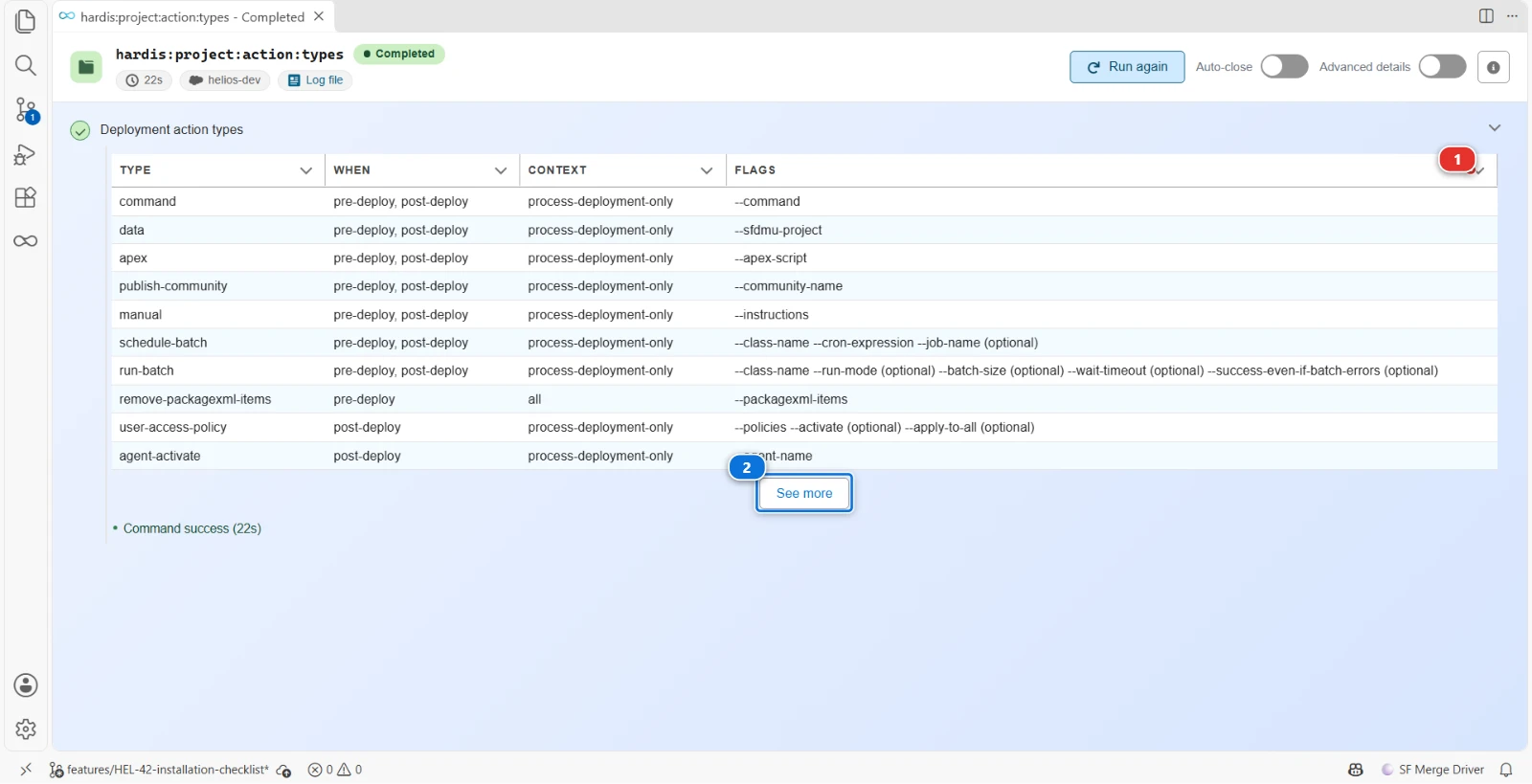
The deployment action types with their phases, default context and flags, the notifyCrew custom function of Helios included
- (1) The flags of hardis:project:action:create for each type
- (2) Shows the other types and the custom functions of the project
Reports
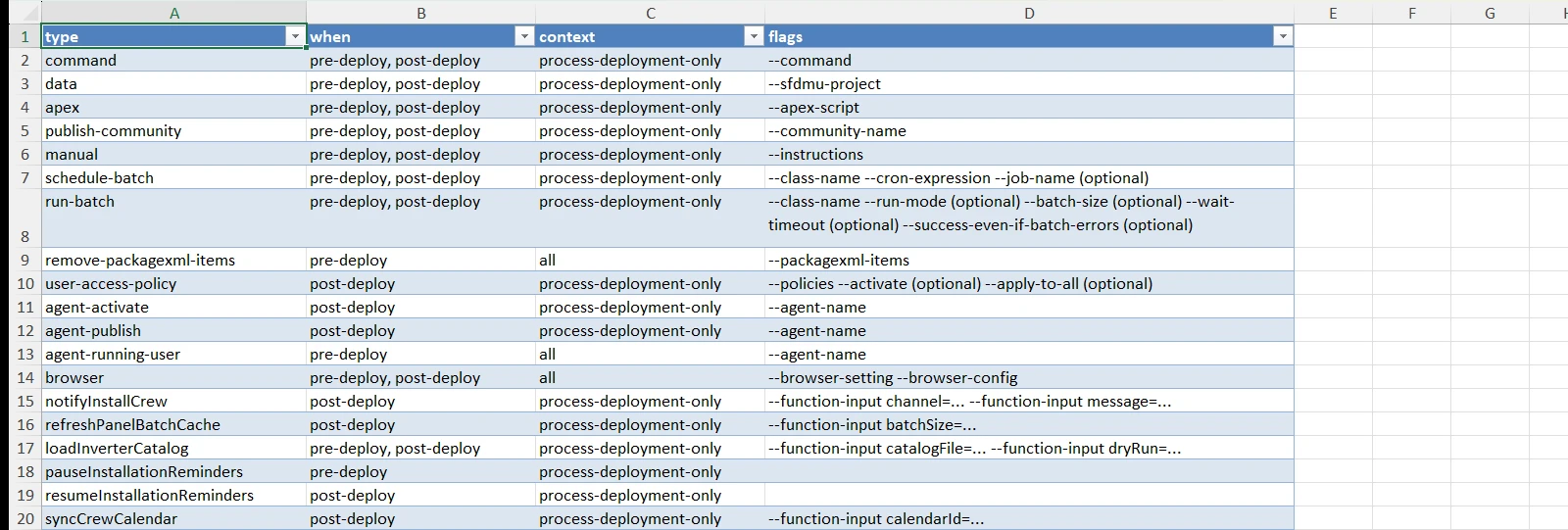
The command writes these reports in the hardis-report folder of the project: a CSV file, and its Excel copy (XLSX) in the xls sub-folder.
Action types
One row per deployment action type or custom function, with when it can run, its default context and its flags.
Files: deployment-action-types-*.csv, xls/deployment-action-types-*.xlsx
Parameters
| Name | Type | Description | Default | Required | Options |
|---|---|---|---|---|---|
| agent | boolean | Run in non-interactive mode for agents and automation | |||
| browser-setting | option | With --type browser: describe this Browserforce setting (fields, JSON Schema, examples) | |||
| debug -d |
boolean | Activate debug mode (more logs) | |||
| flags-dir | option | Import flag values from a directory. | |||
| json | boolean | Format output as json. | |||
| type | option | Describe only this type: a built-in type or the id of a project custom function | |||
| websocket | option | Websocket host:port for VsCode SFDX Hardis UI integration | |||
| when | option | Only the types that can run in this phase | pre-deploy post-deploy |
Examples
$ sf hardis:project:action:types
$ sf hardis:project:action:types --json
$ sf hardis:project:action:types --when pre-deploy --json
$ sf hardis:project:action:types --type browser --json
$ sf hardis:project:action:types --type browser --browser-setting densitySettings --json
$ sf hardis:project:action:types --agent