Retrofit
Retrofit
A retrofit brings back into the BUILD branches what reached production without going through them. Skip it, and the next version quietly undoes the fix.
A retrofit is one of two things, and this page covers both:
- Retrofit a branch: a top branch is merged down into a lower one through a
retrofit/branch, to give the BUILD what the RUN just shipped. This is what follows a hotfix or a promotion branch.- Manual retrofit: somebody changed an org by hand. That must never happen; you recover the change as a User Story under
integration, retrieved with the Metadata Retriever.
- Why it matters
- When to retrofit
- Retrofit a branch into the BUILD
- Manual retrofit of a change made in an org
Why it matters
The BUILD branches were cut before the fix existed. They still hold the old version of the same metadata, and they do not know it is old. When the BUILD is promoted, it deploys what it holds, and the fix disappears from production.
%%{init: {"theme": "base", "themeVariables": {"primaryColor": "#eaf5fe", "primaryTextColor": "#032d60", "primaryBorderColor": "#0176d3", "lineColor": "#0176d3", "secondaryColor": "#f3f3f3", "tertiaryColor": "#ffffff", "fontFamily": "Salesforce Sans, Arial, sans-serif"}}}%%
flowchart LR
    %% Lanes stack in reverse declaration order: declare WITH first so WITHOUT draws on top
    subgraph WITH["With a retrofit"]
        direction LR
        R1["Hotfix deployed<br/>in production"] --> R2["Retrofit into<br/>integration"] --> R3["The BUILD holds<br/>the fix too"] --> R4["Next version promoted:<br/>the fix survives"]
    end
    subgraph WITHOUT["Without a retrofit"]
        direction LR
        W1["Hotfix deployed<br/>in production"] --> W2["The BUILD still holds<br/>the old version"] --> W3["Next version promoted"] --> W4["The fix is gone:<br/>regression in production"]
    end
    style W4 fill:#fef1ee,stroke:#ea001e
    style R4 fill:#e3f7e8,stroke:#2e844a
To summarize, you publish at RUN level, then also at BUILD level (the retrofit), so that when the BUILD is later merged into the RUN, no overwrite triggers a regression.
When to retrofit
Every time something reached production without going through the BUILD branches.
| What happened | What to retrofit | When |
|---|---|---|
A hotfix was merged into main |
main (or preprod) into integration |
Right after the hotfix is in production |
A promotion branch (Beta) was merged into preprod |
preprod into integration |
Right after the promotion is merged |
| Somebody changed an org by hand (which must never happen) | The change, as a User Story | As soon as you notice, see below |
Do it right away in every case. A retrofit left for later is a conflict that grows: the BUILD branches keep moving on top of metadata that is already out of date in production.
On pattern B, retrofit into
uat_runas well asintegration.uat_runalso merges intopreprodwithout holding the hotfix, so the next RUN promotion would overwrite it exactly like the next BUILD promotion would.
Retrofit a branch into the BUILD
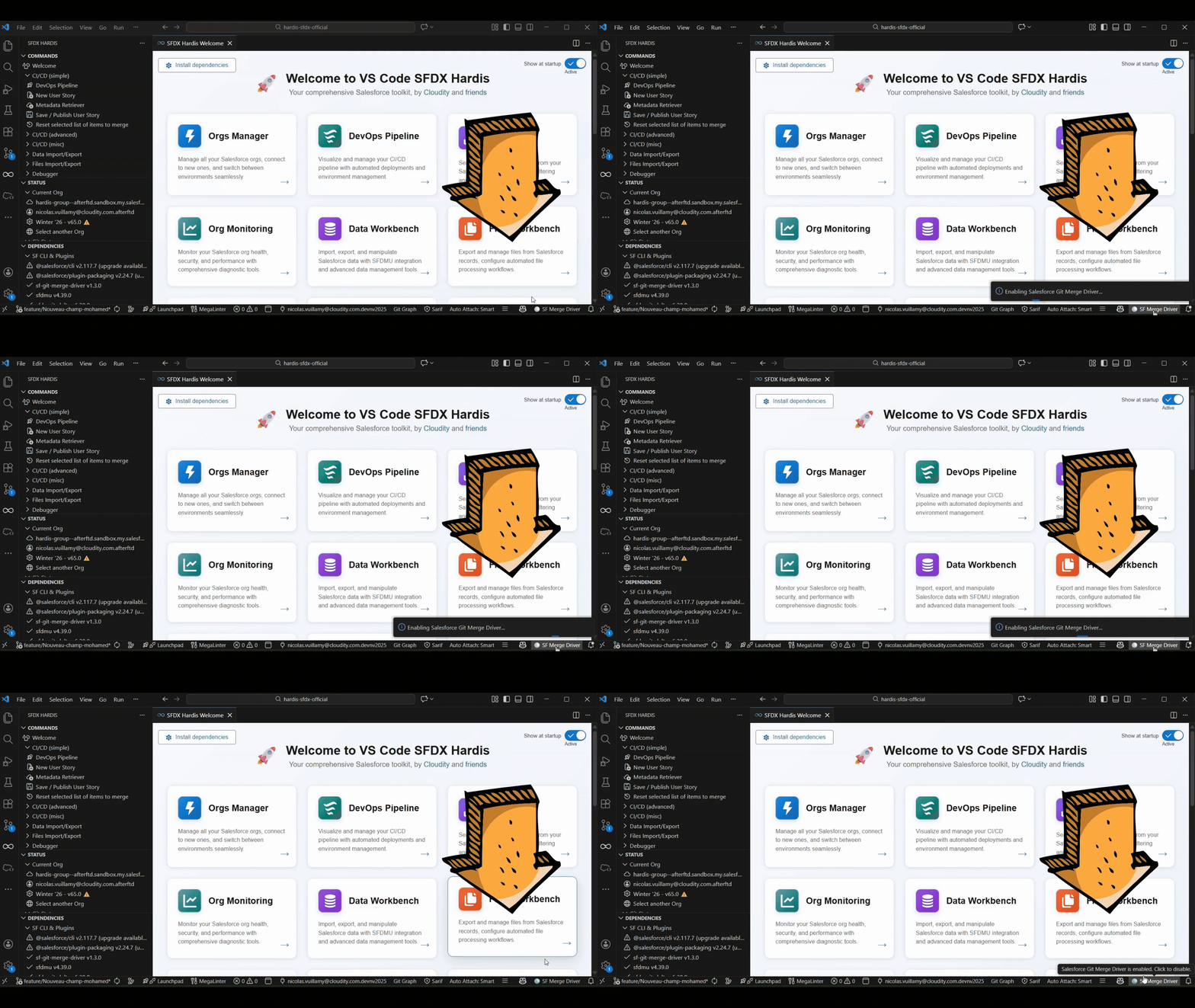
1. Activate the merge driver
Activate the sf-git-merge-driver plugin before the retrofit: it automatically solves many XML conflicts, which is most of what a retrofit produces.
2. Merge production down into a retrofit branch
%%{init: {"theme": "base", "themeVariables": {"primaryColor": "#eaf5fe", "primaryTextColor": "#032d60", "primaryBorderColor": "#0176d3", "lineColor": "#0176d3", "secondaryColor": "#f3f3f3", "tertiaryColor": "#ffffff", "fontFamily": "Salesforce Sans, Arial, sans-serif"}}}%%
flowchart LR
    MAIN["main<br/>holds the hotfix"] -.->|"merge, solve the conflicts"| RETRO
    INT1["integration"] -->|"cut the branch"| RETRO["retrofit/from-main"]
    RETRO -->|"Pull Request"| INT2["integration<br/>holds the hotfix too"]
    style RETRO fill:#fff7e0,stroke:#dd7a01
style INT2 fill:#e3f7e8,stroke:#2e844a- Create a sub-branch of
integrationnamedretrofit/from-main, for example. Keep theretrofit/prefix: sfdx-hardis recognizes it and carries the deployment actions of every Pull Request included in the retrofit - Using your git IDE, merge the
main(orpreprod) branch intoretrofit/from-main - If there are git conflicts, solve them before committing
3. Merge the retrofit into the BUILD
- Create a Pull Request from
retrofit/from-maintointegration - Merge the Pull Request into
integration: the retrofit from the RUN to the BUILD is done- If the retrofit has many impacts, consider refreshing the dev sandboxes
How it works behind the hood
The retrofit/ prefix is what makes the difference. A merge from a feature branch only processes the actions of the Pull Request that has just been merged, but a merge from a retrofit/* branch is treated like a merge between two major branches: its scope is every Pull Request merged since the previous merge.
That is what lets a hotfix keep its deployment actions on the way down. A Pull Request merged into an upstream branch joins the batch as soon as its commits arrive in the window, so a hotfix merged into main is collected when the retrofit brings it into integration, and its actions run there too. runOnlyOnceByOrg keeps an action that already ran in that org from running twice.
In the DevOps Pipeline, a retrofit/ Pull Request is listed as work of its own: it carries its own change, unlike a merge between two major branches, which only moves other Pull Requests.
Manual retrofit of a change made in an org
⚠️ Changing a major org by hand must never happen. Production, preprod, uat and integration are deployed from their branch: a change made through Setup is in no branch, nobody reviewed it, and the next deployment silently overwrites it. All work goes through a dev sandbox, a branch and a Pull Request, however small and however urgent. Protect your major branches and keep the number of people with Setup access in production to a minimum.
It still happens, and pretending otherwise loses the change. What follows is the repair, not a way of working.
The change is live in the org, it is in no branch, and the next deployment will undo it. Bring it back into git as an ordinary User Story, from the bottom of the pipeline, so it is reviewed and then climbs the branches like anything else.
1. Start a User Story under integration
Start a new User Story with integration as its target branch, on a dev sandbox. Name it after the change you are recovering.
Start from the bottom of the pipeline even though the change was made at the top: what enters through integration reaches every branch above it on its own. Retrieving it straight into preprod would leave the BUILD branches without it, and you would be back to the problem this page opens with.
2. Retrieve the changed metadata
Use the Metadata Retriever of the VS Code SFDX Hardis extension to pick exactly what was changed in the org, and nothing else.
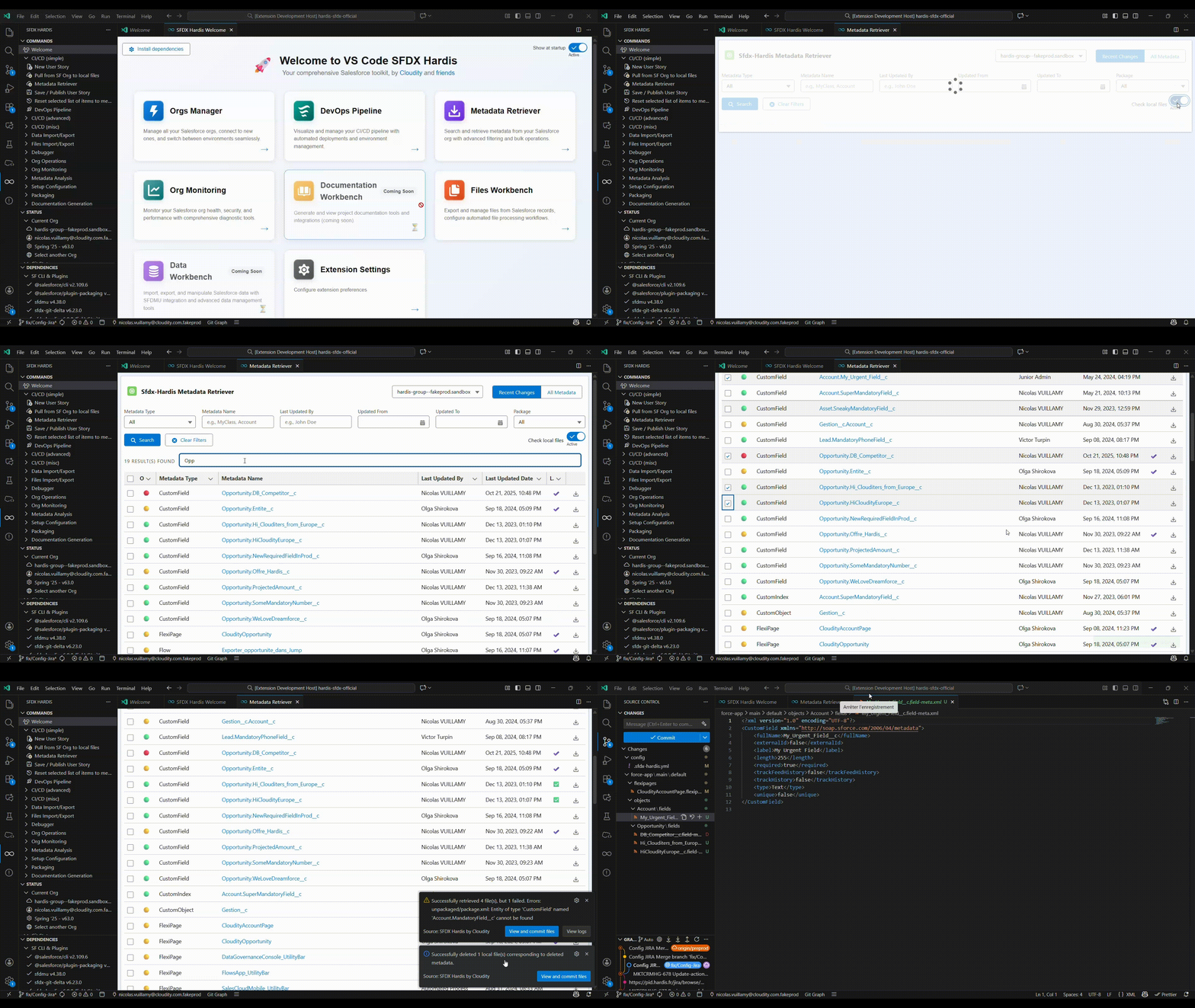
Retrieve from the org that holds the change. Take the items you identified, not everything the retriever offers: a retrofit that drags along unrelated metadata is a deployment nobody can review.
Not sure what changed? The Org Monitoring backup gives you the git diff of the org day by day, and the Salesforce Audit Trail names who changed what.
3. Review and merge like any User Story
Commit, Save / Publish, and open the Pull Request to integration. From there it climbs uat, preprod and production with the next promotions, the same as any other work.
See also
- Hotfixes: ship an urgent fix to production through the RUN stream.
- Promotion branches (Beta): ship the approved stories of
uatwithout waiting for the rest. - Deployment actions: what runs around a deployment, and the scope each kind of merge gets.
Learn by doing
The free Salesforce DevOps with sfdx-hardis course does this, click by click, on an org of your own, in these labs:
- Lab 3.7 - Production is broken: hotfix and retrofit
- Lab 3.10 - Promote a subset with promotion branches (Beta)